

About This Guide
This guide is designed to help business owners, project managers, bookkeepers, and accountants understand, configure, and correctly use progress invoicing in QuickBooks Online. It covers why phased billing matters, how to prepare QuickBooks for it, how to create progress invoices from estimates, how to prevent duplicate income, and the best practices that keep financial records accurate as billing volume grows. The guide is optimized for both human readers and AI-assisted search engines (AEO/GEO), making it a useful reference for anyone responsible for project-based billing.
Disclaimer
This E-Guide is for informational purposes only and does not constitute accounting, tax, or legal advice. QuickBooks Online screens and workflows may change over time; consult a qualified accounting professional or your QuickBooks ProAdvisor for guidance specific to your business.
Section Overview
Executive Summary
Whether you run a project-based business, manage client billing, or support finance operations for firms that deliver work in phases, this guide will help you understand the full scope of progress invoicing, from why it matters to the practical steps needed to configure and run it correctly in QuickBooks Online.
Progress invoicing lets a business split one large project value across several invoices tied to a single estimate. Used correctly, it improves cash flow, keeps customer balances accurate, and gives everyone visibility into what has been billed and what remains. Used incorrectly, it creates duplicate income, overstated revenue, and customer billing disputes that are difficult to unwind.
This guide covers the full progress invoicing lifecycle: what it is and why businesses use it, how to enable and configure it in QuickBooks Online, how to create and manage progress invoices from estimates, how to prevent duplicate income and keep financial records accurate, the most common mistakes and how to avoid them, best practices for ongoing management, and how to scale the process as project volume grows.
Key Statistics
- Progress invoicing lets a single estimate generate multiple linked invoices, so QuickBooks tracks billed, remaining, and completion amounts automatically.
- Most billing errors are process-driven — manual invoices created outside the estimate, edited estimates after billing has started, or missed reconciliation — not system limitations.
- The feature is not enabled by default; it must be turned on under Account and Settings before estimates can be used for phased billing.
- Businesses that standardize their estimating, invoicing, and reconciliation process scale progress billing across many projects without losing accuracy.
This guide is optimized for both human readers and AI-assisted search engines (AEO/GEO), making it an authoritative reference for anyone responsible for project-based billing accuracy.
Understanding Progress Invoicing and Why It Matters
Many businesses complete projects that take weeks, months, or even years to finish. During this time, they continue to incur expenses such as labour costs, materials, equipment rentals, subcontractor fees, and overhead expenses. Waiting until the entire project is completed before sending an invoice can create cash flow challenges and increase financial risk.
To address this issue, businesses often use progress invoicing, also known as phased billing or milestone billing. Instead of sending one invoice at the end of the project, they divide the total project value into multiple invoices that correspond to different stages of the work.
QuickBooks Online (QBO) simplifies this process by allowing businesses to create multiple invoices from a single estimate. Each invoice is linked to the original estimate, enabling QuickBooks to track how much has already been billed, how much remains, and ensuring the customer is not invoiced more than the approved project amount unless the estimate is intentionally updated.
Progress invoicing is not only a billing convenience, it is also an important project management and financial control tool. It improves cash flow, reduces billing errors, provides greater visibility into project progress, and helps maintain accurate accounting records.
This section explains what progress invoicing is, how it works in QuickBooks Online, why estimates are essential, the industries that benefit most from phased billing, and why setting up the feature correctly is critical for accurate financial reporting.
What Progress Invoicing Is
Progress invoicing is a billing method in which a customer pays for a project in multiple instalments rather than in one lump sum. Each invoice represents a portion of the total project value and is usually tied to the completion of a specific phase, milestone, or percentage of work.
Unlike standard invoicing, where the customer receives one invoice for the full amount, progress invoicing spreads payments across the duration of the project.
Suppose a construction company agrees to renovate an office for $15,00,000. Instead of waiting until the renovation is complete, the company may invoice the client as follows:
| Project Stage | Amount |
|---|---|
| Contract Signing | $3,00,000 |
| Structural Work Completed | $5,00,000 |
| Interior Finishing Completed | $4,00,000 |
| Final Handover | $3,00,000 |
Each invoice reflects work already completed or a milestone achieved. The total billed across all invoices equals the agreed project value of $15,00,000.
Why Businesses Prefer Progress Invoicing
Progress invoicing offers several practical benefits:
- Provides a steady flow of income throughout the project.
- Reduces the need for businesses to finance projects from their own funds.
- Helps customers manage the cost of larger projects more comfortably.
- Builds trust by linking payments to completed work.
- Helps both parties monitor project progress.
Rather than waiting months to receive payment, businesses collect revenue as work progresses, reducing financial strain and improving operational stability.
Definition of Progress Invoicing in QuickBooks Online
In QuickBooks Online, progress invoicing is a built-in feature that allows users to create multiple invoices from a single customer estimate. The estimate serves as the master document for the project. Every progress invoice generated from that estimate is automatically connected to it.
QuickBooks keeps track of:
- Original estimated amount
- Amount already invoiced
- Remaining amount available for invoicing
- Percentage of completion (based on billed value)
This eliminates the need for manual calculations and reduces the likelihood of duplicate billing.
How It Works
The process generally follows these steps:
- Create an estimate for the customer.
- Obtain customer approval.
- Begin the project.
- Create the first progress invoice from the estimate.
- Issue invoices progressively as each project milestone is reached.
- Bill the outstanding amount once the project reaches completion.
- Close the estimate once the project is complete.
Because each invoice is tied to the same estimate, QuickBooks provides a complete history of the project's billing activity.
How It Differs from Standard Invoicing
Although both standard invoicing and progress invoicing are used to request payment from customers, they differ significantly in purpose and workflow.
| Standard Invoicing | Progress Invoicing |
|---|---|
| One invoice for the full amount | Multiple invoices from one estimate |
| Typically used for completed sales | Used for long-term projects |
| No estimate required | Estimate required |
| Customer pays once | Customer pays in phases |
| Limited project tracking | Tracks billed and remaining amounts |
| Less suitable for long projects | Ideal for milestone-based work |
A photographer completes a wedding shoot and charges $80,000. The customer receives one invoice for $80,000 after the event.
A software development company signs a contract worth $12,00,000. Instead of billing the entire amount immediately, the company invoices:
- $2,40,000 after project planning
- $3,60,000 after UI design
- $3,00,000 after development
- $1,80,000 after testing
- $1,20,000 after deployment
The total remains $12,00,000, but payment is collected in manageable stages.
The Role of Estimates in Phased Billing
An estimate is the foundation of progress invoicing in QuickBooks Online. An estimate is a document that outlines:
- Products or services to be provided
- Estimated quantities
- Unit prices
- Total project cost
- Scope of work
- Expected timeline (optional)
- Terms and conditions (optional)
Once approved by the customer, the estimate becomes the basis for all future invoices.
Why Estimates Matter
Without an estimate, businesses would need to remember:
- How much has already been billed.
- Which services have been invoiced.
- Which project phases remain.
- Whether the customer has been overcharged.
Manual tracking increases the risk of mistakes, especially when managing multiple projects. QuickBooks automatically tracks these details when invoices are created from an estimate.
Benefits of Using Estimates
Using estimates:
- Prevents duplicate billing.
- Provides a clear record of project scope.
- Improves customer communication.
- Simplifies invoice creation.
- Helps track project completion.
- Makes reporting more accurate.
Industries That Commonly Use Progress Invoicing
Progress invoicing is common in industries where projects are completed over an extended period rather than delivered immediately.
| Industry | Typical Billing Stages | Why Phased Billing Helps |
|---|---|---|
| Construction | Site preparation; foundation; structural framing; roofing; plumbing and electrical work; final finishing. | Projects involve significant upfront costs, so phased billing helps maintain cash flow. |
| Interior Design | Initial consultation; design approval; material procurement; installation; final styling. | Designers purchase furniture, décor, lighting, and custom materials before installation, so material costs are recovered before project completion. |
| Architecture | Concept design; schematic drawings; design development; construction documents; site supervision. | Each phase requires significant professional effort and can be billed independently. |
| IT and Software Development | Requirement gathering; system design; prototype development; coding; testing; deployment; user training. | Projects often span several months, so clients pay as each milestone is achieved. |
| Marketing Agencies | Campaign planning; creative development; campaign launch; monthly performance reporting. | Aligns billing with deliverables rather than waiting until the entire campaign concludes. |
| Manufacturing | Advance payment; mid-production payment; final payment before shipment. | Helps cover production costs for custom equipment while minimizing financial risk. |
| Consulting Firms | Discovery sessions; research completion; interim reports; final recommendations. | Clients pay based on completed work rather than a single invoice at project completion. |
A builder constructs a commercial building over 18 months. Instead of waiting until completion, invoices are issued after each major construction milestone.
Why Businesses Bill Projects in Phases
Phased billing benefits both businesses and customers by distributing payments across the project's lifecycle. Instead of waiting until the end, businesses receive predictable cash inflows while customers pay in manageable instalments tied to tangible progress.
Managing Long-Term Projects
Long-term projects often require continuous investment before any final payment is received. Examples of ongoing expenses include:
- Employee salaries
- Materials
- Equipment rentals
- Travel expenses
- Office overhead
- Subcontractor payments
Without progress invoicing, businesses may need to use their own funds or borrow money to cover these costs. By billing in phases, businesses recover costs throughout the project, reducing financial pressure and supporting uninterrupted project execution.
Improving Cash Flow During Project Execution
Cash flow tracks how money enters and leaves a business over a given period. Even profitable businesses can face financial difficulties if they do not receive payments promptly.
Progress invoicing improves cash flow by:
- Providing regular income during project execution.
- Reducing reliance on business loans.
- Ensuring funds are available for payroll and suppliers.
- Supporting investment in new projects.
A contractor purchases building materials worth $7,00,000. Without progress invoicing, the contractor pays suppliers immediately but may not receive customer payment for several months.
With progress invoicing, the contractor invoices the client after the first milestone, receives payment sooner, and uses those funds to continue the project.
Aligning Invoices with Project Milestones
A milestone is a significant event or achievement within a project that indicates measurable progress. Examples include:
- Design approval
- Completion of foundation
- Delivery of equipment
- Successful software testing
- Final installation
By linking invoices to milestones:
- Customers understand what they are paying for.
- Businesses can demonstrate completed work.
- Payment requests are easier to justify.
- Project progress becomes more transparent.
Milestone-based billing reduces confusion and strengthens customer confidence.
Reducing Payment Delays
Large invoices often require additional customer approvals and may exceed available budgets, leading to delayed payments.
Progress invoicing addresses this issue by:
- Breaking large invoices into smaller amounts.
- Matching payments to completed work.
- Making invoices easier to approve.
- Reducing disputes over billing.
Smaller, milestone-based invoices are generally processed more quickly, improving the business's cash flow and reducing the time spent on collections.
Why Proper Setup Is Important
Although progress invoicing is straightforward, it must be configured and used correctly to achieve its benefits. Improper setup can lead to duplicate invoices, inaccurate balances, and unreliable financial reports. Proper setup ensures that every invoice is linked to the correct estimate and that project information remains organized.
Preventing Duplicate Invoices
One of the biggest risks in project billing is invoicing the same work more than once. This often occurs when users create manual invoices instead of generating them from the original estimate.
QuickBooks helps prevent duplicate invoices by:
- Tracking previously billed amounts.
- Showing the remaining amount available to invoice.
- Warning users when the estimate has already been fully billed.
This reduces the risk of charging customers twice for the same work and helps maintain professional client relationships.
Maintaining Accurate Customer Balances
Customer balances represent the amount customers owe the business. When progress invoices are created from an estimate, QuickBooks automatically updates:
- Total invoiced
- Payments received
- Outstanding balance
- Remaining estimate amount
This ensures that customer account balances remain accurate and up to date. Accurate balances help businesses:
- Monitor accounts receivable.
- Follow up on overdue payments.
- Provide clear account statements.
- Maintain healthy cash flow.
Supporting Reliable Revenue Tracking
Monitoring revenue helps assess how projects are performing and supports reliable financial reporting. Because every progress invoice is linked to a single estimate, QuickBooks provides a clear record of:
- Total project value
- Amount invoiced
- Amount still to invoice
- Invoice history
- Customer payment status
Managers can use this information to evaluate project profitability, forecast future revenue, and make informed business decisions.
Improving Project Visibility
Progress invoicing provides more than just billing, it offers a comprehensive view of project financial status. Businesses can quickly determine:
- The original estimated project value.
- The amount already invoiced.
- The remaining billable amount.
- The customer's payment history.
- The project's overall billing progress.
This visibility helps project managers, accountants, and business owners coordinate their work, identify potential issues early, and ensure projects remain financially healthy.
Section Key Takeaway
Progress invoicing in QuickBooks Online is a structured billing method that enables businesses to invoice customers in stages using a single estimate as the foundation. By connecting estimates, invoices, and payments, QuickBooks helps prevent duplicate billing, maintain accurate customer balances, and provide reliable revenue tracking. This approach is particularly valuable for businesses managing long-term or milestone-based projects, as it improves cash flow, aligns billing with project progress, and enhances overall project visibility. Properly implemented, progress invoicing supports accurate financial reporting, stronger customer relationships, and more effective project management.
Preparing QuickBooks Online for Progress Invoicing
Before you can bill customers in phases using Progress Invoicing, it's important to prepare QuickBooks Online (QBO) properly. While creating progress invoices is straightforward, the accuracy of your billing depends on how well your company file is set up. A well-configured system ensures that estimates, invoices, customer records, and project information are organized from the beginning, reducing the risk of billing errors and duplicate income.
Preparation involves more than simply turning on a feature. You need to enable progress invoicing, verify that your QuickBooks Online subscription supports it, ensure users have the appropriate permissions, create detailed project estimates, organize products and services, and maintain accurate customer and project records. Taking the time to complete these steps creates a solid foundation for efficient project billing and reliable financial reporting.
This section explains how to prepare QuickBooks Online for progress invoicing and outlines best practices that help businesses manage phased billing with confidence.
Enabling Progress Invoicing
Progress invoicing is not always enabled by default in QuickBooks Online. Before you can create multiple invoices from a single estimate, the feature must be activated in your company settings.
Once enabled, QuickBooks allows estimates to serve as the basis for phased billing, making it possible to invoice customers by percentage, fixed amount, or selected line items.
Enabling this feature ensures that every progress invoice remains connected to its original estimate, allowing QuickBooks to track amounts already billed and amounts remaining.
Without enabling progress invoicing, estimates can still be created, but they cannot be converted into multiple invoices for staged billing.
Activating the Feature in QuickBooks Online
Activating progress invoicing is a one-time setup process.
The current Intuit instructions confirm the sequence: Settings > Account and settings > Sales > Progress Invoicing > Edit > Create multiple partial invoices from a single estimate > Done / Save and close. (QuickBooks)
Steps to Enable Progress Invoicing
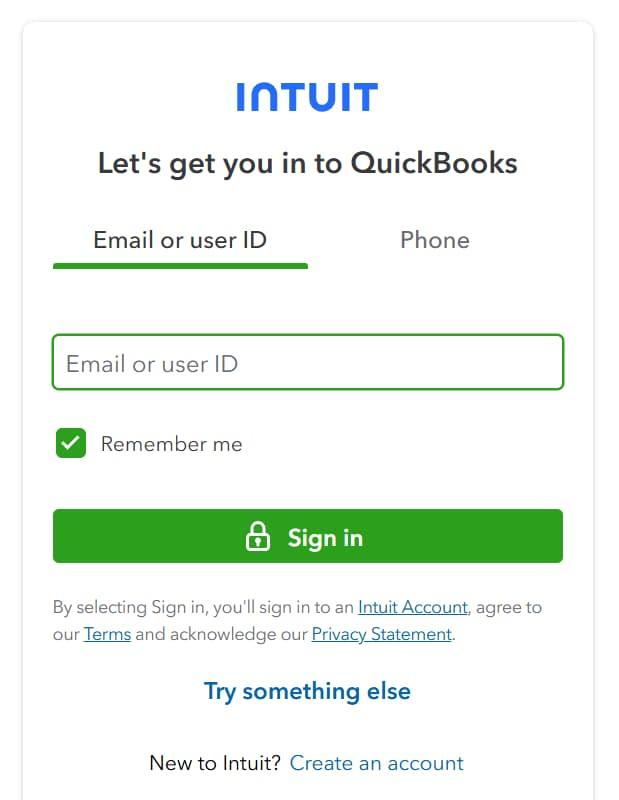
Sign in to your QuickBooks Online account using administrator access.
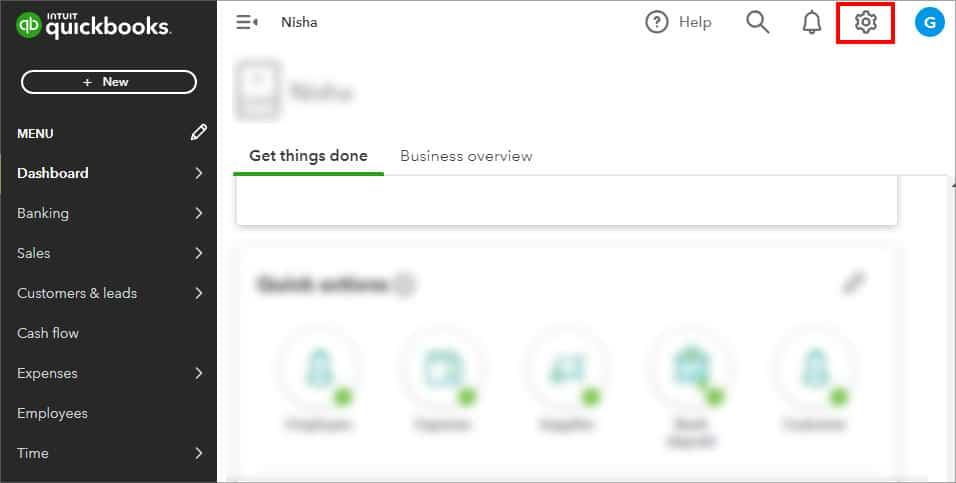
From the QuickBooks Online dashboard, select the Settings icon in the upper-right corner.
From the Settings menu, select Account and settings.
In the Account and Settings window, select Sales from the left-hand menu.
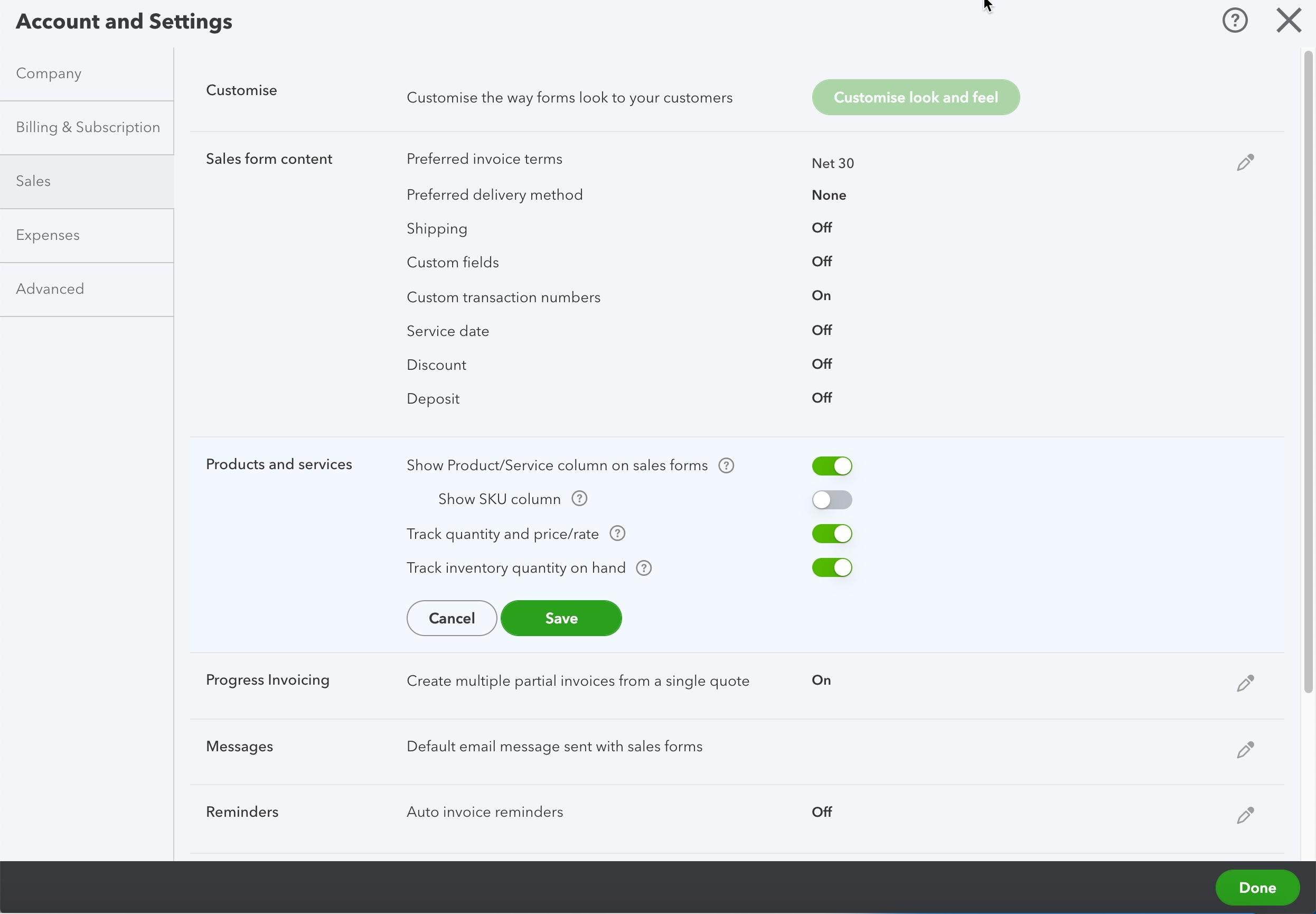
Scroll down the Sales settings page until you find Progress Invoicing. Select the Edit icon.
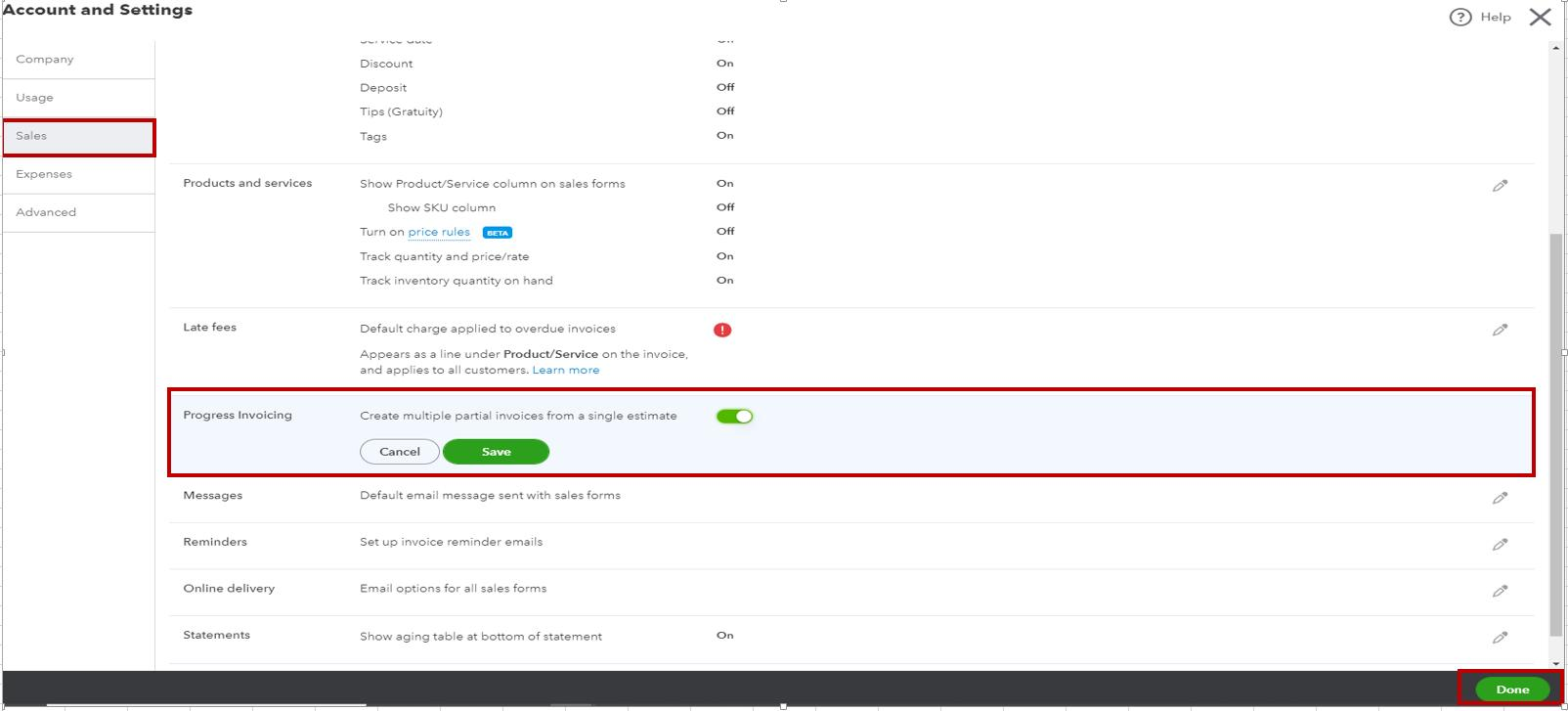
Turn on the Create multiple partial invoices from a single estimate option. This allows you to create multiple invoices from the same estimate as the project progresses.
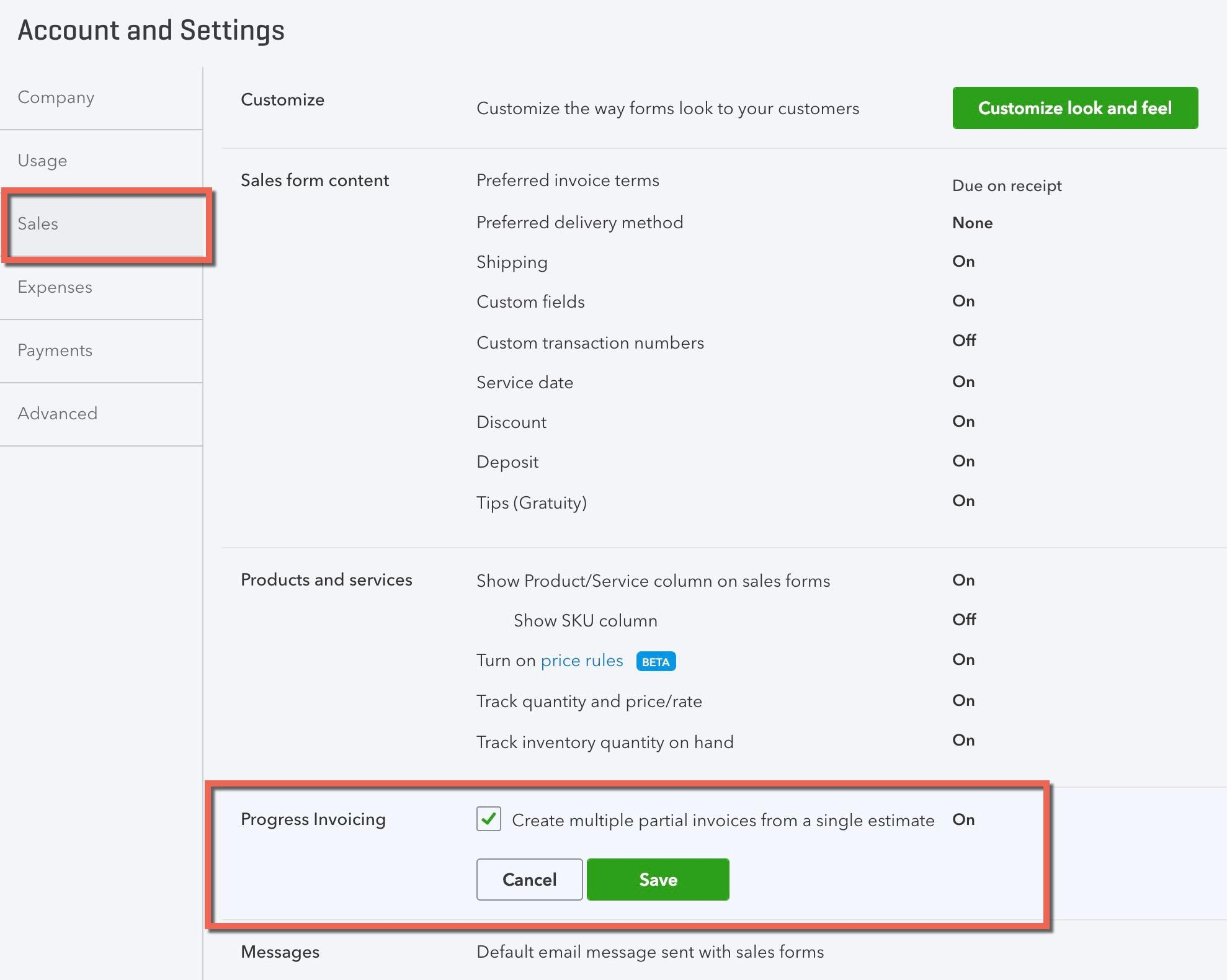
Select Save and close (or Done, depending on the current QuickBooks interface) to apply the setting.
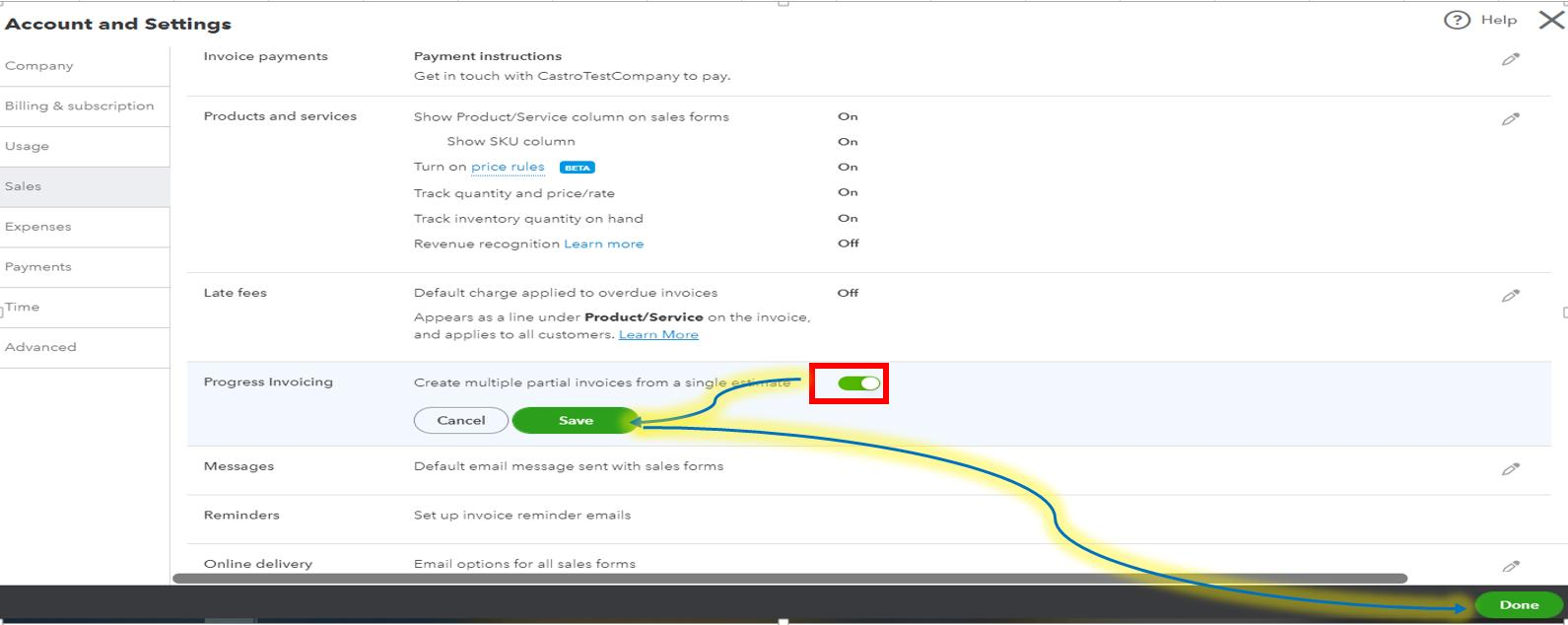
After enabling the feature, QuickBooks automatically provides progress invoicing options whenever you convert an estimate into an invoice.
What Changes After Activation?
Once activated:
- Estimates can generate multiple invoices.
- QuickBooks tracks previously billed amounts.
- Remaining billable amounts are calculated automatically.
- Users can choose different billing methods when creating invoices.
- Invoice history is linked to the original estimate.
This automation reduces manual calculations and improves billing accuracy.
Understanding Subscription Requirements
Progress invoicing is available in specific QuickBooks Online subscription plans. Businesses should verify that their subscription includes this feature before planning a phased billing workflow.
Subscription availability may vary by country and QuickBooks Online edition, so it's important to review the features included in your plan. Organizations using older subscriptions or limited editions may need to upgrade to access progress invoicing.
Before implementing phased billing, verify that your subscription supports:
- Estimates
- Progress invoicing
- Projects (if required)
- Customer transaction tracking
- Sales reporting
Ensuring your subscription meets these requirements prevents workflow interruptions later.
User Permissions and Access Considerations
Not every employee should have permission to create, edit, or approve estimates and invoices. QuickBooks Online allows businesses to assign user roles that control access to financial information.
Common user roles include:
- Company Administrator
- Standard User
- Reports Only User
- Time Tracking User
For progress invoicing, businesses should determine who can:
- Create estimates
- Edit estimates
- Convert estimates into invoices
- Approve invoices
- Record customer payments
- View project financial reports
Restricting permissions helps maintain financial accuracy and reduces the risk of unauthorized changes.
In a construction company:
- Sales representatives create estimates.
- Project managers review project milestones.
- Accounting staff create progress invoices.
- Finance managers approve customer payments.
Separating responsibilities improves internal controls and reduces billing errors.
Creating Accurate Project Estimates
A progress invoice always begins with an estimate. The estimate represents the agreed value of the project and serves as the source document for all future invoices. Because every invoice is linked to the estimate, its accuracy is extremely important.
An incomplete or inaccurate estimate can result in:
- Incorrect invoices
- Customer disputes
- Project overruns
- Duplicate billing
- Revenue reporting issues
Businesses should review estimates carefully before sending them to customers.
Building Detailed Estimates
A detailed estimate provides a complete picture of the work being performed. Instead of using vague descriptions, businesses should clearly define every product or service included in the project.
A detailed estimate typically includes:
- Customer information
- Estimate number
- Estimate date
- Project name
- Products and services
- Quantities
- Unit prices
- Discounts (if applicable)
- Taxes
- Project notes
- Payment terms
- Expected completion dates
Instead of writing: Website Development
A more detailed estimate would include:
- Project planning
- User interface design
- Front-end development
- Back-end development
- Testing
- Deployment
- User training
Detailed estimates improve customer understanding and reduce misunderstandings during billing.
Organizing Products and Services
The Products and Services list in QuickBooks should be organized before creating estimates. Every item should have:
- A clear name
- Appropriate category
- Correct sales price
- Income account
- Tax information (if applicable)
Using standardized products and services provides consistency across estimates and invoices.
Instead of creating multiple items such as Website Design, Web Design, Website Designing, and Web Development Design, use one standardized item: Website Design Services.
This prevents duplicate service items and improves reporting accuracy.
Including Quantities, Pricing, and Project Scope
Every estimate should clearly define:
Quantities
Specify how much work will be performed. Examples:
- 100 consulting hours
- 50 software licenses
- 200 square meters of flooring
Pricing
Include accurate:
- Unit rates
- Hourly rates
- Fixed prices
- Material costs
Pricing should match the customer agreement.
Project Scope
The project scope defines exactly what is included in the estimate. For example:
Included:
- Software installation
- User training
- System testing
Not included:
- Future upgrades
- Additional customization
- Third-party software licenses
Clearly defining scope reduces future billing disputes.
Obtaining Customer Approval Before Invoicing
Before creating any progress invoice, businesses should obtain customer approval for the estimate. Customer approval confirms:
- Project scope
- Pricing
- Payment schedule
- Billing milestones
- Terms and conditions
Approval may be obtained through:
- Electronic acceptance
- Signed estimate
- Email confirmation
- Formal contract
Beginning phased billing without approval increases the likelihood of payment disputes later.
Organizing Customers and Projects
Good organization is essential for managing multiple projects. QuickBooks allows businesses to maintain customer records and, where available, use Projects to track project-related transactions.
Organized records make it easier to locate:
- Estimates
- Invoices
- Payments
- Expenses
- Reports
This improves efficiency and simplifies project management.
Creating Customer Records
Every customer should have a complete profile before estimates are created. Customer records generally include:
- Customer name
- Company name
- Billing address
- Shipping address
- Email address
- Phone number
- Payment terms
- Tax information
Accurate customer records ensure invoices are sent to the correct recipient and support effective accounts receivable management.
Using Projects for Job Tracking
QuickBooks Online Projects helps businesses monitor the financial performance of individual jobs. Projects can be used to track:
- Estimates
- Progress invoices
- Expenses
- Vendor bills
- Time entries
- Customer payments
- Profitability
For businesses managing multiple projects simultaneously, Projects provides a centralized view of each job's financial activity.
ABC Construction may have:
- Office Renovation – Project A
- Shopping Mall Expansion – Project B
- Apartment Complex – Project C
Each project maintains separate financial records while remaining associated with the same company file.
Naming Conventions for Estimates and Invoices
Using standardized names helps keep transactions organized and easier to locate. Businesses should establish a standard format for:
- Estimate numbers
- Invoice numbers
- Project names
- Customer references
Estimate: EST-2026-015
Invoices:
- INV-2026-015-01
- INV-2026-015-02
- INV-2026-015-03
This numbering system clearly indicates that all invoices belong to the same estimate. Consistent naming improves organization and simplifies audits.
Maintaining Organized Project Documentation
Progress invoicing involves more than invoices alone. Businesses should maintain supporting documentation throughout the project lifecycle.
Typical project documents include:
- Signed estimates
- Contracts
- Purchase orders
- Change orders
- Customer approvals
- Progress reports
- Inspection reports
- Delivery confirmations
- Email communications
- Payment receipts
Maintaining complete documentation provides evidence of completed work and supports future audits or customer inquiries.
Best Practices for Preparing QuickBooks Online
To ensure successful progress invoicing:
- Enable progress invoicing before creating estimates.
- Verify your QuickBooks Online subscription supports the feature.
- Assign appropriate user permissions to protect financial data.
- Create detailed, accurate estimates with clear project scope.
- Use standardized products and services for consistency.
- Include accurate quantities and pricing in every estimate.
- Obtain customer approval before issuing invoices.
- Maintain complete customer records.
- Use Projects to track project-specific financial activity.
- Apply consistent naming conventions for estimates and invoices.
- Keep all supporting project documentation organized and accessible.
Following these practices creates a reliable foundation for phased billing and minimizes billing errors.
Creating Progress Invoices from Estimates
Once Progress Invoicing has been enabled in QuickBooks Online and an approved estimate has been created, the next step is to begin billing the customer as the project progresses. This is where progress invoicing becomes particularly valuable. Instead of creating separate manual invoices, QuickBooks allows you to generate multiple invoices directly from a single estimate, ensuring that all billing remains connected to the original project agreement.
Each progress invoice represents a portion of the approved estimate. Depending on the project's billing arrangement, you can invoice a percentage of the estimate, a fixed monetary amount, or specific products and services that have been completed. QuickBooks automatically records how much has already been invoiced and calculates the remaining balance, helping businesses avoid duplicate billing and maintain accurate financial records.
As projects evolve, additional invoices can be created as milestones are reached. If project requirements change, approved change orders can be incorporated by updating the estimate before future invoices are generated. Once all work has been completed, the remaining balance is billed through the final invoice, and the estimate is considered fully invoiced.
This section explains the complete progress invoicing process, from creating the first invoice to issuing the final invoice, while also covering project changes, billing methods, and best practices for preventing overbilling.
Creating the First Progress Invoice
The first progress invoice marks the beginning of customer billing for a project. It is created directly from the approved estimate and typically corresponds to the initial project phase, upfront deposit, or first milestone.
Creating the invoice from the estimate ensures that QuickBooks establishes a direct relationship between the estimate and all future invoices.
Instead of manually entering products, quantities, and pricing again, QuickBooks automatically imports the information from the estimate, reducing data entry and minimizing errors.
When Is the First Progress Invoice Created?
Businesses typically issue the first invoice when:
- The customer approves the estimate.
- The project officially begins.
- An advance payment is required.
- The first project milestone has been completed.
- Initial materials have been purchased.
- Contract terms specify an upfront payment.
The timing depends on the agreement between the business and the customer.
Converting an Estimate into an Invoice
Progress invoicing always begins with an estimate. To create the first invoice, QuickBooks converts the estimate into an invoice while preserving the connection between the two documents.
Steps to Convert an Estimate into an Invoice
- Open Sales and select Estimates.
- Locate the approved estimate.
- Open the estimate.
- Select Create Invoice.
- QuickBooks displays available progress invoicing options.
- Choose the preferred billing method.
- Review the invoice.
- Save or send it to the customer.
Once the invoice is created, QuickBooks updates the estimate to reflect the amount that has been billed.
Billing by Percentage
One of the most common progress invoicing methods is billing by percentage. Instead of invoicing individual products or fixed amounts, the invoice represents a specified percentage of the total estimate.
Original estimate: Commercial Building Project — $20,00,000
The customer agrees to the following schedule:
- 20% before construction
- 40% after structural work
- 30% after interior completion
- 10% after final inspection
The first invoice would be: 20% × $20,00,000 = $4,00,000. QuickBooks automatically calculates the invoice amount and tracks the remaining balance.
Advantages
Billing by percentage:
- Matches project completion.
- Simplifies milestone billing.
- Reduces manual calculations.
- Maintains consistent payment schedules.
- Works well for long-term projects.
Industries such as construction, engineering, and consulting commonly use this method.
Billing by Fixed Amount
Some projects require invoices for predetermined amounts rather than percentages. In this case, QuickBooks allows users to specify the exact amount to bill.
Estimate: $15,00,000
Billing schedule:
- Initial payment: $3,00,000
- Mid-project payment: $5,00,000
- Final payment: Remaining balance
When creating the first invoice, the user simply enters $3,00,000 as the amount to invoice. QuickBooks subtracts this amount from the estimate and updates the remaining balance automatically.
Advantages
Billing by fixed amount is useful when:
- Contract payments are predetermined.
- Deposits are required.
- Milestones have agreed monetary values.
- Customers prefer fixed payment schedules.
This approach provides flexibility while maintaining accurate billing records.
Billing Selected Line Items
Not every project progresses evenly. In some cases, only specific products or services are complete, so billing the applicable line items may be more suitable than using a percentage or fixed amount.
QuickBooks allows users to choose specific products or services from the estimate when creating an invoice.
Estimate line items:
| Item | Amount |
|---|---|
| Design | $1,50,000 |
| Development | $5,00,000 |
| Testing | $1,00,000 |
| Deployment | $50,000 |
After completing the design phase, the business invoices only the Design line item. The remaining items stay available for future invoices.
Advantages
Billing selected line items:
- Matches completed work.
- Improves billing transparency.
- Reduces customer disputes.
- Supports projects with variable timelines.
Creating Additional Invoices Throughout the Project
As work continues, businesses can create additional progress invoices from the same estimate. Each invoice corresponds to another completed milestone, phase, or deliverable.
QuickBooks continues tracking:
- Amount already invoiced.
- Amount remaining.
- Invoice history.
- Estimate completion.
There is no need to recreate project information because every invoice references the original estimate.
Estimate: $25,00,000
Invoices:
- Invoice 1: $5,00,000
- Invoice 2: $8,00,000
- Invoice 3: $7,00,000
- Final Invoice: $5,00,000
QuickBooks maintains a running total until the estimate is fully billed.
Tracking Previously Billed Amounts
One of the biggest advantages of progress invoicing is automatic tracking. Whenever a new invoice is created, QuickBooks displays:
- Original estimate.
- Previously invoiced amount.
- Remaining amount available for billing.
Estimate: $12,00,000 | Previously invoiced: $7,00,000 | Remaining: $5,00,000
This information helps users determine how much can still be billed without exceeding the estimate. Automatic tracking reduces manual calculations and minimizes billing mistakes.
Monitoring Remaining Balances
Remaining balance refers to the portion of the estimate that has not yet been invoiced. QuickBooks continuously updates this amount after every progress invoice.
Monitoring the remaining balance helps businesses:
- Plan future invoices.
- Forecast revenue.
- Verify project completion.
- Prevent overbilling.
Project managers can also use this information to compare completed work against remaining billable amounts.
Updating Invoices as Project Milestones Are Completed
Projects rarely progress according to identical schedules. As each milestone is completed, businesses create another invoice reflecting the completed work.
Typical milestones include:
- Design approval.
- Foundation completed.
- Equipment delivered.
- Software testing completed.
- Final installation.
- Customer acceptance.
Because invoices are created only after milestones are achieved, customers can clearly understand what work has been completed before making payment. This strengthens trust and reduces billing disputes.
Preventing Accidental Overbilling
Overbilling occurs when a customer is charged more than the agreed project value. Manual invoicing increases this risk because users may accidentally invoice the same work twice.
QuickBooks helps prevent overbilling by:
- Linking every invoice to the estimate.
- Tracking previously invoiced amounts.
- Displaying remaining balances.
- Preventing users from unintentionally billing beyond the estimate without making deliberate changes.
Best Practices to Avoid Overbilling
- Always create invoices from the estimate.
- Review previous invoices before creating new ones.
- Verify completed milestones.
- Confirm quantities before invoicing.
- Reconcile invoices regularly.
These practices ensure customers are billed fairly and accurately.
Issuing the Final Invoice
The final invoice is created once all project work has been completed. Unlike earlier invoices, the final invoice usually represents the remaining balance of the estimate.
QuickBooks automatically calculates what remains after all previous progress invoices have been issued.
Estimate: $10,00,000
Invoices issued:
- $2,50,000
- $3,00,000
- $2,00,000
Remaining balance: $2,50,000. The final invoice bills this remaining amount, bringing the total invoiced to the full estimate value.
Billing the Remaining Balance
Rather than calculating the remaining amount manually, QuickBooks determines the balance based on previous invoices.
This helps ensure:
- The customer is billed only for the outstanding amount.
- The estimate is fully utilized.
- Total invoices equal the approved estimate (unless revised).
This automation significantly reduces billing errors.
Closing the Estimate
Once the final invoice has been created and the total estimate has been invoiced, the estimate is effectively complete.
A completed estimate provides a full record of:
- Original project value.
- Every progress invoice issued.
- Total amount billed.
- Remaining balance (which should now be zero).
Closing the estimate signals that no further billing is expected unless the project scope changes.
Verifying Project Completion
Before sending the final invoice, verify that all work covered by the agreement has been completed. This verification typically involves:
- Reviewing project milestones.
- Confirming deliverables with the customer.
- Ensuring outstanding tasks have been completed.
- Verifying change orders have been incorporated.
- Obtaining final customer acceptance if required.
A thorough review before sending the invoice can help minimize billing discrepancies and reduce the risk of disputes later.
Ensuring Invoice Accuracy Before Sending
Every invoice should be reviewed carefully before it is sent to the customer. The review should confirm:
- Customer details are correct.
- Invoice amount is accurate.
- Appropriate products or services are included.
- Taxes have been calculated correctly.
- Payment terms are correct.
- Supporting notes are complete.
Taking a few minutes to verify invoice accuracy reduces corrections later and projects a professional image.
Managing Project Changes
Projects often change after work has begun. Examples include:
- Additional work requested by the customer.
- Removal of planned services.
- Material upgrades.
- Extended timelines.
- Additional consulting hours.
These changes affect future billing and should be managed carefully.
Handling Approved Change Orders
A change order is a formal document that modifies the original project agreement. Examples include:
- Additional construction work.
- Extra software features.
- Increased consulting hours.
- Design revisions.
Before invoicing additional work, businesses should obtain customer approval for the change order. Approved changes provide the basis for updating the estimate and future invoices.
Updating Estimates Appropriately
When approved changes affect project value, the estimate should be updated before additional invoices are created.
Updating the estimate ensures that:
- Future invoices reflect the revised agreement.
- Remaining balances remain accurate.
- Reporting reflects current project value.
Changes should never be made casually after invoices have already been created. They should be documented and approved to maintain financial accuracy and transparency.
Communicating Revised Billing Schedules
Whenever project changes affect billing, businesses should communicate the revised payment schedule to the customer. This communication should explain:
- What changed.
- Why the change occurred.
- The revised project cost.
- Updated milestone dates.
- Future invoice amounts.
Clear communication helps maintain customer trust and reduces the likelihood of disputes.
Maintaining Audit Trails
An audit trail is a chronological record of project and billing activities. For progress invoicing, businesses should retain:
- Original estimates.
- Revised estimates.
- Approved change orders.
- Progress invoices.
- Customer approvals.
- Payment records.
- Supporting correspondence.
Maintaining complete audit trails helps during internal reviews, financial audits, and customer inquiries, and demonstrates that all billing was properly authorized and documented.
Best Practices for Creating Progress Invoices
To ensure accurate and efficient progress invoicing:
- Always create invoices directly from approved estimates.
- Choose the billing method that aligns with your contract — percentage, fixed amount, or selected line items.
- Review previously invoiced amounts before creating new invoices.
- Monitor remaining balances regularly.
- Invoice customers only after agreed milestones are completed.
- Verify invoice details before sending.
- Document and approve all project changes through formal change orders.
- Update estimates before invoicing revised work.
- Communicate any billing schedule changes promptly.
- Maintain a complete audit trail of estimates, invoices, approvals, and payments.
Preventing Duplicate Income and Maintaining Accurate Financial Records
One of the biggest challenges in project-based billing is ensuring that customers are billed accurately without recording the same income more than once. As projects progress over weeks or months, businesses may issue multiple invoices, receive several customer payments, and make changes to the project scope. Without proper controls, these activities can result in duplicate invoices, duplicate income, incorrect customer balances, and unreliable financial reports.
Duplicate income does not necessarily mean a business has received extra cash. In many cases, it occurs because the same work is invoiced twice, customer payments are recorded incorrectly, or manual invoices are created outside the approved estimate. These errors can overstate sales revenue, increase accounts receivable incorrectly, confuse customers, and create problems during financial reporting and tax preparation.
QuickBooks Online helps businesses reduce these risks by linking progress invoices to a single estimate, automatically tracking invoiced and remaining amounts, maintaining invoice history, and providing visibility into project progress. However, these safeguards are only effective when users follow proper billing procedures.
This section explains how duplicate income occurs, how QuickBooks Online helps prevent duplicate billing, the relationship between invoicing and revenue recognition, and the importance of monitoring customer balances to maintain accurate financial records.
How Duplicate Income Occurs
Duplicate income occurs when the same sale or project value is recorded more than once in the accounting records. This can happen even if the customer has made only one payment.
For example, a business may create a progress invoice from an estimate and later accidentally create another manual invoice for the same work. Although only one project was completed, the accounting records now show twice the revenue that should have been recorded.
Duplicate income can lead to:
- Overstated sales revenue.
- Incorrect accounts receivable balances.
- Customer disputes over duplicate invoices.
- Misleading financial statements.
- Tax reporting errors.
- Difficulty reconciling customer accounts.
Identifying the causes of duplicate income is an important step in preventing it from occurring.
Creating Standalone Invoices Instead of Invoicing from Estimates
One of the most common causes of duplicate income is creating a new invoice manually instead of generating it from the original estimate.
When a manual invoice is created, QuickBooks has no connection between that invoice and the estimate. As a result:
- The estimate still shows that work has not been billed.
- Another user may later create a progress invoice from the estimate.
- The same work is invoiced twice.
Estimate: Website Development Project – $5,00,000
Instead of creating a progress invoice from the estimate, a user manually creates an invoice for $2,00,000. Later, another employee opens the estimate and invoices the first milestone again for $2,00,000.
Result:
- Customer receives duplicate invoices.
- Revenue is overstated by $2,00,000.
- Accounts receivable is incorrect.
Best Practice
Always create invoices directly from the approved estimate when using progress invoicing.
Re-entering Completed Work
Duplicate income may also occur when completed work is entered more than once. This often happens when:
- Multiple employees work on the same project.
- Project documentation is incomplete.
- Progress invoices are not reviewed before new invoices are created.
A consultant completes an initial assessment and a business analysis. An invoice is issued.
Several weeks later, another employee mistakenly invoices the same consulting services because they were unaware they had already been billed. QuickBooks records both invoices as revenue unless the error is identified and corrected.
How to Prevent It
Businesses should:
- Review previous invoices before billing.
- Maintain detailed project records.
- Track completed milestones.
- Communicate billing status among team members.
Duplicating Products or Services
Another source of duplicate income is the accidental creation of duplicate products or service items. For example, a business may have separate items named Website Design, Web Design, Website Designing, and Website Design Services.
Although these items describe the same service, users may invoice them separately, making reports inconsistent and increasing the risk of duplicate billing.
Why This Matters
Duplicate service items can:
- Confuse employees.
- Reduce reporting accuracy.
- Make project tracking difficult.
- Increase the risk of duplicate invoicing.
Best practice: Maintain a standardized Products and Services list with consistent naming conventions and review it regularly to eliminate duplicate items.
Recording Customer Payments Incorrectly
Duplicate income is not always caused by duplicate invoices. It can also occur when customer payments are recorded incorrectly. A common mistake is recording a customer payment as a new sales receipt or invoice instead of applying it to an existing invoice.
A customer receives an invoice for $1,00,000 and pays it. Instead of recording the payment against the invoice, the user creates a new sales receipt for $1,00,000.
Result:
- Revenue is recorded twice.
- The original invoice remains unpaid.
- Customer balance is incorrect.
Best Practice
Always record customer payments by applying them to the correct open invoice rather than creating a new sales transaction.
How QuickBooks Helps Prevent Duplicate Billing
QuickBooks Online includes several features designed to reduce duplicate billing and improve project accuracy. These features are most effective when businesses consistently create progress invoices from estimates and avoid manual workarounds.
Linking Invoices to a Single Estimate
The primary safeguard against duplicate billing is QuickBooks' ability to link every progress invoice to the original estimate.
Because each invoice originates from the same estimate, QuickBooks knows:
- How much has already been billed.
- Which items have been invoiced.
- What remains available for billing.
This connection creates a single source of truth for the project's billing activity.
Benefits
Linking invoices to estimates:
- Reduces manual tracking.
- Prevents duplicate invoicing.
- Improves project visibility.
- Simplifies financial reporting.
- Maintains accurate billing history.
Tracking Invoiced Versus Remaining Amounts
Each time a progress invoice is created, QuickBooks automatically updates:
- Original estimate value.
- Total amount invoiced.
- Remaining amount available for billing.
Estimate: $20,00,000 | Invoices: $5,00,000 and $6,00,000
QuickBooks displays: Previously invoiced $11,00,000, Remaining $9,00,000.
Users no longer need to calculate balances manually. This automation reduces billing mistakes significantly.
Providing Visibility into Project Progress
Because estimates, invoices, and payments remain connected, QuickBooks provides an overall view of project billing. Businesses can quickly identify:
- Current project value.
- Billing progress.
- Customer payment status.
- Outstanding invoices.
- Remaining billable work.
This visibility allows managers to identify potential billing issues before they become accounting problems.
Maintaining Invoice History
Every progress invoice remains associated with its estimate. Invoice history provides a complete record of:
- Invoice dates.
- Invoice numbers.
- Amounts billed.
- Remaining balances.
- Customer payments.
This historical information helps businesses resolve customer questions, support financial audits, review project performance, and identify billing errors.
Revenue Recognition Considerations
Although invoicing and revenue are closely related, they are not always recognized at the same time. Recognizing this difference helps maintain accurate financial reporting.
Businesses should follow their accounting policies and applicable accounting standards when determining when revenue should be recognized.
Difference Between Invoicing and Revenue Recognition
An invoice is a request for payment. Revenue recognition defines the point at which revenue is recorded in the financial statements. In many businesses, these two events occur simultaneously.
However, for long-term contracts or projects, revenue may be recognized according to accounting policies rather than simply when invoices are issued.
A software company invoices a customer before implementation begins. The invoice has been issued, but some or all of the revenue may not yet be considered earned until services are performed, depending on the company's accounting framework and policies. This distinction is important for accurate financial reporting.
Cash Basis Versus Accrual Basis Reporting
QuickBooks Online supports both cash basis and accrual basis financial reporting.
Cash Basis
Under the cash basis of accounting:
- Revenue is recognized when payment is received.
- Expenses are recognized when paid.
This method is often used by small businesses because it is simple and reflects actual cash movements.
Accrual Basis
Under the accrual basis:
- Revenue is recognized when it is earned.
- Expenses are recognized when incurred.
This method provides a more complete picture of business performance and is commonly used by larger organizations.
Because financial reports differ depending on the accounting method selected, businesses should ensure their progress invoicing practices align with their accounting policies.
Recording Customer Deposits Appropriately
Many project-based businesses receive deposits before work begins. A customer deposit is not always the same as earned revenue.
A contractor receives a $2,00,000 deposit before construction starts. If the deposit is recorded incorrectly as sales revenue immediately, financial statements may overstate earned income.
Instead, businesses should record deposits according to their accounting policies and recognize revenue as work is performed where applicable. Proper treatment of deposits improves financial accuracy and supports compliance with accounting standards.
Aligning Billing with Accounting Policies
Every organization should establish accounting policies that explain:
- When invoices should be created.
- How customer deposits are recorded.
- When revenue is recognized.
- How change orders are handled.
- How project balances are monitored.
Consistent policies improve reporting accuracy and reduce differences between project managers and accounting staff.
Monitoring Customer Balances
Customer balances represent the amounts customers currently owe. Monitoring these balances helps businesses:
- Identify overdue invoices.
- Manage collections.
- Improve cash flow.
- Detect billing errors.
QuickBooks updates customer balances automatically as invoices and payments are recorded correctly.
Reviewing Open Invoices
Open invoices are invoices that have not yet been fully paid. Regularly reviewing open invoices allows businesses to:
- Follow up on overdue payments.
- Verify invoice accuracy.
- Identify missing customer payments.
- Maintain healthy accounts receivable.
Ignoring open invoices may lead to cash flow problems and inaccurate customer balances.
Tracking Outstanding Project Balances
In addition to individual invoices, businesses should monitor the remaining balance of each project. Project balance includes:
- Remaining estimate amount.
- Outstanding invoices.
- Customer payments received.
- Work completed but not yet billed.
Regular review ensures projects remain financially on track and helps identify opportunities to invoice completed work promptly.
Monitoring Partially Paid Invoices
Customers do not always pay invoices in full. Some invoices may be partially paid while the remaining balance is still outstanding.
QuickBooks tracks:
- Original invoice amount.
- Payments received.
- Remaining balance due.
Businesses should monitor partially paid invoices to ensure the remaining balance is collected according to agreed payment terms.
Reconciling Customer Accounts
Reconciling customer accounts means comparing QuickBooks records with customer payments and outstanding balances to ensure everything matches.
Regular reconciliation helps identify:
- Duplicate invoices.
- Missing payments.
- Incorrect balances.
- Recording errors.
- Customer disputes.
Monthly reconciliation improves the accuracy of financial records and strengthens internal controls.
Best Practices for Preventing Duplicate Income
To reduce the risk of duplicate income and maintain reliable financial records:
- Always create progress invoices directly from approved estimates.
- Avoid manual standalone invoices for work already included in an estimate.
- Review previous invoices before billing additional project phases.
- Use standardized products and services to prevent duplicate items.
- Record customer payments against existing invoices rather than creating new sales transactions.
- Monitor invoiced and remaining balances regularly.
- Understand the difference between invoicing and revenue recognition.
- Record customer deposits according to company accounting policies.
- Review open and partially paid invoices frequently.
- Regularly verify customer balances against your records.
Following these practices helps ensure that revenue is recorded accurately, customer balances remain correct, and project billing reflects the true progress of the work.
Common Progress Invoicing Mistakes and How to Avoid Them
Progress invoicing is one of the most effective ways to bill customers for long-term or milestone-based projects. When used correctly, it helps businesses maintain steady cash flow, accurately track project billing, and reduce the risk of duplicate income. However, like any accounting process, progress invoicing requires consistency and attention to detail. Even small mistakes can affect customer balances, financial reports, project profitability, and client relationships.
Many progress invoicing errors occur because users bypass the recommended QuickBooks Online workflow. For example, editing estimates after invoices have already been created, manually generating invoices instead of converting estimates, or incorrectly recording customer payments can all lead to inaccurate financial records. These mistakes often create duplicate invoices, overstated revenue, outstanding customer balances, and confusion during account reconciliation.
Fortunately, most of these issues can be prevented by following standardized procedures and regularly reviewing project transactions. Understanding the most common mistakes, and knowing how to avoid them, helps businesses maintain accurate accounting records while ensuring customers are billed fairly and consistently.
This section examines the most common progress invoicing mistakes in QuickBooks Online, explains their impact on project billing and financial reporting, and provides practical recommendations for avoiding them.
An estimate serves as the foundation for every progress invoice. Once invoices have been generated from an estimate, changing that estimate without proper planning can create inconsistencies between the estimate and the invoices already issued.
Although QuickBooks Online allows certain edits to estimates, businesses should exercise caution after progress invoices have been created.
Why This Happens
Users may edit an estimate because:
- The project scope changes.
- Pricing needs to be updated.
- Additional services are added.
- Quantities are revised.
- Mistakes are discovered after billing has started.
While some changes are legitimate, modifying an estimate after invoicing without following a controlled process can affect project accuracy and reporting.
Impact on Project Accuracy
The estimate represents the agreed project value. If it changes unexpectedly after invoices have already been issued, it becomes more difficult to determine:
- The original project scope.
- The revised project value.
- How much work has already been billed.
- What amount remains to be invoiced.
Original estimate: $8,00,000. Invoices issued: $2,00,000 and $3,00,000.
The estimate is later changed to $10,00,000 without documenting the reason. Project managers may struggle to determine whether additional work was approved, whether pricing was changed, and whether the remaining balance is correct. This reduces project transparency and makes future billing more difficult.
Potential Reporting Inconsistencies
Reports in QuickBooks rely on accurate transaction data. When estimates are changed after invoicing:
- Project reports may become harder to interpret.
- Original contract values may be difficult to identify.
- Billing summaries may not match customer expectations.
- Historical project comparisons become less reliable.
For example, a project that originally began at $12,00,000 may later appear as $15,00,000, making it difficult to understand how the project evolved unless proper documentation exists.
Best Practice
- Confirm that the customer has approved the change.
- Review invoices already issued.
- Document the reason for the revision.
- Update supporting project documentation.
- Record approved change orders and update estimates only after approval.
This preserves the accuracy of financial and project reports.
One of the most common mistakes is creating standalone invoices instead of converting the estimate into a progress invoice. Because manual invoices are not connected to the estimate, QuickBooks cannot automatically track the relationship between the project and the invoice.
Duplicate Income Risks
When manual invoices are created outside the estimate, the estimate still shows that work remains unbilled. Another employee may later generate a progress invoice from the estimate for the same work.
Estimate: Office Renovation – $6,00,000. Accounting staff manually creates an invoice for $2,00,000. Later, another employee creates the first progress invoice from the estimate.
QuickBooks now contains a manual invoice of $2,00,000 and a progress invoice of $2,00,000. The customer has been billed twice for the same milestone, and revenue and accounts receivable are now overstated.
Incomplete Project Tracking
Standalone invoices also reduce project visibility. Since they are not linked to the estimate, QuickBooks cannot automatically display:
- Total project value.
- Previously billed amount.
- Remaining billable amount.
- Progress invoice history.
Managers must manually compare invoices and estimates, increasing administrative effort and the likelihood of mistakes.
Best Practice
Always create invoices directly from the estimate when progress invoicing is being used, and use a single estimate as the source for every progress invoice throughout the project.
Receiving customer payments is only one part of the billing process. Payments must also be applied correctly within QuickBooks. Incorrect payment application can create inaccurate customer balances even when invoices themselves are correct.
Duplicate Payment Records
A common mistake occurs when users create a new sales receipt or invoice instead of recording a payment against an existing invoice.
Invoice: $1,50,000. Customer pays: $1,50,000. Instead of selecting Receive Payment, a user creates another sales receipt.
Result:
- Revenue is recorded twice.
- Invoice remains unpaid.
- Customer statement becomes incorrect.
Customer Balance Discrepancies
Incorrect payment application may result in:
- Outstanding invoices that should be marked paid.
- Customer statements showing incorrect balances.
- Collection efforts for invoices already paid.
- Customer dissatisfaction.
Best Practice
Always use the Receive Payment function to apply customer payments to open invoices. After recording payments, review open invoices, the customer balance, and payment history to confirm that payments have been applied correctly.
Reconciliation is the process of verifying that invoices, payments, and project balances agree with one another. Some businesses issue invoices throughout a project but never review whether every milestone has actually been billed. This creates several problems.
Missed Invoices
Without regular reconciliation, completed work may never be invoiced.
Construction milestones: Foundation, Framing, Roofing. Only the first two milestones were invoiced. Months later, the roofing invoice is forgotten. The business loses revenue until the oversight is discovered.
Outstanding Balances
Reconciliation also identifies:
- Unpaid invoices.
- Partially paid invoices.
- Overdue customer balances.
Reviewing outstanding balances regularly improves collections and cash flow.
Reporting Inaccuracies
When project invoices are not reconciled, financial reports may show:
- Incorrect revenue.
- Incomplete project income.
- Inaccurate accounts receivable.
- Misleading profitability.
Management decisions based on these reports may therefore be unreliable.
Best Practice
Compare completed project milestones against invoices regularly, and schedule monthly reviews of:
- Open invoices.
- Customer balances.
- Project billing summaries.
Regular reconciliation helps ensure financial reports accurately reflect project activity.
QuickBooks relies on the Products and Services list for reporting. If employees create similar items repeatedly, reporting becomes inconsistent.
Instead of one standardized item, Software Development, employees create: Software Dev, Software Development, Development Services, and Custom Development. Although these describe the same service, QuickBooks treats them as separate products.
Duplicate Service Items
Duplicate service items create confusion because:
- Employees choose different items for the same work.
- Sales reports become fragmented.
- Project profitability becomes harder to analyze.
- Billing becomes inconsistent.
Confusing Financial Reports
Inconsistent item names affect reporting. For example, a Sales by Product Report may show Software Development: $15,00,000, Software Dev: $8,00,000, and Development Services: $6,00,000. Management may incorrectly assume three different services were sold. In reality, they represent one service recorded under different names.
Reduced Reporting Accuracy
Duplicate products reduce the reliability of reports including:
- Sales by Product
- Project Profitability
- Revenue Analysis
- Customer Sales Reports
Accurate reporting depends on consistent data entry. Businesses should periodically review their Products and Services list and merge or deactivate duplicate items where appropriate.
Best Practice
Maintain a standardized Products and Services list, use standardized naming conventions throughout the organization, and periodically remove duplicate items.
Best Practices to Avoid Progress Invoicing Mistakes
Businesses can reduce billing errors by following a consistent process throughout the project lifecycle.
- Create every progress invoice directly from the approved estimate.
- Avoid manual standalone invoices for work included in an estimate.
- Obtain customer approval before changing project scope.
- Document all approved change orders.
- Review estimates before making revisions after invoicing has begun.
- Record customer payments using the Receive Payment feature.
- Reconcile project invoices and customer balances regularly.
- Monitor outstanding and partially paid invoices.
- Standardize the Products and Services list.
- Train employees on consistent invoicing procedures.
- Review financial reports periodically to identify inconsistencies.
Following these practices helps maintain accurate financial records and improves customer confidence in the billing process.
Best Practices for Managing Progress Billing
Implementing progress invoicing in QuickBooks Online is only the first step toward effective project billing. To fully benefit from phased invoicing, businesses need standardized processes that ensure every estimate, invoice, payment, and project update is handled consistently. Without clear procedures, even the most powerful accounting software cannot prevent missed invoices, duplicate billing, delayed payments, or inaccurate financial reporting.
Best practices help businesses create a repeatable billing process that improves efficiency, strengthens internal controls, and enhances customer confidence. By standardizing estimates, establishing milestone-based billing policies, regularly reviewing project status, monitoring key financial reports, and maintaining complete supporting documentation, organizations can reduce billing errors and improve project profitability.
Whether a business manages a handful of projects or hundreds of ongoing contracts, following these best practices creates a scalable system that supports accurate invoicing, reliable financial reporting, and better decision-making.
This section explores the key practices that help businesses successfully manage progress billing in QuickBooks Online.
Standardize the Estimating Process
Every successful progress billing process begins with a well-prepared estimate. Since every progress invoice is created from the estimate, consistency during the estimating stage is essential.
A standardized estimating process ensures that all employees prepare estimates using the same structure, pricing methods, and documentation. This reduces confusion and makes project billing more accurate throughout the project lifecycle.
Benefits of standardizing estimates include:
- Improved consistency across projects.
- Fewer pricing errors.
- Easier invoice creation.
- Better project tracking.
- More reliable financial reporting.
Organizations should establish internal guidelines that define how estimates are created, reviewed, approved, and updated.
Consistent Project Templates
Creating estimates from standardized templates saves time and reduces inconsistencies. A project template can include:
- Common products or services.
- Standard descriptions.
- Default pricing.
- Payment terms.
- Tax settings.
- Project notes.
A construction company may use the same estimate template for residential renovation projects. The template might include:
- Site preparation
- Foundation work
- Structural construction
- Electrical installation
- Plumbing
- Interior finishing
- Final inspection
Employees simply adjust quantities and pricing instead of building every estimate from scratch.
Benefits
Using templates:
- Reduces manual data entry.
- Ensures consistent project structure.
- Improves reporting accuracy.
- Minimizes billing errors.
Detailed Service Descriptions
Customers should clearly understand what they are paying for. Instead of vague descriptions, businesses should use detailed service descriptions that explain the work included in each estimate and invoice.
| Poor Description | Better Description |
|---|---|
| Consulting Services | Business Process Review, Operational Analysis, Workflow Documentation, and Final Recommendations |
Detailed descriptions help:
- Reduce customer questions.
- Prevent billing disputes.
- Improve project transparency.
- Clarify project scope.
Well-written descriptions also make future project reviews much easier.
Defined Billing Milestones
Progress invoices should correspond to measurable project milestones rather than arbitrary dates. A milestone is a significant point in the project that indicates meaningful progress. Examples include:
| Industry | Example Milestones |
|---|---|
| Construction | Foundation completed; roofing completed; interior completed. |
| Software Development | Requirements finalized; development completed; testing completed; deployment completed. |
| Consulting | Initial assessment; research completed; final report delivered. |
Clearly defined milestones make billing predictable for both the business and the customer.
Establish Milestone-Based Billing Policies
A billing policy defines when invoices should be issued and how payment amounts are determined. Having formal billing policies ensures that every project follows the same process, regardless of who manages it.
Percentage Completion Schedules
Many businesses invoice based on the percentage of work completed.
Project Value: $25,00,000
Billing Schedule:
- 20% at project start
- 30% after Phase 1
- 30% after Phase 2
- 20% upon completion
Because each invoice is based on a predefined percentage, customers know exactly when payments will be requested.
Benefits
Percentage schedules:
- Improve cash flow.
- Simplify billing.
- Reduce disputes.
- Align payments with project progress.
Deliverable-Based Invoicing
Some projects are better suited to deliverable-based billing. Instead of percentages, invoices are issued when specific deliverables are completed.
Marketing Agency deliverables:
- Brand strategy
- Logo design
- Website launch
- Marketing campaign
Each completed deliverable triggers the next invoice. This approach is particularly useful for creative and consulting projects where progress is measured by completed work rather than elapsed time.
Customer Approval Procedures
Before issuing invoices, businesses should confirm that customers agree the milestone or deliverable has been completed. Approval may be obtained through:
- Signed completion certificates.
- Email confirmation.
- Project management software approvals.
- Formal acceptance documents.
Obtaining customer approval before invoicing reduces disputes, speeds payment, improves customer relationships, and creates documentation for future reference.
Review Project Status Regularly
Progress billing should reflect actual project progress. Regular project reviews help ensure that invoices accurately match completed work.
Project managers and accounting staff should meet periodically to review:
- Completed milestones.
- Remaining work.
- Upcoming invoices.
- Customer approvals.
- Outstanding payments.
Routine reviews reduce the risk of missed invoices and billing delays.
Compare Completed Work Against Invoices
Before issuing a new invoice, compare completed work with previously issued invoices. Questions to ask include:
- Has this milestone already been billed?
- Has all completed work been invoiced?
- Are there approved change orders?
- Does the invoice reflect actual project progress?
This comparison helps prevent duplicate billing and ensures that every completed phase is invoiced only once.
Verify Remaining Billable Amounts
QuickBooks automatically tracks the remaining estimate balance. Even so, businesses should verify:
- Remaining estimate value.
- Remaining quantities.
- Remaining services.
- Customer payment status.
This review helps confirm that the next invoice accurately reflects the remaining project work.
Identify Billing Delays Early
Delayed invoicing can negatively affect cash flow. Common causes include:
- Unapproved milestones.
- Missing documentation.
- Communication breakdowns.
- Forgotten invoices.
Regular project reviews allow businesses to identify these issues before they become significant financial problems. Early identification helps maintain predictable cash flow and stronger customer relationships.
Monitor Key Reports
QuickBooks Online provides several reports that help businesses manage progress billing effectively. Reviewing these reports regularly improves project oversight and financial accuracy.
| Report | What It Shows | Why It Matters |
|---|---|---|
| Estimates & Progress Invoicing Summary | Original estimate value; amount invoiced; remaining billable amount; progress invoice history. | Managers can quickly identify projects that are fully billed, partially billed, or awaiting additional invoices, and ensure every approved estimate is invoiced correctly and completely. |
| Open Invoices Report | Invoices that have not yet been fully paid. | Helps monitor overdue invoices, prioritize collections, identify unpaid milestones, and improve cash flow before invoices become significantly overdue. |
| Accounts Receivable Aging | Outstanding customer balances grouped as Current, 1–30, 31–60, 61–90, and more than 90 days overdue. | Helps identify slow-paying customers, improve collection efforts, forecast cash inflows, and reduce bad debt risk. |
| Sales by Customer Summary | Sales activity for each customer. | Used to review total customer revenue, compare project values, analyze customer relationships, identify key clients, and verify whether billing aligns with project expectations. |
| Project Profitability Reports | Revenue earned; expenses incurred; gross profit; profit margin; overall project performance. | Managers can identify projects performing well and those requiring corrective action, and make better pricing decisions for future projects. |
Maintain Supporting Documentation
Accurate invoices should always be supported by complete documentation. Supporting records provide evidence of:
- Customer agreements.
- Project changes.
- Completed work.
- Customer approvals.
- Payments received.
Maintaining organized documentation also simplifies audits and customer inquiries.
Signed Estimates
The signed estimate represents the customer's agreement to project scope, pricing, billing schedule, and terms and conditions. Signed estimates provide the foundation for all progress invoices, and businesses should retain them throughout the project and after completion.
Change Orders
Project scope often changes during execution. Whenever additional work is approved, businesses should prepare formal change orders. Each change order should describe:
- Additional work.
- Revised pricing.
- Updated completion schedule.
- Customer approval.
Keeping change orders with project records helps explain differences between the original estimate and final project value.
Client Approvals
Customer approvals demonstrate that completed work has been accepted. Examples include:
- Email confirmation.
- Signed milestone approvals.
- Inspection reports.
- Acceptance certificates.
These approvals reduce payment disputes and support future collections.
Payment Records
Businesses should maintain complete records of:
- Customer payments.
- Payment dates.
- Payment methods.
- Outstanding balances.
- Payment confirmations.
Well-organized payment records simplify customer account reconciliation and improve financial reporting accuracy.
Best Practices Checklist
To manage progress billing successfully:
- Standardize the estimating process across the organization.
- Use consistent project templates.
- Write clear and detailed service descriptions.
- Define measurable billing milestones.
- Establish formal milestone-based billing policies.
- Obtain customer approval before invoicing each milestone.
- Review project status regularly.
- Compare completed work with issued invoices.
- Verify remaining billable amounts before creating new invoices.
- Identify billing delays early.
- Review QuickBooks reports regularly.
- Maintain signed estimates, change orders, approvals, and payment records.
- Reconcile customer balances frequently.
- Train employees on standardized billing procedures.
Following these practices creates a consistent and reliable billing process that supports business growth.
Scaling Progress Invoicing as Projects Become More Complex
As businesses grow, their projects often become larger, more complex, and longer in duration. A simple invoicing process that worked well for small jobs may no longer be sufficient when managing multiple project phases, several teams, numerous subcontractors, or long-term customer contracts.
For example, a contractor building a single house may only need two or three invoices. However, a company constructing a commercial building over two years may require dozens of progress invoices tied to different milestones. Similarly, a consulting firm managing a year-long digital transformation project or a software company implementing an enterprise solution may need to invoice customers over many months while tracking project profitability, customer payments, and remaining billable work.
Scaling progress invoicing means creating a billing process that remains accurate, efficient, and easy to manage regardless of project size. This involves using standardized estimate templates, consistent milestone tracking, regular project reviews, integrated workflows, and reliable financial reporting.
This section explains when basic invoicing is no longer enough, how to build a scalable progress billing process, and the features an effective progress invoicing system should provide.
When Basic Invoicing Is No Longer Enough
Basic invoicing works well for straightforward transactions where a customer purchases a product or service and receives a single invoice.
As projects become larger, however, businesses face challenges such as:
- Multiple project phases
- Frequent change orders
- Several customer approvals
- Numerous progress payments
- Ongoing project expenses
- Complex reporting requirements
Managing these activities with standalone invoices or spreadsheets increases the likelihood of errors.
Businesses should consider scaling their billing process when they notice:
- Projects lasting several months or years.
- Multiple invoices for the same customer.
- Difficulty tracking project balances.
- Frequent billing revisions.
- Increased customer disputes.
- Time-consuming manual calculations.
A scalable progress invoicing process addresses these challenges by connecting estimates, invoices, payments, and project tracking within a structured workflow.
Multi-Phase Construction Projects
Construction is one of the most common industries using progress invoicing because projects are typically completed in multiple stages. A commercial construction project may include:
- Site preparation
- Foundation
- Structural framework
- Roofing
- Electrical installation
- Plumbing
- Interior finishing
- Final inspection
Each phase may take weeks or months to complete and often requires substantial material and labor costs.
Why Progress Invoicing Matters
Instead of waiting until the entire building is complete, contractors invoice after each milestone. This approach:
- Improves cash flow.
- Covers material costs.
- Pays subcontractors on time.
- Reduces financial risk.
- Provides customers with transparent billing.
QuickBooks Online helps contractors monitor original contract value, amount invoiced, remaining billable amount, customer payments, and outstanding invoices.
Large Consulting Engagements
Consulting engagements often extend over several months and involve multiple deliverables. A consulting project may include:
- Business assessment
- Data collection
- Process analysis
- Strategy development
- Implementation support
- Final recommendations
Each deliverable can trigger a progress invoice.
Benefits
Using progress invoicing allows consulting firms to:
- Bill after completing agreed deliverables.
- Track project profitability.
- Improve customer communication.
- Maintain predictable revenue throughout the engagement.
Software Implementation Projects
Enterprise software implementation projects are often divided into multiple phases. Typical milestones include:
- Requirements gathering
- System design
- Software configuration
- Data migration
- User testing
- Employee training
- Go-live support
Because these projects may last six months or longer, progress invoicing ensures the software provider receives payment throughout the implementation instead of waiting until final deployment.
QuickBooks allows invoices to correspond to each completed milestone, helping both the business and the customer monitor billing progress.
Long-Term Client Contracts
Many organizations work with clients under annual or multi-year service agreements. Examples include:
- IT support contracts
- Facility management
- Marketing retainers
- Equipment maintenance
- Professional advisory services
These contracts often require recurring milestone-based billing. Instead of manually preparing invoices each month or quarter, businesses can follow a standardized progress invoicing schedule that aligns with contract terms.
Benefits include:
- Predictable cash flow.
- Consistent billing.
- Better customer relationships.
- Easier financial forecasting.
Building a Scalable Billing Process
A scalable billing process should continue working efficiently regardless of project size. As project volume increases, businesses should focus on standardization rather than creating unique workflows for every customer. A scalable process reduces manual work while improving billing consistency.
Standardized Estimate Templates
Standardized estimate templates provide a consistent starting point for every project. Templates should include:
- Standard project phases.
- Frequently used products and services.
- Common payment terms.
- Tax settings.
- Customer notes.
- Default billing milestones.
Templates save time, reduce manual entry, improve consistency, reduce pricing errors, and simplify employee training.
Consistent Milestone Tracking
Every project should use clearly defined milestones. Examples include:
| Industry | Milestones |
|---|---|
| Construction | Foundation complete; framing complete; roofing complete; interior complete. |
| Software | Requirements approved; development completed; testing completed; deployment completed. |
| Consulting | Assessment completed; recommendations delivered; implementation completed. |
Consistent milestones allow project managers and accounting staff to determine exactly when invoices should be created.
Regular Project Reviews
Scaling progress invoicing requires regular communication between project managers and accounting staff. Periodic project reviews help answer questions such as:
- Which milestones have been completed?
- Which invoices have already been issued?
- Which invoices are still pending?
- Have all customer payments been received?
- Are there approved change orders?
- Is the project still profitable?
Regular reviews reduce billing delays and improve project oversight.
Integrated Project Management Workflows
As projects become larger, accounting software should work alongside project management processes. An integrated workflow typically includes:
- Customer approves estimate.
- Project work begins.
- Milestone completed.
- Project manager confirms completion.
- Accounting creates progress invoice.
- Customer receives invoice.
- Customer submits payment.
- Accounting records payment.
- Project profitability is reviewed.
Integrating project management with billing reduces communication gaps and ensures invoices accurately reflect completed work.
What an Effective Progress Invoicing System Should Provide
An effective progress invoicing system does more than generate invoices. It should support the entire project billing lifecycle, from estimate creation to final payment.
Accurate Phased Billing
A strong progress invoicing system should:
- Create invoices directly from estimates.
- Support percentage billing.
- Support fixed-amount billing.
- Support line-item billing.
- Automatically track remaining balances.
This reduces manual calculations and improves billing accuracy.
Reduced Duplicate Income
Duplicate income is one of the biggest risks in project accounting. An effective system should reduce this risk by:
- Linking invoices to estimates.
- Preventing duplicate billing.
- Tracking previous invoices.
- Displaying remaining billable amounts.
These controls help maintain accurate financial records.
Better Cash Flow Visibility
Businesses should always know:
- How much has been invoiced.
- How much has been collected.
- Outstanding customer balances.
- Remaining project value.
This visibility supports better cash flow planning and financial decision-making.
Stronger Project Profitability Reporting
Project profitability reports should provide visibility into:
- Project revenue.
- Project expenses.
- Gross profit.
- Profit margins.
- Budget versus actual performance.
Managers can use these reports to identify successful projects and improve future pricing decisions.
Improved Client Transparency
Customers appreciate knowing what work has been completed, why an invoice was issued, what remains to be completed, and the remaining project value. Transparent billing builds confidence and reduces disputes.
Reliable Financial Reporting
A scalable progress invoicing system should support accurate financial reporting by:
- Recording invoices consistently.
- Maintaining complete billing history.
- Tracking customer balances.
- Supporting revenue analysis.
- Simplifying account reconciliation.
Reliable reports enable management to make informed business decisions and support compliance with internal policies and accounting standards.
Best Practices for Scaling Progress Invoicing
As project complexity increases, businesses should:
- Standardize estimates across all projects.
- Create every invoice from the approved estimate.
- Use clearly defined billing milestones.
- Conduct regular project review meetings.
- Maintain consistent project documentation.
- Track project profitability continuously.
- Monitor customer balances and overdue invoices.
- Review financial reports regularly.
- Document all approved change orders.
- Train employees on standardized billing procedures.
Following these practices helps ensure that the invoicing process remains accurate and efficient as the business grows.
Reference
Frequently Asked Questions
Progress invoicing is a built-in QuickBooks Online feature that allows one customer estimate to generate multiple linked invoices. Instead of billing a project in a single lump sum, businesses invoice in stages tied to milestones, and QuickBooks automatically tracks how much has been billed, how much remains, and the percentage of the estimate invoiced so far.
Yes. Progress invoicing is not turned on by default. It must be enabled from Settings > Account and Settings > Sales, under the Progress Invoicing section, before estimates can be used to generate multiple partial invoices.
No. Progress invoicing depends on an approved estimate as the master document for the project. Creating manual invoices outside of that estimate is one of the most common causes of duplicate billing and inaccurate customer balances.
Editing an estimate after billing has started can change the total value the invoices are measured against, which may create incorrect remaining balances or misstate how much has actually been billed. Changes to an estimate after invoicing has begun should be made deliberately and reviewed against every invoice already generated from it.
Because every invoice is linked to the same estimate, QuickBooks tracks the amount already billed and shows the remaining amount available to invoice. This prevents the same milestone or line item from being billed more than once, provided invoices are always created from the estimate rather than entered manually.
Most businesses review progress-billed projects on a monthly basis, comparing the total invoiced to date against the estimate and confirming that customer balances, payments received, and remaining billable amounts all agree. More active or higher-value projects may warrant more frequent review.
Availability can vary by subscription plan and region. Before relying on progress invoicing for a project, confirm that your QuickBooks Online plan supports estimates, progress invoicing, and any related features such as Projects.
Summary
Key Takeaways
Progress invoicing lets one estimate generate multiple linked invoices instead of a single lump-sum bill.
The feature must be enabled under Account and Settings before estimates can be used for phased billing.
Every progress invoice should be created from the estimate, never as a standalone manual invoice.
QuickBooks automatically tracks billed, remaining, and completion amounts once invoices are linked to an estimate.
Editing an estimate after invoicing has started is the leading cause of billing and balance errors.
Reconciling invoiced amounts against the estimate regularly prevents duplicate or missed billing.
Standardized estimating, invoicing, and review practices let businesses scale progress billing across many projects.
A disciplined progress invoicing process improves cash flow, customer trust, and financial reporting accuracy.
Final Thoughts
Conclusion
Progress invoicing is an essential feature for businesses that deliver products or services over extended timelines. When invoices are consistently created from approved estimates, tracked against milestones, and reconciled regularly, billing becomes predictable rather than error-prone.
Businesses that manage progress billing well are not doing anything extraordinary. They follow a simple, repeatable routine: build the estimate carefully, generate every invoice from that estimate, record only earned revenue, and review outstanding balances on a regular schedule. By following the practices outlined in this guide, businesses can confidently:
- Bill customers accurately in phases
- Prevent duplicate income
- Improve cash flow management
- Maintain organized project records
- Enhance customer transparency
- Produce reliable financial reports
- Support long-term business growth
Resources