

About This Guide
This guide is designed to help property managers, property management bookkeepers, and accountants who use Buildium understand what the software’s 1099 tools prepare, what they do not replace, and what must be verified before Forms 1099-NEC and 1099-MISC are filed. It covers vendor data preparation, the batch generation workflow, pre-filing verification, the 2026 reporting threshold change under the One Big Beautiful Bill Act, the most common filing mistakes, and year-end recordkeeping. The guide is optimized for both human readers and AI-assisted search engines (AEO/GEO), making it a useful reference for anyone responsible for vendor and contractor reporting in a property management business.
Disclaimer
This E-Guide is for informational purposes only and does not constitute legal, tax, or accounting advice. Buildium features, menu names, and default settings may change; confirm current functionality in Buildium’s own documentation. Consult a qualified accounting or tax professional for guidance specific to your business.
Section Overview
Executive Summary
Buildium can track vendor payments all year and generate 1099 totals automatically, but “the software generated a form” and “the form is correct and ready to file” are two different things. The totals Buildium suggests are a starting point built from whatever payment data was actually entered into the system: accurate if the underlying records are accurate, and wrong in exactly the same ways the underlying records are wrong.
For property management companies, that distinction carries real weight. A single portfolio can involve dozens or hundreds of vendors, contractors, and property owners, each with its own payment history, tax classification, and W-9 status. A small coding or classification error, repeated across that volume, can produce a batch of forms that looks complete but misreports income to the IRS and to the people who receive the forms.
This guide walks through what Buildium’s 1099 tools actually do, what they don’t replace, how to prepare vendor data before generating anything, and, most importantly, what a property manager still needs to verify before those forms actually go out to the IRS and to vendors. It also explains the most significant change to 1099 reporting in decades: the increase of the general reporting threshold from $600 to $2,000 for payments made on or after January 1, 2026, under the One Big Beautiful Bill Act.
Key Facts at a Glance
- Buildium totals the payments recorded against each vendor and rental owner, flags those above the reporting threshold, and can generate and e-file Forms 1099-NEC and 1099-MISC through its partnership with Nelco.
- Buildium totals what was recorded. It does not independently determine entity type, payment category, or W-9 accuracy.
- The threshold for Form 1099-NEC and most Form 1099-MISC payments rose from $600 to $2,000 for payments made on or after January 1, 2026: the first change since 1954.
- Gross proceeds paid to attorneys remain reportable at $600; royalties remain reportable at $10.
- Payments made by credit card or through a third-party payment network are generally reported on Form 1099-K by the processor or network, not on Form 1099-NEC or 1099-MISC.
- Form 1099-NEC is generally due to both recipients and the IRS by January 31.
This guide is optimized for both human readers and AI-assisted search engines (AEO/GEO), making it an authoritative reference for anyone responsible for year-end vendor and contractor reporting from Buildium.
What Buildium Can and Cannot Do for 1099 Filing
Why property management companies use Buildium to organize vendor and contractor payment data
Property management companies typically make payments to dozens or hundreds of vendors and contractors across a portfolio: plumbers, electricians, landscapers, cleaning crews, and property owners themselves. Buildium already records every one of those payments as part of day-to-day accounting, which makes it a natural place to also total up what each vendor was paid over the year rather than reconstructing that history from scratch every January.
Typical payees recorded in Buildium over the course of a year include:
- Plumbers, electricians, and HVAC technicians
- Landscaping, snow removal, and cleaning crews
- General contractors and repair specialists
- Property owners receiving rent distributions
- Attorneys and other professional service providers
Because those payments are already captured in the books, the year-end task becomes one of review and verification rather than data collection, provided the data was entered correctly in the first place.
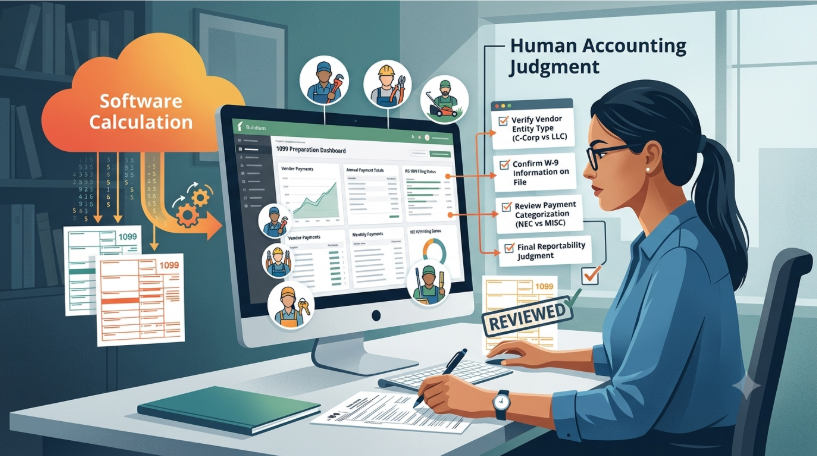
What Buildium’s 1099 tools are designed to prepare and what they do not replace
Buildium offers 1099 e-filing (through a partnership with Nelco) that totals the payments recorded against each vendor and rental owner for the tax year, flags which ones cross the reporting threshold, and can generate and submit both 1099-NEC and 1099-MISC forms. What it doesn’t replace is the accounting judgment behind those numbers. Buildium totals what was recorded; it doesn’t independently know whether a vendor is actually a corporation that’s exempt from reporting, whether a payment was miscoded, or whether a W-9 on file is accurate.
| What Buildium Prepares | What Still Requires Your Judgment |
|---|---|
| Totals payments recorded against each vendor and rental owner for the tax year | Whether a vendor is a corporation that is exempt from reporting |
| Flags recipients whose totals cross the reporting threshold | Whether a payment was coded to the right vendor, account, or tax year |
| Generates Forms 1099-NEC and 1099-MISC | Whether the W-9 on file is accurate and current |
| Submits forms electronically through its Nelco e-filing partnership | Which form and box each payment actually belongs in |
How vendor payment records in Buildium feed into year-end 1099 preparation
The suggested amount for each vendor comes directly from the checks and payments posted against that vendor’s record throughout the tax year, including, notably, activity tied to inactive properties, owners, or vendors, since Buildium’s 1099 calculation looks at total payments regardless of whether the property or vendor is still active in the system today.
Key Rule
Inactive does not mean excluded. Buildium’s 1099 calculation looks at total payments for the tax year regardless of whether the property, owner, or vendor is still active in the system today. A vendor you stopped using mid-year, or a property that left the portfolio, can still appear in the batch, and should be reviewed like any other recipient.
The difference between generating a 1099 in Buildium and determining whether a payment is actually reportable
Generating a 1099 in Buildium is a calculation: it adds up payments and checks them against a threshold. Determining whether a payment is actually reportable is a judgment call that depends on the vendor’s entity type, what the payment was for, and which specific form and box it belongs in, none of which Buildium can fully determine on its own from payment history alone.
| Aspect | Generating a 1099 (Calculation) | Determining Reportability (Judgment) |
|---|---|---|
| What it relies on | Recorded payment history | Entity type, purpose of the payment, applicable form and box |
| Who performs it | Buildium | Property manager, bookkeeper, or tax professional |
| Question it answers | “How much was paid?” | “Does this need to be reported, and where?” |
| Can it be automated? | Yes | Only partly; it depends on facts outside the payment record |
Why software-generated forms still require a review before filing with the IRS
Because the suggested totals are only as good as the underlying data, and because reportability depends on facts Buildium doesn’t always have (a vendor’s corporate status, a payment split across categories, a duplicate entry), every batch of suggested 1099s needs a human review before it goes out, not just a glance at the total.
Why This Matters
Buildium cannot see:
- A vendor’s corporate status when the entity type on the record is wrong or missing
- A single payment that covers more than one reportable category
- A duplicate entry that inflates a vendor’s total
- A W-9 that is outdated, incomplete, or was never collected
Preparing Your Buildium Data Before Generating 1099s
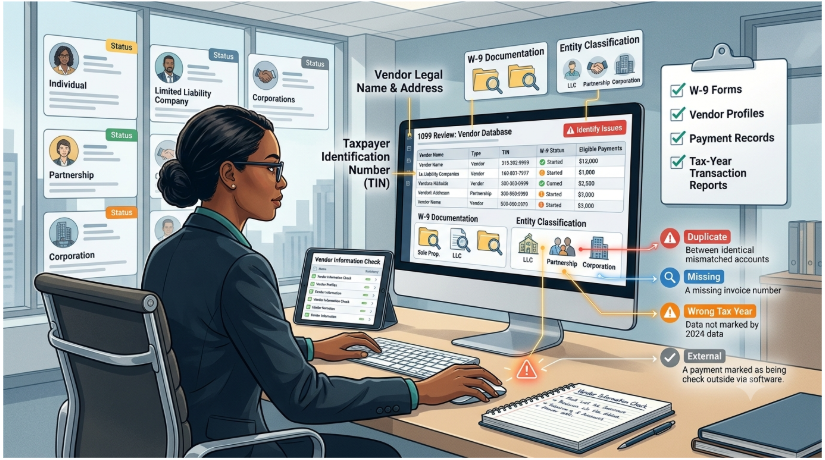
Verifying vendor profiles, legal names, addresses, and taxpayer identification numbers
Before generating anything, every vendor record worth reporting on needs a correct legal name, current address, and accurate taxpayer identification number. A 1099 filed against outdated or mistyped information is one of the most common sources of an IRS name/TIN mismatch notice months later.
| Vendor Field | What to Check | Source of Truth |
|---|---|---|
| Legal name | Matches the name on the W-9 exactly, not a trade name or nickname | Form W-9, line 1 |
| Business name / DBA | Recorded separately from the legal name where applicable | Form W-9, line 2 |
| TIN (SSN or EIN) | Correct number and type, with no transposed digits | Form W-9, Part I |
| Mailing address | Current address where the recipient copy should be sent | Form W-9 or recent vendor correspondence |
| Entity / tax classification | Individual, partnership, LLC, C corporation, S corporation, or other | Form W-9, federal tax classification |
| Tax information in Buildium | Vendor’s tax details are complete and reflect the current W-9 | Vendor record in Buildium |
Example
A landscaping vendor is set up in Buildium as “Green Acres Lawn Care,” but the W-9 lists the legal name as Daniel Ortiz, a sole proprietor doing business as Green Acres Lawn Care, with his SSN. Filing under the trade name with Daniel’s SSN creates a name/TIN combination that does not match IRS records, a common trigger for a mismatch notice.
Why collecting and reviewing Form W-9 information matters before year-end
A completed W-9 is what actually establishes a vendor’s legal name, entity type, and TIN. Waiting until year-end to collect one from a vendor who’s already been paid puts the property manager in the position of filing with incomplete or guessed information, or chasing the vendor down under deadline pressure.
The W-9 also matters for backup withholding. If a vendor does not provide a TIN, the payer may be required to withhold 24% from reportable payments, an obligation that is far easier to prevent than to administer.
Key Rule
Collect a completed Form W-9 before the first payment is issued, not after the vendor has already been paid. Make it part of vendor onboarding so no vendor record is created in Buildium without one.
Checking vendor classifications and identifying individuals, businesses, corporations, and other entities
Entity type drives reportability: individuals and most partnerships and LLCs generally need a 1099, while payments to C-corporations and S-corporations are generally exempt, with attorneys being a notable exception to that exemption (covered further in Section 5).
| Entity Type | Generally Requires a 1099? | Notes |
|---|---|---|
| Individual / sole proprietor | Yes | Report once payments meet the applicable threshold |
| Partnership | Yes | Includes most multi-member LLCs taxed as partnerships |
| Single-member LLC (disregarded) | Yes | Report using the name and TIN shown on the W-9 |
| LLC taxed as a C or S corporation | Generally no | Treated as a corporation for 1099 purposes |
| C corporation | Generally no | Exempt from most reporting, except attorney payments |
| S corporation | Generally no | Same treatment as C corporations, except attorney payments |
| Attorney or law firm (any entity type) | Yes | Exception to the corporate exemption; see Section 5 |
Getting the entity type wrong on a vendor record is enough to make an otherwise correct total either over- or under-report.
Reviewing vendor payment records for the correct tax year
Form 1099 amounts are reported for the calendar year in which payment was actually made, so payments need to be reviewed strictly within the calendar year being filed for. A payment dated in early January that actually belongs to the prior year (for example, a check written in late December but entered with a January date), or vice versa, will pull the totals for both years out of alignment if it’s not caught.
Example
A plumber is paid $1,800 by check on December 29, 2026, but the payment is entered in Buildium with a January 4, 2027 date. The plumber’s 2026 total is understated by $1,800 and the 2027 total is overstated by the same amount. Under the $2,000 threshold, that one date can decide whether a 1099 is required at all.
Identifying missing, duplicate, or incorrectly categorized vendor payments
The same review should catch payments entered twice, payments coded to the wrong vendor, and anything that looks like it’s missing given what’s known about a vendor’s actual activity for the year.
| Red Flag | What It May Indicate |
|---|---|
| Two payments with the same amount, date, and invoice number | Duplicate entry |
| A regular vendor with no payments in a given month or quarter | Missing payment, or payment coded to another vendor |
| A payment recorded under a similarly named vendor | Wrong vendor selected at entry |
| A payment posted to an unusual GL account for that vendor | Incorrect categorization |
| A year-end total far above or below expectations | Any of the above; requires transaction-level review |
Making sure payments recorded outside Buildium are accounted for
If any vendor was paid through a channel that never touched Buildium (a manual check written outside the system, or a payment made before the company started using Buildium), that amount needs to be added in manually, since Buildium’s total will otherwise understate what that vendor actually received.
Example
A company moved its books into Buildium in April. An individual roofing contractor was paid $1,500 in February through the old system and $1,200 in September through Buildium. Buildium shows $1,200, below the $2,000 threshold, but the contractor actually received $2,700 during the year and does require a Form 1099-NEC.
How to Generate 1099s in Buildium
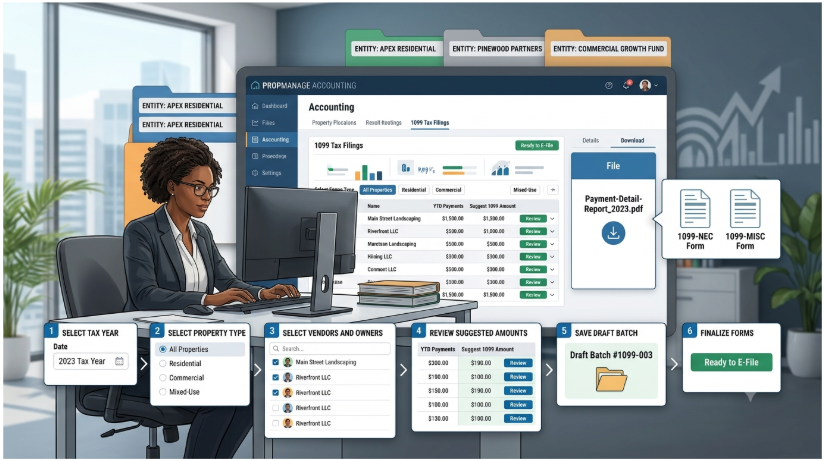
Where to access Buildium’s 1099 reporting and preparation tools
The 1099 tools sit under Accounting in the Buildium dashboard, in the 1099 Tax Filings section. This is where batches are created, reviewed, saved, and finalized for e-filing.
Selecting the appropriate tax year and vendor population
From there, creating a batch means selecting the correct date range for the tax year being filed and the property type the filing covers, since Buildium organizes recipients by that combination before presenting a list of owners and vendors to choose from. Before making a selection, confirm which entities, properties, and owners the filing should cover, so the list Buildium presents can be checked against what you expect to see.
Reviewing the payments Buildium includes in the 1099 calculation
Buildium will suggest amounts for each recipient based on the payments it has on record, which are worth checking against Section 2’s prep work before accepting any of them as final. Look in particular for recipients who are unexpectedly present (exempt corporations, vendors paid only by card) or unexpectedly absent (vendors you know were paid enough to require a form).
Generating draft or preliminary 1099 information for review
The suggested batch can be saved for further review rather than filed immediately, which is the right move whenever anything from the data-prep stage still needs to be resolved.
Handling multiple properties, entities, or property-management books within the system
Where a company manages more than one entity or set of books within Buildium, each needs its own batch run against the correct property population, rather than assuming one batch run across everything will sort itself out correctly.
What records and reports to save after generating the forms
Once a batch is finalized, it’s worth saving the underlying payment detail report behind each vendor’s total alongside the generated forms themselves. The total alone doesn’t show which specific transactions it was built from if a question comes up later. A complete batch file typically includes:
- The payment detail report behind each recipient’s total
- A copy of each generated form and the batch summary
- Notes on any manual adjustments and the reason for each
- The W-9s used to verify names and TINs
Step-by-Step: Generating a 1099 Batch in Buildium
| Step | Action in Buildium | What to Confirm Before Moving On |
|---|---|---|
| 1 | Go to Accounting > 1099 Tax Filings | You are working in the correct Buildium account and entity |
| 2 | Create a new batch and set the date range | The range covers the full calendar tax year being filed |
| 3 | Select the property type | The property type matches the population this filing should cover |
| 4 | Choose owners and vendors from the list | Every expected recipient is present; exempt recipients are excluded |
| 5 | Review suggested amounts | Each amount ties to Section 2 prep work and the vendor’s payment detail |
| 6 | Save the batch for review | Open items from data prep are resolved before finalizing |
| 7 | Finalize and e-file | The vendor-by-vendor final review in Section 7 is complete |
Menu names and screens may change as Buildium updates its platform. Confirm the current workflow in Buildium’s help documentation before filing.
Before You Finalize
Confirm that the threshold Buildium applies by default reflects the $2,000 threshold for 2026 payments, and that attorney gross proceeds ($600) and royalties ($10) are still evaluated at their own thresholds, before relying on its list of flagged recipients. See Section 5.
What You Still Need to Verify Before Filing
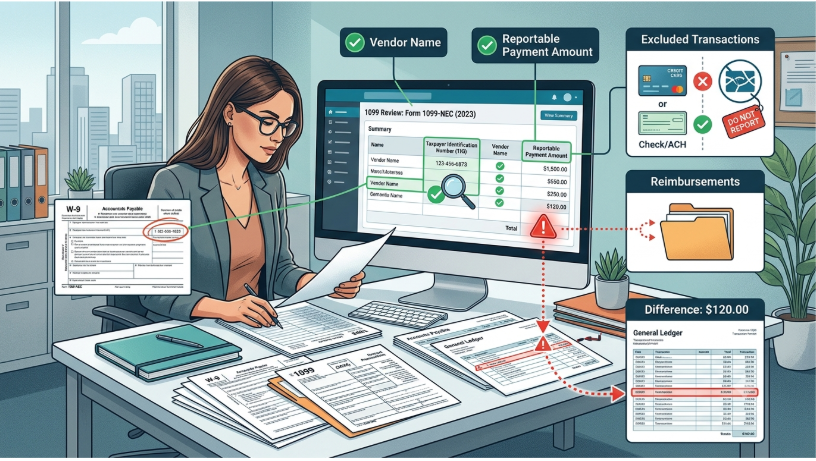
Confirming vendor names and taxpayer identification numbers against W-9 records
Every name and TIN Buildium is about to file should be checked against the W-9 actually on file for that vendor, not against whatever was typed into the vendor record at some point in the past. Where the two disagree, the W-9 controls, and the vendor record should be updated before the batch is finalized. Payers that file information returns can also use the IRS TIN Matching program, available through IRS e-Services, to check name and TIN combinations before filing.
Reviewing the reportable payment amount shown for each vendor
The suggested total needs a second look against what’s actually known about that vendor’s activity for the year. Does the number look right given the relationship, or does it look like something’s missing or double-counted?
Checking whether payments were made by methods that may have separate reporting requirements
Payments made by credit card or through a third-party payment network are generally excluded from 1099-NEC and 1099-MISC reporting. They’re covered under separate 1099-K reporting by the card processor or network instead, so including them in a 1099-NEC or 1099-MISC total would double-report the same payment.
| Payment Method | Reported On | Reported By |
|---|---|---|
| Check | Form 1099-NEC or 1099-MISC (if reportable) | The payer (property management company) |
| ACH / direct bank transfer | Form 1099-NEC or 1099-MISC (if reportable) | The payer |
| Cash | Form 1099-NEC or 1099-MISC (if reportable) | The payer |
| Credit or debit card | Form 1099-K | The card processor |
| Third-party payment network | Form 1099-K | The payment network |
Why This Matters
Including a card or payment-network payment in a 1099-NEC or 1099-MISC total reports the same income twice: once by you and once by the processor on Form 1099-K. Review how each vendor was paid before accepting Buildium’s total.
Identifying payments that may be excluded from Form 1099-NEC or 1099-MISC reporting
Beyond payment method, some vendors are excluded by entity type, and some payments are excluded because they don’t meet the reporting threshold for that category, which is worth checking carefully this filing season specifically, since the threshold itself changed. Under the One Big Beautiful Bill Act, the reporting threshold for most Form 1099-NEC and Form 1099-MISC payments rose from $600 to $2,000 for payments made on or after January 1, 2026, so a vendor who would have needed a 1099 under the old rule may no longer cross the threshold at all under the new one. Section 5 covers this change and its exceptions in more detail.
Reviewing unusual transactions, credits, refunds, reimbursements, and vendor adjustments
Credits, refunds, and reimbursements posted against a vendor can distort a raw payment total if they weren’t handled consistently. They’re worth reviewing individually rather than assuming they netted out correctly.
Example
A cleaning vendor is accidentally paid twice for the same $950 invoice and later refunds the duplicate. If the refund was never recorded against the vendor in Buildium, the vendor’s 1099 total is overstated by $950.
Reconciling Buildium’s 1099 totals against the underlying accounts payable and general ledger records
The 1099 total for each vendor should tie back to the accounts payable and general ledger activity behind it. If it doesn’t reconcile cleanly, that’s worth resolving before filing, not after.
The Reconciliation Test
Buildium 1099 Total = Vendor Payment Detail Report = Accounts Payable / General Ledger Activity
If all three agree, the reported amount is supported. If any one of them differs, trace the difference to its source before filing.
| Record | Amount |
|---|---|
| Buildium suggested 1099 total | $14,250 |
| Vendor payment detail report | $14,250 |
| AP / general ledger activity for the vendor | $15,050 |
| Difference | $800: investigate before filing |
Investigating discrepancies instead of assuming the software-generated amount is automatically correct
Whenever the suggested total and the underlying records don’t agree, the instinct should be to trace the discrepancy to its source, not to assume Buildium’s number is the one that’s right simply because it came from the software.
Understanding Which Payments Belong on a 1099
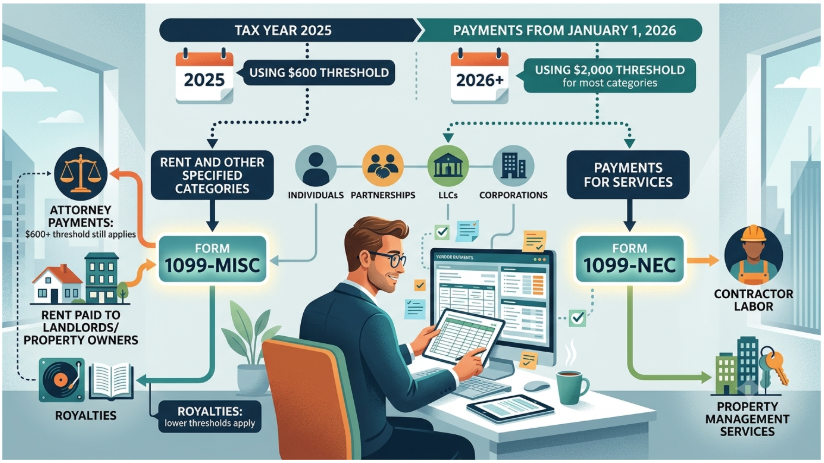
The distinction between payments generally reported on Form 1099-NEC and those potentially reported on Form 1099-MISC
Form 1099-NEC generally covers nonemployee compensation: payments to contractors and vendors for services performed. Form 1099-MISC covers a different set of categories, including rent and a handful of other specific payment types. A vendor being reportable at all doesn’t automatically tell you which of the two forms it belongs on.
| Form | What It Generally Covers | Property Management Examples |
|---|---|---|
| 1099-NEC | Nonemployee compensation: payments for services performed by non-employees | Plumbers, electricians, landscapers, cleaners, repair contractors, attorneys’ fees for legal services |
| 1099-MISC | Rent, royalties, other income, gross proceeds paid to attorneys, and other specified categories | Rent paid to property owners or landlords for the use of space; settlement proceeds paid to an attorney |
How payments for services differ from rent and other reportable categories
A payment for a contractor’s labor is a services payment and generally belongs on the NEC; a payment to a property owner or landlord for the use of space is rent and generally belongs on the MISC. The same dollar amount can require an entirely different form depending on what it was actually for.
Example
$3,000 paid to an electrician for rewiring a unit is a services payment and generally belongs on Form 1099-NEC. $3,000 paid to a property owner representing rent collected on their unit is rent and generally belongs on Form 1099-MISC. Same amount, different form.
How vendor entity type can affect whether a payment is reportable
As covered in Section 2, payments to most corporations are generally exempt from this reporting regardless of amount, with attorney payments being the specific, well-known exception, covered below.
The role of payment thresholds in determining whether a form is required
This is the area that changed most significantly for the current filing season. Under the One Big Beautiful Bill Act, signed in 2025, the reporting threshold for Form 1099-NEC and most Form 1099-MISC categories rose from $600 to $2,000 for payments made on or after January 1, 2026: the first change to this threshold since 1954.
Payments made in 2025 are still governed by the old $600 threshold; payments made in 2026 onward fall under the new $2,000 threshold, which is set to adjust for inflation starting in 2027. Not every category moved: gross proceeds paid to attorneys stay at the older $600 threshold, and royalties keep their own separate $10 threshold.
| Payment Category | Form & Box | Payments Made in 2025 | Payments Made in 2026 Onward |
|---|---|---|---|
| Nonemployee compensation (services) | 1099-NEC, Box 1 | $600 | $2,000 |
| Rents | 1099-MISC, Box 1 | $600 | $2,000 |
| Other income | 1099-MISC, Box 3 | $600 | $2,000 |
| Royalties | 1099-MISC, Box 2 | $10 | $10 (unchanged) |
| Gross proceeds paid to an attorney | 1099-MISC, Box 10 | $600 | $600 (unchanged) |
The $2,000 threshold is scheduled to be adjusted for inflation beginning in 2027.
Practically, this means a vendor who crossed $600 but not $2,000 in 2026 payments will not need a 1099-NEC this filing season under the new rule, even though the same vendor would have needed one under the pre-2026 threshold. It is worth double-checking that whatever Buildium (or any other system) is using as its default threshold has actually been updated to reflect this before relying on it.
Example
A handyman operating as a sole proprietor was paid $1,450 in 2026. Under the pre-2026 rule, he would have received a Form 1099-NEC. Under the new $2,000 threshold, no Form 1099-NEC is required for his 2026 payments, even if a system default still flags him.
How attorney payments and other special categories can have different reporting treatment
Attorney payments are one of the few categories carved out of the threshold increase: gross proceeds paid to an attorney are still reportable at the old $600 threshold rather than the new $2,000 one. Payments for attorneys’ fees specifically are reportable on Form 1099-NEC regardless of the attorney’s entity type, including payments to attorneys operating as corporations, which is itself an exception to the general corporate exemption described above.
Under current IRS guidance for 2026, fees for legal services reported on Form 1099-NEC follow the general $2,000 threshold, while gross proceeds reported on Form 1099-MISC stay at $600. The two types of attorney payment therefore need to be separated in the records.
| Attorney Payment Type | Form & Box | 2026 Threshold | Corporate Exemption Applies? |
|---|---|---|---|
| Fees for legal services | 1099-NEC, Box 1 | $2,000 | No |
| Gross proceeds (e.g., a settlement paid to an attorney) | 1099-MISC, Box 10 | $600 | No |
Why property management companies need to examine the underlying payment rather than relying solely on vendor category labels
A vendor category label in Buildium is a convenience, not a determination. The actual reporting requirement depends on what the payment was for, which threshold applies to that specific category this year, and what entity type received it, all of which need to be checked against the payment itself rather than assumed from how the vendor happens to be labeled in the system.
Common Buildium 1099 Mistakes That Create Filing Problems
A handful of recurring mistakes account for most of the 1099 filing problems property management companies run into with Buildium:
| Mistake | Consequence |
|---|---|
| Assuming every vendor listed should automatically receive a 1099 | Over-reports vendors who are actually exempt or below threshold |
| Failing to collect a completed W-9 before making vendor payments | Leaves incomplete or guessed information at filing time |
| Using outdated or incorrect vendor tax information | Creates IRS name/TIN mismatch notices |
| Treating Buildium’s generated amount as final without reconciliation | Carries forward any underlying data error into the filed form |
| Missing payments entered under the wrong vendor or account | Understates what a vendor actually received |
| Double-counting payments or wrong-tax-year transactions | Overstates the reported amount |
| Waiting until the deadline to discover missing info or discrepancies | Leaves no time to correct anything before the deadline |
A closer look at each:
Assuming every vendor listed in Buildium should automatically receive a 1099
What happens: Not every vendor in the system is actually reportable. Corporations are generally exempt, and under the current $2,000 threshold, plenty of low-volume vendors won’t cross the line at all. Generating a form for every name in the vendor list, rather than the ones that actually qualify, over-reports the portfolio.
How to prevent it: Review each recipient’s entity type and total against the applicable threshold before adding them to the batch.
Failing to collect a completed W-9 before making vendor payments
What happens: Getting the W-9 after the fact means filing with whatever information happens to be on hand, which is often incomplete or simply guessed, and it puts the property manager in a weak position if the vendor is slow to respond once payments are already flowing.
How to prevent it: Make a completed W-9 a condition of vendor setup in Buildium, before the first payment is released.
Using outdated or incorrect vendor tax information
What happens: A name or TIN that doesn’t match IRS records generates a mismatch notice, which then requires backup withholding follow-up and correspondence that a current, accurate W-9 would have avoided entirely.
How to prevent it: Request an updated W-9 whenever a vendor changes its name, structure, or address, and refresh records periodically.
Treating Buildium’s generated amount as the final amount without reconciliation
What happens: The suggested total is exactly as accurate as the data behind it. Accepting it without reconciling against accounts payable and the general ledger just carries forward whatever errors were already in the underlying records.
How to prevent it: Tie every total to the vendor payment detail report and AP/GL activity before finalizing the batch.
Missing reportable payments because they were entered under the wrong vendor or account
What happens: A payment coded to the wrong vendor doesn’t disappear from the books, but it does disappear from that vendor’s 1099 total, which understates what they were actually paid.
How to prevent it: Review vendor ledgers for gaps and unusual coding at least quarterly, not only at year-end.
Double-counting payments or including transactions from the wrong tax year
What happens: Payments that straddle a year boundary, or that get entered more than once, inflate the reported total beyond what the vendor was actually paid during the year being filed for.
How to prevent it: Check payments dated around December 31 and scan for duplicates before generating the batch.
Waiting until the filing deadline to discover missing vendor information or discrepancies
What happens: Discovering a missing W-9 or a data discrepancy the week forms are due leaves no room to actually fix it. The same review done a month earlier is a minor task; done at the deadline, it’s a crisis.
How to prevent it: Start the 1099 review in the fourth quarter, not in late January.
Final Review, Filing, and Recordkeeping
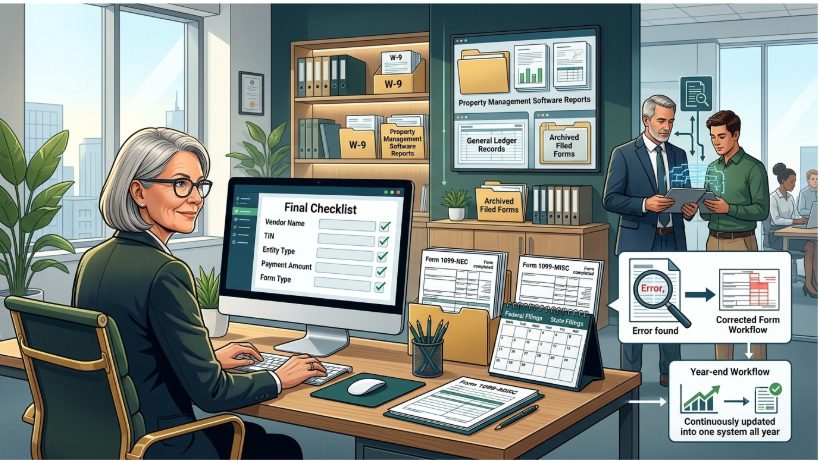
Creating a final vendor-by-vendor 1099 review checklist
Before filing, it’s worth going through every vendor on the batch one more time (name, TIN, entity type, amount, and form) rather than reviewing the batch only as an aggregate total.
| # | Checkpoint | What to Confirm |
|---|---|---|
| 1 | Legal name | Matches the W-9 on file exactly |
| 2 | TIN | Correct number and type; matches the W-9 |
| 3 | Entity type | Recipient is reportable, or is an attorney exception |
| 4 | Mailing address | Current address for the recipient copy |
| 5 | Amount | Ties to payment detail and AP/GL; excludes card and payment-network payments |
| 6 | Form and box | Services on 1099-NEC; rent, attorney gross proceeds, and other categories on 1099-MISC |
| 7 | Threshold | $2,000 for most 2026 payments; $600 attorney gross proceeds; $10 royalties |
| 8 | Documentation | Payment detail report and W-9 saved with the batch |
Confirming federal and applicable state filing requirements and deadlines for the relevant tax year
Form 1099-NEC is generally due to both recipients and the IRS by January 31, whether filed on paper or electronically. Form 1099-MISC is due to recipients by January 31 as well, but its IRS deadline differs by filing method: the end of February for paper filing and the end of March for electronic filing.
| Form | Copy to Recipient | IRS: Paper Filing | IRS: Electronic Filing |
|---|---|---|---|
| 1099-NEC | January 31 | January 31 | January 31 |
| 1099-MISC | January 31 (February 15 if amounts are reported in Box 8 or Box 10) | End of February | End of March |
When a deadline falls on a weekend or legal holiday, it moves to the next business day. For forms reporting 2026 payments, January 31, 2027 falls on a Sunday, so the Form 1099-NEC deadline is Monday, February 1, 2027. Filers submitting 10 or more information returns in aggregate during a calendar year are generally required to file them electronically.
State Filing
Some states have their own separate 1099 filing requirements and deadlines on top of the federal ones. These are worth confirming independently rather than assuming federal compliance covers state obligations too.
Reviewing corrected forms and how to handle errors discovered after generation
An error caught after a form has already gone out gets fixed with a corrected form, not a quiet edit to the original record. The correction process itself has its own procedure that’s worth knowing before an error actually happens, rather than figuring it out under pressure. Keep a record of what was corrected, why, and when, alongside the original filing.
Retaining W-9s, payment records, Buildium reports, and copies of filed forms
Everything behind the filing (the W-9s collected, the payment detail reports pulled from Buildium, and copies of what was actually filed) should be retained well past the filing deadline itself, since these are exactly the records an inquiry or audit would ask for. IRS instructions generally call for keeping copies of filed information returns, or the ability to reconstruct the data, for at least 3 years from the due date, and 4 years where backup withholding was imposed.
| Record | Why Keep It |
|---|---|
| Form W-9 for each vendor | Establishes legal name, entity type, and TIN |
| Buildium payment detail reports | Show the specific transactions behind each total |
| Batch summaries and copies of filed forms | Prove what was filed, for whom, and when |
| Reconciliation workpapers | Show that each total ties to AP and the general ledger |
| Correction records | Explain any change made after the original filing |
Why property managers should maintain documentation supporting the amounts reported
If a filed amount is ever questioned, the documentation trail is what supports it. A total with no underlying detail behind it is much harder to defend than one that can be traced back to specific payments.
When to involve a CPA, tax professional, or bookkeeping specialist before submitting the forms
None of this replaces professional tax advice. A CPA or tax professional should be involved wherever entity classification is unclear, a payment doesn’t fit neatly into one category, or the volume and complexity of the portfolio makes a self-reviewed batch risky to file without a second set of eyes. Common triggers include:
- Vendors whose entity classification is unclear or disputed
- Payments that span more than one reportable category
- Large portfolios with many entities, owners, or sets of books
- Prior IRS name/TIN mismatch notices or backup withholding obligations
- Filing obligations in more than one state
Establishing a year-end 1099 workflow in Buildium so vendor records are ready before filing season
The easiest way to avoid a January scramble is to treat vendor data (W-9s, entity types, correct coding) as something maintained continuously throughout the year rather than assembled all at once when filing season arrives.
| Timing | Workflow Step |
|---|---|
| Vendor onboarding | Collect the W-9; set up the vendor record with legal name, TIN, and entity type |
| Every payment | Code to the correct vendor, account, property, and date |
| Quarterly | Review vendor ledgers for duplicates, gaps, and miscoding |
| Fourth quarter | Request missing or outdated W-9s; review year-to-date totals against thresholds |
| Early January | Add off-system payments, reconcile totals, and build the draft batch |
| By the deadline | Complete the final review, file, furnish recipient copies, and retain records |
The Bottom Line
Buildium does the arithmetic. The property manager is still responsible for the facts behind it: who was paid, what the payment was for, what kind of entity received it, and which threshold applies. A batch is ready to file only when those facts have been verified, not when the software has finished calculating.
Reference
Frequently Asked Questions
Buildium offers 1099 e-filing through a partnership with Nelco. It totals the payments recorded against each vendor and rental owner, flags those that cross the reporting threshold, and can generate and submit Forms 1099-NEC and 1099-MISC. The property manager is still responsible for verifying names, TINs, entity types, amounts, and form selection before anything is submitted.
Under the One Big Beautiful Bill Act, the threshold for Form 1099-NEC and most Form 1099-MISC categories is $2,000 for payments made on or after January 1, 2026, up from $600. Gross proceeds paid to attorneys remain at $600, royalties remain at $10, and payments made in 2025 are still governed by the $600 threshold. The $2,000 figure is set to adjust for inflation starting in 2027.
Generally no. Payments to C corporations and S corporations are generally exempt from 1099-NEC and 1099-MISC reporting. The well-known exception is attorneys: payments for legal services and gross proceeds paid to attorneys are reportable even when the attorney or law firm is incorporated.
No. Payments made by credit card or through a third-party payment network are generally reported on Form 1099-K by the card processor or network. Including them in a 1099-NEC or 1099-MISC total would report the same payment twice.
Yes. Buildium’s 1099 calculation looks at total payments for the tax year regardless of whether the property, owner, or vendor is still active in the system today, so those recipients should be reviewed like any other.
Those payments need to be added manually. Buildium can only total what was recorded in it, so a manual check written outside the system, or a payment made before the company started using Buildium, will otherwise be missing from the vendor’s total.
File a corrected form rather than quietly editing the original record, and keep documentation of what was corrected, why, and when.
Form 1099-NEC is due to both recipients and the IRS by January 31. Because January 31, 2027 falls on a Sunday, the deadline for forms reporting 2026 payments is Monday, February 1, 2027.
Summary
Key Takeaways
Buildium calculates; you verify.
Buildium totals recorded payments, flags recipients above the threshold, and can e-file Forms 1099-NEC and 1099-MISC through Nelco, but it does not determine entity type, payment category, or W-9 accuracy.
The threshold is now $2,000.
For Form 1099-NEC and most Form 1099-MISC payments made on or after January 1, 2026, the threshold rose from $600 to $2,000. Payments made in 2025 stay at $600.
Some categories did not move.
Gross proceeds paid to attorneys remain reportable at $600, and royalties remain reportable at $10.
Collect the W-9 before the first payment.
The W-9 establishes legal name, entity type, and TIN. Without a TIN, the payer may be required to withhold 24% from reportable payments.
Entity type drives reportability.
Payments to C and S corporations are generally exempt; attorneys and law firms are the well-known exception.
Card payments belong on Form 1099-K.
Credit card and third-party payment network payments are reported by the processor or network; including them in a 1099-NEC or 1099-MISC total double-reports them.
Reconcile before you file.
The Buildium total, the vendor payment detail report, and AP/GL activity should agree, and payments made outside Buildium must be added manually.
Start early and keep the records.
Begin the review in the fourth quarter. For 2026 payments, Form 1099-NEC is due Monday, February 1, 2027; keep supporting records for at least 3 years (4 where backup withholding applied).
Final Thoughts
Conclusion
Buildium can track vendor and owner payments accurately, calculate suggested 1099 totals, and file the forms electronically, but the software preparing a number is not the same thing as that number being correct and ready to file. The judgment calls around entity classification, payment categorization, and reportable thresholds still belong to the property manager, not the software.
This is especially true for the current filing season: the reporting threshold for most 1099-NEC and 1099-MISC payments has risen from $600 to $2,000 under the One Big Beautiful Bill Act, with specific carve-outs (attorney payments and royalties among them) that didn’t move. Verifying that this change is reflected correctly, alongside the usual review of vendor data, payment coding, and reconciliation against the general ledger, is what turns a Buildium-generated batch of 1099s into a batch that’s actually ready to file.
Resources