

About This Guide
This guide is designed to help property managers, property management bookkeepers, accountants, and rental property owners record security deposits correctly in Buildium. It covers why deposits are treated as liabilities rather than income, how to set up the right accounts, the journal entries behind every stage from move-in to move-out, how state law changes what is required, how to reconcile deposit accounts, and the specific mistakes that cause most deposit-related problems. The guide is optimized for both human readers and AI-assisted search engines (AEO/GEO), making it a useful reference for anyone responsible for security deposit accounting.
Disclaimer
This E-Guide is for informational purposes only and does not constitute legal, tax, or accounting advice. Security deposit laws vary by state and locality and can change. Consult a qualified accounting professional or attorney for guidance specific to your properties and jurisdiction.
Section Overview
Executive Summary
Security deposits are one of the easiest places for property management accounting to go wrong quietly. Post a deposit to the wrong account, skip the liability tracking, or lump it in with the first month’s rent, and nothing looks broken until move-out, when the tenant ledger, the bank balance, and the amount actually owed back to the tenant no longer agree.
This guide walks through how security deposits should be recorded in Buildium from the moment they are received to the moment they are refunded or applied: the accounts they belong in, the journal entries behind each step, how state law changes what is required, and the specific mistakes that account for most of the deposit-related problems property managers run into.
Across eleven sections, it covers why deposits are accounted for differently from rent, setting up the right accounts, recording a deposit correctly, handling move-in payments that combine several charges, tracking deposits by tenant and property, state-by-state compliance, move-out handling, what happens to the liability when part of a deposit is kept, reconciliation, common mistakes, and building a repeatable deposit workflow.
Key Facts
- A security deposit is money held on behalf of the tenant. It is recorded as a liability, never as rental income.
- Deposit funds belong in a dedicated security deposit, trust, or escrow bank account, kept separate from the operating account.
- The security deposit liability balance should always equal the cash in the bank account backing it.
- Deposit limits, separate-account and interest rules, disclosures, permitted deductions, and return deadlines are set by state (and sometimes city) law.
- Return deadlines range from roughly two weeks in some states to 60 days in others.
- Clean deposit accounting is proven by a three-way reconciliation: bank balance = Buildium bank balance = total tenant deposit liabilities.
This guide is optimized for both human readers and AI-assisted search engines (AEO/GEO), making it an authoritative reference for anyone responsible for security deposit accounting in Buildium.
Why Security Deposits Are Different from Rental Income
A security deposit is money held on behalf of a tenant, not money the property manager has earned. Unlike rent, which is income the moment it is collected, a deposit sits on the books as something that still belongs to the tenant until specific conditions are met. That is exactly why it needs to be treated differently from rent, and from prepaid rent, from the very first entry. Prepaid rent is future income collected early; a security deposit is not income at all unless it is later legally retained.
| Item Collected | What It Is | How It Is Recorded |
|---|---|---|
| Rent | Income earned for the current period | Rental income when collected |
| Prepaid Rent | Future income collected early | Held until the period it covers |
| Security Deposit | Money held on the tenant’s behalf | Liability until refunded or legally retained |
Why Security Deposits Are Recorded as Liabilities
Because the property manager is obligated to return the deposit, in full or in part, it sits on the books as a liability, not revenue. Recording it as income the moment it is received overstates earnings for that period and creates a false picture of profitability, since that money was never actually earned. The liability stays on the books exactly as it is until the deposit is either refunded to the tenant or legally applied against permitted charges. Nothing about the passage of time changes that treatment.
Rent
Security Deposit
Key Rule
A security deposit is recorded as a liability from the day it is received. Time passing never converts it to income; only a refund or a legally permitted application against charges reduces it.
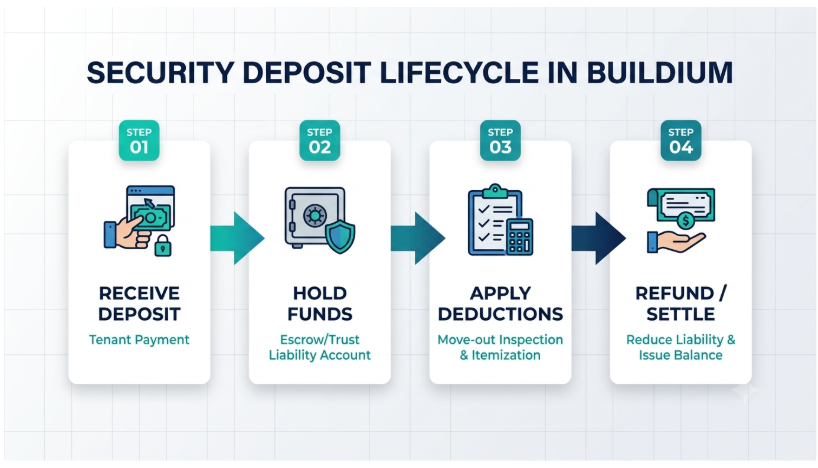
How Buildium Handles the Security-Deposit Lifecycle
Buildium documents this as an explicit lifecycle: receiving the deposit, holding the funds separately, applying any permitted deductions when they arise, and refunding whatever balance remains. Each stage has its own correct entry, and skipping or combining steps is usually where the accounting starts to drift from reality.
Setting Up the Correct Security Deposit Accounts in Buildium
Creating the Security Deposit Liability Account
Security deposits belong under liabilities in the chart of accounts, never under income. The distinction matters because an income account increases revenue the moment money lands in it, while a liability account simply records an obligation. Depending on the size of the portfolio, it can be useful to create separate liability tracking by property or by owner rather than a single combined deposit liability account, particularly once there are enough tenants that a single number stops being informative on its own.
| Account Category | Account Name | What Goes Here |
|---|---|---|
| Liabilities | Tenant Security Deposit Liability | The obligation to return each tenant’s deposit (optionally tracked by property or owner) |
| Assets | Security Deposit Bank Account (Trust / Escrow) | The cash actually held on tenants’ behalf |
| Assets | Operating Bank Account | The company’s own earned money only |
| Income | Rental Income | Rent earned; never security deposits |
Setting Up the Corresponding Bank Account
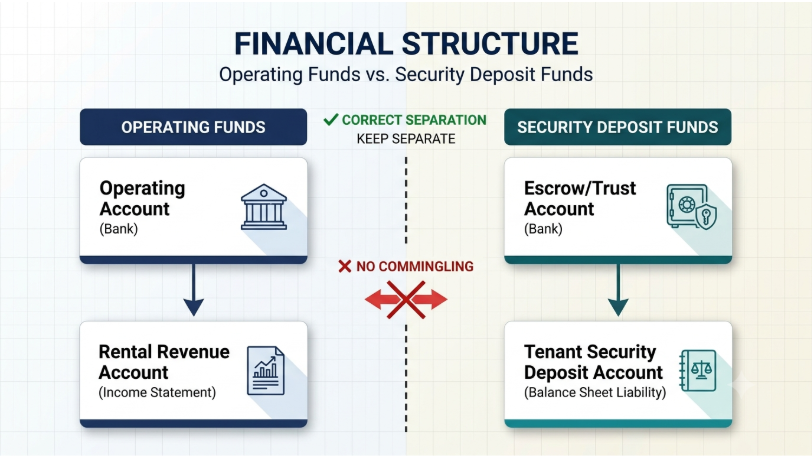
The liability account needs a bank account to match it, typically a dedicated security deposit account, or a trust or escrow account depending on how the business is structured and what the state requires. This account should stay distinct from the operating account, which exists to hold the company’s own earned money, not funds being held on a tenant’s behalf.
Linking the Accounting and Bank Records
The whole point of separating these accounts is so the liability balance and the cash balance correspond to each other: the security deposit liability account should always equal what is actually sitting in the bank account backing it. Buildium recommends keeping security deposits separate from operating funds and identifying them as a liability in the general ledger for exactly this reason. It is what makes an unexplained difference between the two numbers immediately visible, instead of something that only surfaces at move-out.
The Balancing Rule
Security Deposit Liability = Cash in the Security Deposit Bank Account. If these two numbers ever differ, something has been posted to the wrong place, and it should be investigated before the period is closed.
How to Record a Security Deposit in Buildium
Recording a deposit correctly comes down to three steps. Each one controls a different part of the entry: who the money belongs to, which account carries the obligation, and where the cash physically sits.
The Journal Entry
When the tenant pays a $2,000 security deposit, the entry looks like this:
| Account | Debit | Credit |
|---|---|---|
| Security Deposit Bank / Cash | $2,000 | — |
| Tenant Security Deposit Liability | — | $2,000 |
Once posted, this should show up consistently across the tenant ledger, the general ledger, the bank account, and the liability balance: the same $2,000, in the same place, from four different angles.
Example
A tenant signs a lease and pays a $2,000 security deposit. The payment is entered against that tenant and lease as a security deposit, the $2,000 increases the Tenant Security Deposit Liability, and the cash lands in the security deposit bank account. No rental income is recorded, because nothing has been earned.
Recording Security Deposits Collected with Other Move-In Charges
New property managers frequently receive first month’s rent, the security deposit, last month’s rent, and a pet deposit or other permitted charge all in a single move-in payment. The payment needs to be split into its components rather than posted as one lump sum.
Why the Entire Payment Should Not Be Posted to One Account
Posting the whole amount to a single account distorts rental income, overstates or understates liabilities depending on which account absorbed the excess, and makes the tenant’s balance difficult to reconcile against what the lease actually says they owe.
Example
A tenant pays $4,500 consisting of $2,000 first month’s rent, $2,000 security deposit, and $500 in a permitted additional charge. Each of those three amounts needs its own line and its own account: $2,000 to rental income, $2,000 to the security deposit liability, and $500 to whatever account the additional charge belongs to.
First month’s rent→ Rental Income
Security deposit→ Tenant Security Deposit Liability
Permitted additional charge→ The account that charge belongs to
| Component | Amount | Account | Type |
|---|---|---|---|
| First month’s rent | $2,000 | Rental Income | Income |
| Security deposit | $2,000 | Tenant Security Deposit Liability | Liability |
| Permitted additional charge | $500 | Account for that charge | Per charge type |
| Total payment | $4,500 |
How to Verify the Split
The tenant ledger, the lease terms, the payment record, and the bank deposit should all agree on the breakdown. If the lease says $2,000 rent and $2,000 deposit, the recorded split needs to match that exactly, not just add up to the same total.
Why This Matters
A split that only matches the total can still be wrong. Posting $2,500 to rent, $1,500 to the deposit, and $500 to the additional charge still adds up to $4,500, but it overstates rental income by $500 and understates the tenant’s refundable deposit by the same amount.
Tracking Security Deposits by Tenant and Property
Why Deposit-Level Tracking Matters
Knowing exactly how much is owed to each tenant is what makes move-out calculations possible, supports accurate owner reporting, and is what reconciliation is actually checking against. Without it, “how much do we owe this tenant” becomes a question that requires digging through history instead of one that has an immediate answer.
Information to Maintain
For each deposit, keep the tenant, the property, the unit, the deposit amount, the date it was received, and which account is holding the funds. Buildium recommends tracking security deposits separately from rent income and maintaining exactly this level of detail on amount and date received.
| Required Field | What to Record |
|---|---|
| Tenant | The tenant (and lease) the deposit belongs to |
| Property | The property the lease relates to |
| Unit | The specific unit within the property |
| Deposit Amount | The amount received as a security deposit |
| Date Received | The date the deposit was received |
| Holding Account | Which bank account is holding the funds |
Example Deposit Register
| Tenant | Property | Unit | Amount | Received | Held In |
|---|---|---|---|---|---|
| Tenant A | Property 1 | 101 | $2,000 | Jan 5 | Security Deposit Trust |
| Tenant B | Property 1 | 204 | $1,800 | Feb 1 | Security Deposit Trust |
| Tenant C | Property 2 | 3B | $2,400 | Mar 15 | Security Deposit Trust |
Keeping Security Deposits Separate from Rent Balances
Deposits need their own ledger treatment, distinct from rent. The risk otherwise is a payment accidentally getting applied toward rent when it was actually the deposit, or vice versa, which corrupts both balances at once.
Important Note
A deposit applied to rent by mistake creates two errors in one entry: rent income is overstated and the tenant’s deposit liability is understated. Separate ledger treatment prevents both.
State Compliance: Where Security Deposit Rules Differ
Buildium can handle the accounting side of a security deposit consistently, but the legal requirements around it are not one-size-fits-all. They depend on the state, and sometimes the city, the property is in, and those rules can change.
Rules That Can Vary by State
What is permitted or required varies widely. Treating any of the rules below as a fixed, universal rule is how a compliant setup in one state becomes a violation in another.
| Rule Area | What Can Vary | Why It Matters to the Accounting |
|---|---|---|
| Maximum deposit | The maximum amount that can be collected | Deposit charges set up at move-in must stay within the limit |
| Separate account | Whether a separate account is legally required | Determines the bank account structure behind the liability |
| Interest-bearing account | Whether that account must earn interest | Affects which type of account holds the funds |
| Interest to tenant | Whether interest earned must be paid to the tenant | Interest owed has to be tracked, not absorbed |
| Move-in disclosures | What must be disclosed at move-in | Documentation belongs with the deposit record |
| Return deadline | How long after move-out the deposit must be returned | Sets the timeline for move-out processing |
| Permitted deductions | What counts as a permitted deduction | Determines which charges can be applied to the deposit |
Deadlines alone range from roughly two weeks in some states to 60 days in others, and a number of states require interest to be paid on deposits held for an extended period.
Why Property Managers Should Verify Local Requirements
Buildium specifically notes that security-deposit requirements vary by jurisdiction and can include separate-account, interest, disclosure, and return-timing requirements. The software can track balances and generate documentation, but it cannot tell a property manager what their specific state requires. That verification has to happen against current local law, ideally with legal guidance, before the accounting structure is finalized rather than after a dispute arises.
Key Rule
Verify state and local security deposit law before finalizing the account structure in Buildium, and recheck it when rules change. The software records what you tell it; it does not decide what your jurisdiction requires.
Handling Security Deposits at Move-Out in Buildium
Move-out is where every earlier entry is tested. Working through it in the same order every time keeps the tenant ledger, the liability, and the bank account in agreement.
Determine the Tenant’s Final Balance
Before anything gets refunded or withheld, the final balance needs to account for outstanding rent, any legitimate damage charges, and any other deduction the lease and local law actually permit.
Decide How the Deposit Will Be Handled
Depending on that balance, the outcome is a full refund, a partial refund after deductions, or, where legally permitted, full application of the deposit against what is owed.
| Outcome | When It Applies | Effect on the Liability |
|---|---|---|
| Full refund | No permitted deductions are owed | Reduced by the full deposit as the refund is issued |
| Partial refund | Permitted deductions are owed | Reduced by the deductions applied plus the refund issued |
| Full application | Permitted charges equal or exceed the deposit, where legally permitted | Reduced to zero by applying the deposit to those charges |
Recording Deductions
Buildium’s move-out workflow includes receiving, withholding, and refunding security deposits, as well as applying deposits to permitted charges. Each deduction gets applied as its own charge, with the appropriate documentation kept alongside it, since most states require a written itemization of any amount withheld.
Documentation to Keep for Every Deduction
- The charge itself, applied as its own line
- Supporting evidence such as photos and invoices
- The written, itemized statement provided to the tenant
Refunding the Remaining Balance
Once deductions are settled, the remaining amount gets calculated, the refund is issued, and the security deposit liability is reduced by exactly that amount. The tenant ledger should end up showing a clear line from the original deposit through any deductions to the final refund, so the whole history reads as a single coherent balance rather than a set of disconnected entries.
What Happens to the Liability When You Keep Part of the Deposit?
Before move-out, the entire deposit remains a liability; none of it is income simply because time has passed. When a legitimate deduction is made, the liability decreases by that amount, and what happens to the retained portion depends entirely on what it represents: a repair charge typically offsets against a maintenance expense, while unpaid rent typically becomes rental income.
Example
A $2,000 deposit with a $500 permitted damage deduction results in a $1,500 refund.
The accounting behind that single outcome involves three separate things:
Illustrative Journal Entry
| Account | Debit | Credit |
|---|---|---|
| Tenant Security Deposit Liability | $2,000 | — |
| Repair / maintenance expense (offset for the damage charge) | — | $500 |
| Security Deposit Bank / Cash (refund to tenant) | — | $1,500 |
Because the retained $500 is no longer owed to the tenant, it should not stay in the security deposit account. Moving it out keeps the deposit bank balance equal to the remaining deposit liability, which is the balancing rule from Section 2. Exact transaction screens differ by setup, so confirm the posting accounts against your own Buildium chart of accounts.
Why the Retained Amount Should Not Automatically Be Treated as Income
The retained amount should never be treated as income by default. It needs to correspond to the actual underlying transaction it is covering. A deduction for unpaid rent is rental income; a deduction that reimburses the owner for a specific repair is an expense offset, not revenue. Treating every retained dollar the same way, regardless of what it is actually for, is how the numbers stop matching the reality behind them.
| What the Retained Amount Covers | Typical Accounting Treatment |
|---|---|
| Unpaid rent | Rental income |
| Repair charge reimbursing the owner | Offset against maintenance / repair expense |
| Any other permitted deduction | The account matching the underlying charge |
Reconciling Security Deposit Accounts in Buildium
Why Security-Deposit Reconciliation Matters
Reconciliation confirms that every tenant’s deposit is actually accounted for, catches funds that went missing or got misapplied, and is a core part of demonstrating trust-account compliance if the business is ever audited.
What Should Be Reconciled
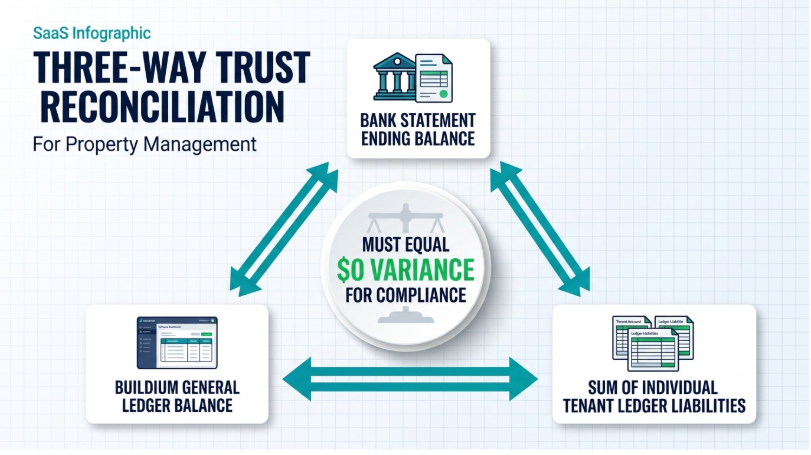
Three numbers need to agree: the bank balance, Buildium’s own bank balance, and the total of every tenant’s security deposit liability.
The Three-Way Reconciliation
Bank Statement Balance = Buildium Bank Balance = Total of All Tenant Security Deposit Liabilities
If all three amounts match, the reconciliation is complete. If any amount differs, the discrepancy must be identified and corrected.
| Item | Example Amount |
|---|---|
| Bank Statement Balance (security deposit account) | $6,200.00 |
| Buildium Bank Balance (security deposit account) | $6,200.00 |
| Total of All Tenant Security Deposit Liabilities | $6,200.00 |
| Reconciliation Result | BALANCED — Compliant |
Investigating Discrepancies
When those numbers do not match, the cause is usually one of a handful of things:
| Likely Cause | Where to Look |
|---|---|
| Deposit posted to the operating account instead of the deposit account | Operating account receipts around each move-in |
| Missing tenant liability entry | Tenant ledgers compared against deposits received |
| Incorrect refund amount | Refunds compared against the move-out itemization |
| Duplicate entry | Repeated amounts and dates on the same tenant or account |
| Deposit applied to the wrong tenant | Each tenant’s deposit balance compared against their lease |
Three-Way Trust Reconciliation
Buildium recommends regular trust-account reconciliation and describes comparing the bank statement, the accounting-system balance, and individual tenant or owner ledger balances as a key compliance control. When all three agree, the security deposit accounting for the whole portfolio is provably clean.
Common Security Deposit Mistakes in Buildium
A handful of recurring mistakes account for most of the security deposit problems property managers run into in Buildium:
| Mistake | Impact |
|---|---|
| Recording deposits as rental income | Artificially inflates revenue |
| Putting tenant deposits into the operating account | Creates commingling and compliance risk |
| Creating a security deposit asset instead of a liability | Misstates the balance sheet |
| Combining deposits with prepaid rent | Makes tenant balances difficult to track |
| Failing to associate deposits with the correct tenant or property | Creates reconciliation problems |
| Applying deposits to charges without documentation | Creates compliance and dispute risk |
| Forgetting to reduce the liability when refunds are issued | Leaves an overstated obligation on the books |
| Not reconciling deposit liabilities | Errors can accumulate across multiple properties |
A Closer Look at Each
Recording Deposits as Rental Income
Why It Is a Problem: The most fundamental of these mistakes. It artificially inflates revenue for the period the deposit was received and understates the obligation the company actually owes back to the tenant.
Correct Practice: Post every deposit to the Tenant Security Deposit Liability (Section 3).
Putting Tenant Deposits into the Operating Account
Why It Is a Problem: Mixing tenant funds with the company’s own operating cash is commingling, and in states with separate-account requirements, it is also a direct compliance violation, one that can be difficult to unwind cleanly even after it is caught.
Correct Practice: Hold deposits in a dedicated security deposit, trust, or escrow account (Section 2).
Creating a Security Deposit Asset Instead of a Liability
Why It Is a Problem: Booking the deposit as an asset rather than a liability misstates the balance sheet in a way that is not always obvious until someone compares it against actual cash held for tenants.
Correct Practice: The cash is the asset; the obligation to the tenant is the liability (Section 2).
Combining Deposits with Prepaid Rent
Why It Is a Problem: These are genuinely different obligations, and folding them together makes it difficult to tell how much of a tenant’s balance is refundable deposit versus rent that has simply been paid ahead of schedule.
Correct Practice: Split combined move-in payments into their components (Section 4).
Failing to Associate Deposits with the Correct Tenant or Property
Why It Is a Problem: A deposit tied to the wrong tenant or property quietly breaks reconciliation for both parties involved, and the error usually is not caught until one of them moves out and the numbers do not add up.
Correct Practice: Record tenant, property, unit, amount, date, and holding account for every deposit (Section 5).
Applying Deposits to Charges without Documentation
Why It Is a Problem: Deducting from a deposit without a paper trail (photos, invoices, an itemized statement) creates both a compliance risk and a dispute risk, since most states require exactly this kind of documentation to be provided to the tenant.
Correct Practice: Apply each deduction as its own charge with documentation attached (Section 7).
Forgetting to Reduce the Liability When Refunds Are Issued
Why It Is a Problem: If the refund goes out but the liability account is not reduced to match, the books show an obligation that no longer exists: a small error that compounds every time it happens.
Correct Practice: Reduce the liability by exactly the amount refunded or applied (Sections 7 and 8).
Not Reconciling Deposit Liabilities
Why It Is a Problem: Skipping reconciliation does not prevent errors from happening; it just lets them accumulate quietly across properties until they are much harder to trace back to their source.
Correct Practice: Run the three-way reconciliation regularly (Section 9).
Using Buildium to Create a Repeatable Security Deposit Workflow
A Dependable Security Deposit Process Follows the Same Sequence Every Time
Move-In & Tenancy
Move-Out
Security Deposit Workflow
- Deposit received → Tenant and lease identified
- Deposit posted to liability → Funds placed in the appropriate account
- Deposit tracked during the tenancy
- Move-out inspection → Permitted deductions calculated
- Refund processed → Liability reduced
- Account reconciled
Establish Standard Operating Procedures
Turning that sequence into a habit means documenting each of the following, written down clearly enough that it does not depend on one person remembering how it is supposed to go:
| Procedure to Document | What It Should Cover |
|---|---|
| Move-in process | Collecting the deposit and any other move-in charges |
| Recording deposits | Exactly how deposits get recorded and split in Buildium |
| Move-out process | Inspection and calculating the tenant’s final balance |
| Deduction approval | How deductions are reviewed and approved before being applied |
| Refund processing | How refunds get calculated, issued, and recorded |
| Reconciliation | How and when the three-way reconciliation happens |
Define Responsibilities
It also helps to be explicit about who does what:
| Role | Responsibility |
|---|---|
| Property Manager | Tenant-facing decisions |
| Bookkeeper | The actual entries in Buildium |
| Leasing Team | Move-in and move-out logistics |
| Owner | Approval where the lease or local law requires it before a deduction is finalized |
Reference
Frequently Asked Questions
No. A security deposit is money held on behalf of the tenant, so it is recorded as a liability, not revenue. It stays a liability until it is refunded or legally applied against permitted charges. Recording it as income overstates earnings for the period and understates what is owed back to the tenant.
Prepaid rent is future income collected early. A security deposit is not income at all unless it is later legally retained. Because they are different obligations, they should never be combined in Buildium; folding them together makes it hard to tell how much of a tenant’s balance is refundable deposit.
For a $2,000 deposit: debit Security Deposit Bank/Cash $2,000 and credit Tenant Security Deposit Liability $2,000. The same $2,000 should then appear consistently in the tenant ledger, the general ledger, the bank account, and the liability balance.
They should be held in a dedicated security deposit, trust, or escrow account, kept separate from the operating account. Putting tenant deposits into the operating account is commingling, and in states with separate-account requirements it is also a direct compliance violation.
Split it into its components. For a $4,500 payment made up of $2,000 rent, a $2,000 deposit, and a $500 permitted charge, post $2,000 to rental income, $2,000 to the security deposit liability, and $500 to the account for that charge. The split must match the lease exactly, not just the total.
Not automatically. It follows what it covers: unpaid rent typically becomes rental income, while a repair charge reimbursing the owner typically offsets maintenance expense. The full deposit liability is reduced, the retained amount is recorded as the charge it represents, and the rest is refunded.
It compares three numbers that must agree: the bank statement balance, Buildium’s bank balance, and the total of every tenant’s security deposit liability. When all three agree, the deposit accounting for the whole portfolio is provably clean.
No. Buildium can track balances and generate documentation, but it cannot tell a property manager what their state requires. Deposit limits, separate-account and interest rules, disclosures, permitted deductions, and return deadlines must be verified against current local law, ideally with legal guidance.
A single combined liability account can work for a small portfolio, but it can be useful to create separate liability tracking by property or by owner once there are enough tenants that a single number stops being informative on its own. Either way, every deposit still needs to be tracked against the correct tenant.
The usual causes are a deposit posted to the operating account instead of the deposit account, a missing tenant liability entry, an incorrect refund amount, a duplicate entry, or a deposit applied to the wrong tenant. Work through each before closing the period rather than forcing the numbers to agree.
It depends on the state. Deadlines range from roughly two weeks in some states to 60 days in others. Most states also require a written itemization of any amount withheld, so check the specific requirements for each property’s jurisdiction.
Summary
Key Takeaways
A deposit is a liability, not income.
It is money held on the tenant’s behalf and stays a liability until it is refunded or legally applied. Time passing never converts it to income.
Keep deposit funds separate.
Hold deposits in a dedicated security deposit, trust, or escrow account. Putting them in the operating account is commingling.
Liability must equal cash.
The security deposit liability should always equal the cash in the bank account backing it. Any difference means something was posted to the wrong place.
Split move-in payments to match the lease.
Rent, deposit, and other charges each get their own line and account, and the split must match the lease exactly, not just the total.
Track every deposit in detail.
Record tenant, property, unit, amount, date received, and holding account for every deposit, separately from rent balances.
Verify state and local law first.
Deposit limits, account and interest rules, disclosures, deductions, and return deadlines vary by jurisdiction. Buildium records what you tell it; it does not decide what your state requires.
Retained amounts follow what they cover.
Unpaid rent becomes rental income; a repair charge offsets the repair expense. Document every deduction with evidence and an itemized statement.
Reconcile three ways, regularly.
Bank statement balance = Buildium bank balance = total tenant deposit liabilities. When all three agree, the deposit accounting is provably clean.
Final Thoughts
Conclusion
The key accounting principle is simple: a security deposit is generally money held for the tenant, not revenue earned by the property manager. In Buildium, that means recording the deposit as a liability, keeping the funds appropriately separated, tracking the amount against the correct tenant and property, and reducing the liability only when the deposit is refunded or legally applied.
The accounting setup is only one part of the process. Property managers also need to account for state-specific rules governing where deposits are held, whether interest is required, permitted deductions, and refund deadlines.
None of this requires anything extraordinary. It requires the same entries made the same way every time: split move-in payments, post deposits to the liability, document every deduction, reduce the liability with every refund, and reconcile the three numbers regularly. Errors that are caught in the month they happen are simple to fix; errors left to accumulate across properties are the ones that surface at move-out, in a dispute, or in an audit.
Resources