

About This Guide
This guide is designed to help ecommerce founders, finance managers, bookkeepers, and accountants understand how Xero and QuickBooks Online compare on the two capabilities that matter most for online sellers: multi-currency accounting and multi-channel sales integration. It covers platform-by-platform feature comparisons, day-to-day workflow differences, total cost of ownership, and a decision framework based on business type. The guide is optimized for both human readers and AI-assisted search engines (AEO/GEO), making it a useful reference for anyone choosing or migrating ecommerce accounting software.
Disclaimer
This E-Guide is for informational purposes only and does not constitute financial, tax, or accounting advice. Software pricing, plan tiers, and feature availability change frequently — confirm current details on each provider's official pricing page, or consult a qualified accounting professional for guidance specific to your business.
Section Overview
Executive Summary
Running an ecommerce business today rarely means selling through one channel in one currency. Between marketplaces, payment gateways, and cross-border customers, the accounting software behind the business has to do far more than record transactions; it has to make sense of them. This guide compares Xero and QuickBooks Online specifically on the two things that trip up most ecommerce sellers: multi-currency accounting and multi-channel sales integration, so you can choose the platform that actually fits how your business sells.
Neither platform is designed specifically as an e-commerce solution by default. Both require higher-tier plans for multi-currency capability and rely on third-party connectors such as A2X, Link My Books, or Synder to translate marketplace and payment-gateway data into clean, reconciled entries. This guide covers eight areas: ecommerce accounting requirements, a head-to-head comparison of multi-currency handling, integration ecosystems, day-to-day workflows, scalability, total cost of ownership, and a decision framework based on your business type.
Key Takeaways at a Glance
- Ecommerce sellers generate hundreds or thousands of small transactions daily across marketplaces, payment processors, and currencies, volume that basic invoice-and-payment accounting was never built for.
- Multi-currency requires a higher-tier plan on both platforms: Established on Xero, Plus or above on QuickBooks Online. On both, turning it on is effectively a one-way decision.
- Neither platform deeply integrates with Amazon, Walmart, Etsy, or eBay natively, both rely on third-party connectors like A2X, Link My Books, or Synder for anything beyond Shopify.
- QuickBooks is generally stronger for native inventory management; Xero is generally stronger for unlimited users and open-API integration breadth.
This guide is optimized for both human readers and AI-assisted search engines (AEO/GEO), making it a reliable reference for anyone responsible for choosing or migrating ecommerce accounting software.
Why Ecommerce Businesses Outgrow Basic Accounting Software
The Unique Accounting Challenges Ecommerce Businesses Face
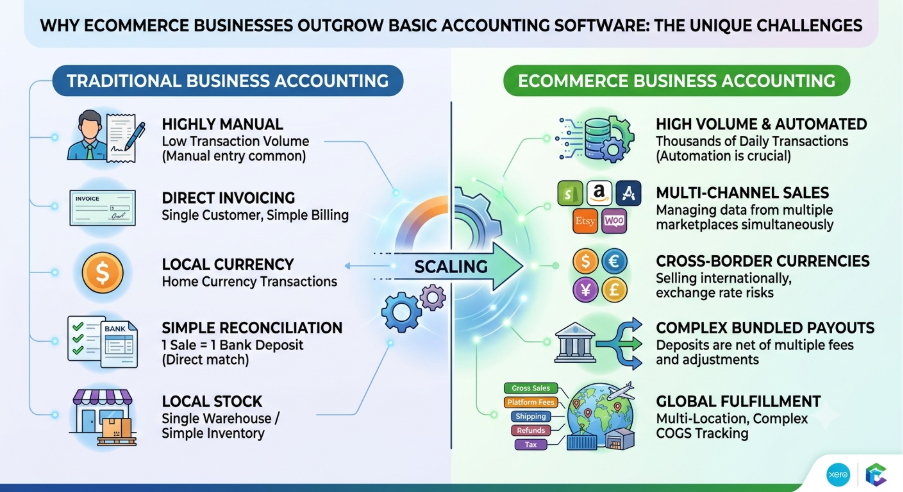
Traditional small businesses issue invoices, receive payments, and reconcile a handful of transactions a month. Ecommerce businesses generate hundreds or thousands of small transactions daily, spread across marketplaces, payment processors, and, increasingly, countries and currencies. That volume and complexity is where generic accounting setups start to break down.
An ecommerce seller doesn't record “a sale.” They record a gross sale amount, a marketplace or payment processor fee, a shipping charge, a discount, sometimes a chargeback, and a net payout that lands in the bank days after the sale happened. None of that maps cleanly onto the simple invoice-and-payment model that basic accounting software is built around.
Why Selling Across Multiple Marketplaces Complicates Bookkeeping
A seller running Shopify, Amazon, and Etsy simultaneously isn't dealing with one sales feed, they're dealing with three, each with its own fee structure, payout schedule, and reporting format. Recording each individually is unsustainable at volume; recording them incorrectly, or as a single lump sum with no detail, destroys the accuracy of the P&L.
Understanding the Two Biggest Challenges
Multi-currency transactions — Selling internationally means collecting revenue in currencies other than your home currency, converting it, and accounting for exchange rate gains and losses along the way. Get this wrong and your reported revenue and margins can be materially misstated.
Multi-channel sales — Each marketplace bundles sales, fees, refunds, and taxes differently before depositing a net payout. Without proper integration and clearing-account mapping, that payout looks like an unexplained lump sum in the bank feed rather than a clean set of categorized transactions.
Why the Wrong Software Creates Reconciliation Headaches
If the accounting platform can't natively or affordably support multi-currency and multi-channel data, sellers end up doing one of two things: manually reconciling every payout (unsustainable past a certain order volume), or accepting inaccurate, lumped-together numbers that make it impossible to know true profitability by channel or by product.
Traditional vs. Ecommerce Accounting: A Visual Comparison
Who Each Platform Is Designed For
Xero and QuickBooks Online are the two dominant cloud accounting platforms for small and mid-sized businesses. Broadly, QuickBooks Online has the larger footprint among U.S.-based businesses and the deeper bench of U.S. accountants and bookkeepers who know it well, while Xero is more widely used internationally and offers unlimited user seats on all plans without extra licensing fees, alongside a large open-API app marketplace. Neither is “ecommerce software” out of the box, both require higher-tier plans for multi-currency capabilities (Plus for QuickBooks Online, Established for Xero) and rely on integrations like A2X or Synder to handle marketplace and payment-gateway data properly.
Ecommerce Growth, Cross-Border Selling, and Integrated Accounting
Cross-border ecommerce has continued to grow as sellers expand beyond their home marketplace into international storefronts, Amazon's international marketplaces, Etsy's global buyers, Shopify Markets, and more. That trend is precisely why multi-currency capability has moved from a “nice to have” to a core requirement for accounting software serious ecommerce sellers can rely on.
What Ecommerce Sellers Need from Their Accounting Software
Before comparing Xero and QuickBooks directly, it's worth being specific about what “good enough for ecommerce” actually requires.
Managing Multiple Sales Channels
Most growing ecommerce brands sell across more than one of Shopify, Amazon, Walmart Marketplace, Etsy, WooCommerce, and eBay. Each channel has a different data structure and payout cadence, and the accounting software, usually via an integration, needs to translate each into clean, categorized journal entries.
Supporting Multiple Payment Gateways
Stripe, PayPal, Shopify Payments, and Amazon Pay each settle funds differently and charge different fees. The accounting system needs to reconcile these payouts against actual sales, not just record a mystery deposit.
Handling Multiple Currencies Without Manual Adjustments
For any seller collecting revenue in more than one currency, the software needs to convert transactions at the correct exchange rate, track unrealized and realized currency gains/losses, and report cleanly in the seller's home currency without a manual journal entry for every conversion.
Inventory Tracking
Ecommerce businesses need to track stock levels, cost of goods sold, and often multi-warehouse or multi-channel inventory, either natively in the accounting software or through a connected inventory tool.
Sales Tax and Marketplace Facilitator Rules
In the U.S., many marketplaces now collect and remit sales tax on the seller's behalf under marketplace facilitator laws. The accounting software needs to reflect that correctly, recording facilitator-collected tax differently from tax the seller is directly responsible for remitting.
Channel- and Product-Level Reporting
Beyond a standard P&L and balance sheet, ecommerce owners typically want visibility by channel and by product, which marketplace is actually profitable after fees, and which products carry the margin.
Why Generic Bookkeeping Software Often Falls Short
Entry-level plans on either platform are built for simple invoicing and expense tracking. As transaction volume and channel count grow, sellers who don't plan for multi-currency and multi-channel support from the start often find themselves migrating platforms, or plans, mid-growth, which is disruptive and best avoided by choosing correctly upfront.
Multi-Currency Management: Which Platform Performs Better?
Xero's Multi-Currency Features
Multi-currency accounting in Xero is only available on the Established plan, Xero's top tier, currently listed at $90/month (regular pricing; Xero frequently runs promotional discounted rates for new customers, so always check the live pricing page). Established includes the ability to use multiple currencies, along with KPI analysis, project tracking, expense claims, and 180-day cash flow forecasting. It isn't available on Xero's Early or Growing plans.
- Supported currencies — Xero supports a wide range of major and minor world currencies for invoicing, bills, and bank accounts.
- Automatic exchange rate updates — Xero automatically applies exchange rates, reducing the need to manually enter conversion rates for individual transactions.
- Foreign currency bank accounts — Established supports holding and reconciling foreign-currency bank accounts directly.
- Currency gains and losses — Realized and unrealized gains/losses from exchange rate movement are tracked and reported automatically.
- Revaluation of foreign balances — Foreign currency balances can be revalued to reflect current exchange rates at period end.
- Reporting in base currency — All reports consolidate back to your home currency regardless of the transaction currency.
QuickBooks' Multi-Currency Features
In QuickBooks Online (U.S. edition), multi-currency is officially unlocked on the Plus and Advanced plans (though some international versions include it in Essentials). Simple Start and Solopreneur do not support multi-currency. While QBO Plus sits at a mid-to-high price tier, it still offers multi-currency without forcing you into an enterprise-level tier.
- Supported currencies — QuickBooks supports a broad list of world currencies for customers, vendors, and accounts.
- Exchange rate management — Exchange rates are pulled automatically, with the option to manually override on individual transactions.
- Foreign vendor and customer handling — Each customer or vendor can be assigned a specific foreign currency, and QuickBooks tracks balances in that currency alongside your home currency.
- Currency conversion limitations — Some account types and reports behave differently once multi-currency is active (extra currency columns appear across reports), which some users find adds visual clutter even when unused for a given transaction.
Enabling Multi-Currency in QuickBooks Is a One-Way Switch
Once turned on in QuickBooks, multi-currency cannot be turned back off. Sellers should confirm they actually need it before switching it on.
Head-to-Head Comparison
| Factor | Xero | QuickBooks Online |
|---|---|---|
| Ease of setup | Straightforward once on Established | Straightforward, but irreversible once enabled |
| Automation | Automatic rate updates, automatic gain/loss tracking | Automatic rate updates, manual override available |
| Currency flexibility | Foreign currency bank accounts supported | Per-customer/vendor currency assignment |
| Entry-level plan required | Established (top tier, $90/mo) | Essentials (mid tier) |
| Reporting | Consolidates to base currency automatically | Consolidates to base currency, extra currency columns in reports |
Limitations to Know Before Enabling Multi-Currency
On both platforms, turning on multi-currency is generally a one-way decision, it's not something to toggle on and off. On Xero, it also forces an upgrade to the most expensive plan, which matters for smaller sellers who don't need Established's other features. On QuickBooks, it's available a tier lower, but the change is permanent and adds reporting complexity across the account even for domestic-only transactions.
Which Platform Performs Better for International Sellers
For a seller whose primary need is multi-currency and nothing else on Xero's Established tier (project tracking, expense claims, KPI analysis), QuickBooks Essentials gets there at a lower price point. But if a business is going to need Established-level features anyway as it scales, deeper reporting, cash flow forecasting, project costing, Xero's all-in-one top tier can end up being the more efficient long-term fit. There's no universal winner here; it depends on which other features the business actually needs alongside multi-currency.
Multi-Channel Ecommerce Integrations Compared
Marketplace Integrations
Neither Xero nor QuickBooks Online deeply integrates with Amazon, Walmart, Etsy, or eBay natively out of the box, both rely primarily on third-party connectors for anything beyond Shopify. Shopify has official apps for both platforms: Xero's official Shopify app posts a daily sales summary, syncing Shopify sales to Xero daily and creating a summary invoice for reconciliation. QuickBooks similarly offers a direct Shopify connection, though it often posts incomplete or inaccurate data at scale, which is why most serious sellers route Shopify data through a dedicated ecommerce connector instead of the native integration.
Payment Processor Integrations
Both platforms connect with Stripe, PayPal, Square, and Authorize.net either natively or through third-party apps. However, native connections often import sales and processing fees as separate line items or gross deposits without fee breakdowns. For proper fee matching and foreign exchange handling, most sellers use dedicated integrations or clearing accounts.
Third-Party Ecommerce Connectors
This is where the real multi-channel work happens for most sellers, and it's largely platform-agnostic — the leading tools work with both Xero and QuickBooks.
| Connector | Channel Coverage | Positioning |
|---|---|---|
| A2X | Shopify, Amazon, eBay, Etsy, Walmart, BigCommerce; integrates with QuickBooks, Xero, Sage, NetSuite | Legacy tool with strong accountant recognition; posts summarized settlement-level entries |
| Link My Books | Shopify, Amazon, eBay, Etsy, TikTok Shop, Walmart, Square, WooCommerce | Simple setup, accurate summaries, faster reconciliation; strong VAT/sales-tax handling |
| Synder | Broad ecommerce and payment platforms, incl. Stripe and PayPal | Granular, line-by-line sync; can add ledger bloat at high order volumes |
| Zapier | Custom automation across less common tools | Not purpose-built for accounting-grade summarization |
How Each Platform Imports Orders, Fees, Refunds, and Payouts
The pattern across connectors is consistent regardless of whether the destination is Xero or QuickBooks: pull raw order and settlement data from the marketplace, categorize it into sales, fees, shipping, discounts, refunds, and tax, and post one summarized journal entry per payout rather than one entry per order. This is what makes bank reconciliation tractable at ecommerce volume.
Other middleware, Webgility, Dext Commerce, MyWorks Sync, Bookkeep, and similar, generally splits into two camps: line-by-line sync tools for granular visibility, and settlement-summary tools like A2X for clean reconciliation.
Differences in Automation Capabilities
The differentiator isn't really Xero vs. QuickBooks at this layer, it's which connector a seller chooses. Both accounting platforms accept the same categorized data equally well. Xero's more open API and larger app marketplace (1,000+ integrations) gives it a slight edge in raw ecosystem breadth, while QuickBooks' larger US install base means more ecommerce-specific accountants and bookkeepers are already fluent in QBO workflows.
Which Ecosystem Offers More Flexibility?
For pure integration breadth, Xero has a modest edge. For finding an accountant or bookkeeper already experienced with a specific ecommerce connector setup, QuickBooks' larger U.S. base often makes sourcing help easier. Since the top ecommerce connectors (A2X, Link My Books, Synder) support both platforms equally, this decision usually comes down to accountant familiarity and pricing rather than a hard technical limitation.
Day-to-Day Ecommerce Accounting: Xero vs. QuickBooks
Recording Sales
Neither platform is designed to record individual ecommerce transactions one by one at volume, both are built (via connectors) around summarized daily or per-settlement sales entries rather than order-by-order posting.
Marketplace Settlements and Bundled Payouts
Both platforms handle bundled marketplace payouts the same way once a connector is in place: the payout hits the bank feed as a single deposit, and the connector's corresponding journal entry breaks it into sales, fees, and refunds so the deposit reconciles to the penny.
Managing Refunds and Returns
Recording refunds correctly, and handling partial refunds, store credits, and chargebacks, are all supported natively in both platforms' credit note / refund receipt functionality, and both integrate the same way with ecommerce connectors that automatically categorize marketplace-issued refunds.
Bank Reconciliation
Both platforms reconcile marketplace payouts and payment processor deposits the same way, matching the summarized connector-generated journal entry to the actual bank deposit. Identifying discrepancies is a manual investigation process on either platform, usually traced back to the marketplace's settlement report.
Financial Reporting
Both platforms offer standard P&L, balance sheet, and cash flow reports, along with sales, customer, and product-level reporting. Multi-currency reporting is available on both once the relevant plan/feature is enabled, consolidating to home currency automatically. Neither platform natively reports channel-level profitability out of the box, that level of detail typically comes from the ecommerce connector's own reporting layer rather than from Xero or QuickBooks directly.
Inventory Accounting
This is one of the clearer differentiators between the two platforms. QuickBooks Online is generally considered stronger for native inventory management, Plus and Advanced handle assemblies, bundles, and reorder points natively, and 2026 updates added Moving Average Cost accounting, which is useful for businesses with fluctuating supplier costs. Xero's native inventory, by contrast, tracks stock levels and updates values but lacks bundling or automated COGS adjustments for more complex inventory situations, which typically pushes Xero users toward a dedicated inventory app such as Cin7 or DEAR Systems for anything beyond simple tracked/untracked stock.
Key Differentiator
Inventory accounting is where Xero and QuickBooks diverge most clearly. If bundles, assemblies, and automated COGS adjustments matter to your business, QuickBooks Plus or Advanced has the stronger native toolset out of the box.
Automation, Scalability, and Ease of Use
Automation Features
Both platforms support recurring transactions, automated bank feeds, rule-based transaction categorization, invoice automation, and bill management. QuickBooks has recently expanded its AI-driven categorization (branded Intuit Assist / Intuit Intelligence), while Xero's automation has leaned more toward predictive cash flow forecasting.
User Experience
Xero's interface is generally regarded as cleaner and simpler for newcomers, while QuickBooks' interface is more feature-dense. QuickBooks' mobile app tends to rate higher for on-the-go reporting and expense capture, while Xero's app has added Tap to Pay support on compatible devices, letting sellers accept in-person card payments without extra hardware.
Scalability
- User limits — Xero includes unlimited users on every plan, with no per-user license fees. QuickBooks Online caps users by plan: 1 user for Solopreneur/Simple Start, 3 for Essentials, 5 for Plus, and 25 for Advanced. For any ecommerce team with multiple stakeholders needing access (owner, bookkeeper, virtual assistants, warehouse manager, CPA), Xero's unlimited-user model provides significant cost savings as team size grows.
- Growing international operations — Xero's per-organization (not per-user) pricing model tends to scale more predictably for growing teams, since adding people doesn't require a plan upgrade the way it does on QuickBooks.
- Larger transaction volumes — Both platforms handle high transaction volume reasonably well once ecommerce data is summarized through a connector rather than posted line-by-line.
- Team collaboration and permissions — QuickBooks Online Advanced provides custom, granular user permission roles (e.g., restricting a team member strictly to Accounts Payable). Xero uses fixed role templates (Adviser, Standard, Read-Only) across all tiers, which is simpler to set up but less customizable for specialized employee roles.
Which Software Grows More Effectively with an Expanding Business?
For a growing team that needs more people with access to the books without paying more for each one, Xero's unlimited-user structure scales more predictably. For a business that needs deep, native inventory management as it scales physical product lines, QuickBooks Plus or Advanced has the stronger built-in toolset.
Pricing, Limitations, and Total Cost of Ownership
Note
Both Xero and QuickBooks change pricing and promotions frequently, the figures below reflect list pricing at the time of writing and should be confirmed on each provider's official pricing page before making a decision.
Xero Pricing Considerations
Xero's current U.S. list pricing is Early $25/month, Growing $55/month, and Established $90/month, with all plans including unlimited users at no extra cost. Multi-currency requires the Established plan. Beyond the subscription, sellers must budget for third-party connector apps (A2X, Link My Books, Synder), which are billed independently based on order volume and connected marketplace channels.
QuickBooks Pricing Considerations
QuickBooks Online's list pricing has moved several times in 2025–2026 and varies by source at the time of writing, generally landing in the range of roughly $35–$38/month for Simple Start, $70–$85/month for Essentials, $110–$140/month for Plus, and $250–$340/month for Advanced, depending on when the plan was purchased and which pricing update has applied, following a round of increases effective August 1, 2026 ranging from 13% on Essentials to 70% on Advanced. Multi-currency requires Essentials or above. User limits scale by plan: 1/3/5/25 users respectively. Payroll is a separate add-on cost on both platforms.
| Plan Tier | Xero (list price) | QuickBooks Online (list price) |
|---|---|---|
| Entry | Early — $25/mo | Simple Start — $35–$38/mo |
| Mid | Growing — $55/mo | Essentials — $70–$85/mo |
| Multi-currency tier | Established — $90/mo | Plus — $110–$140/mo |
| Top tier | — (Established is top tier) | Advanced — $250–$340/mo |
Hidden Costs on Either Platform
- Third-party connector subscriptions — A2X, Synder, and Link My Books all charge their own monthly fees, typically scaling with order volume and number of connected channels, and this cost is the same regardless of which accounting platform you choose.
- Inventory software — If native inventory isn't sufficient (more likely on Xero than on QuickBooks Plus/Advanced), standalone inventory management platforms such as Cin7, Katana, or Inventory Planner add $200 to $500+ per month depending on feature tier and order volume.
- Automation and payment tools, accountant access, and migration costs all apply similarly across both platforms.
Why the Cheapest Subscription Isn't Always the Most Cost-Effective
A lower base subscription that forces a business into third-party inventory software, a higher-tier connector plan, or a plan upgrade sooner than expected can easily cost more overall than a slightly pricier plan that already includes what the business needs. Total cost of ownership, subscription plus connector plus any add-on software, is the number that actually matters, not the sticker price of the base plan.
Which Software Is Right for Your Ecommerce Business?
Xero Is Generally a Better Fit If:
- You sell internationally in multiple currencies and want foreign currency bank accounts and automatic currency gain/loss tracking
- You need more than a handful of people with access to your books without paying per user
- You prioritize flexible, open-API integrations across a broad app ecosystem
- You work with global suppliers and customers as a matter of course
QuickBooks Is Generally a Better Fit If:
- Your business is primarily U.S.-based, especially for sales tax and 1099 workflows
- You need strong native inventory management (bundles, assemblies, reorder points, COGS tracking) without adding third-party inventory software
- You already use or plan to use the broader QuickBooks ecosystem (Payroll, Payments, etc.)
- Your accountant or bookkeeper primarily works in QuickBooks
Decision Guide by Business Type
| Business Type | Better Starting Point |
|---|---|
| Shopify-only seller, single currency | Either, decide on price, UX preference, and accountant familiarity |
| Amazon FBA business, U.S.-based | QuickBooks Plus (native inventory) + A2X or Link My Books |
| Multi-channel ecommerce brand (3+ channels) | Either, paired with a connector like A2X or Link My Books |
| Cross-border ecommerce company | Xero Established (native multi-currency, foreign currency accounts) |
| Wholesale + ecommerce hybrid | QuickBooks Plus/Advanced (stronger native inventory and COGS) |
| High-growth DTC brand adding team members quickly | Xero (unlimited users at no extra cost) |
Reference
Key Questions to Ask Before Choosing or Migrating
- How many currencies do you currently sell in, and how many do you expect to add in the next 12–24 months?
- How many people need direct access to the books, and does that number grow with the team?
- How complex is your inventory, simple SKUs, or bundles, assemblies, and multi-warehouse stock?
- Which ecommerce connector (A2X, Link My Books, Synder, etc.) fits your channel mix, and does it support both platforms you're considering?
- Does your accountant or bookkeeper already work in one platform, and how much does that matter to your support needs?
Reference
Frequently Asked Questions
Migration tools exist for both directions, but a full historical migration is rarely one-click. Most accountants recommend migrating opening balances and a defined lookback period rather than the entire transaction history, then archiving the old platform for reference.
Not necessarily. If Amazon settles your international sales back to you in USD, you may not need native multi-currency, your ecommerce connector can often handle the conversion in its summarized entry. Multi-currency becomes necessary when you hold foreign-currency balances or invoice directly in another currency.
No. Connectors summarize and categorize marketplace and payment-gateway data, then post it into your accounting platform. Xero or QuickBooks remains the system of record for your books, reporting, and tax filings.
Xero's interface is generally considered cleaner for newcomers, while QuickBooks' feature-dense interface suits users who want deeper native functionality (like inventory) without adding another app.
Summary
Key Takeaways
Ecommerce accounting is fundamentally more complex than traditional bookkeeping.
Multi-currency requires a higher-tier plan on both platforms, and is effectively a one-way switch.
Neither platform natively integrates deeply with most marketplaces — both rely on connectors.
A2X, Link My Books, and Synder all support both Xero and QuickBooks equally.
QuickBooks is generally stronger for native inventory management.
Xero is generally stronger for unlimited users and open-API integration breadth.
Total cost of ownership includes connector and inventory add-ons, not just the base subscription.
The right platform depends on your channel mix, currencies, inventory complexity, and team size.
Final Thoughts
Conclusion
The Best Choice Depends on How Your Ecommerce Business Operates
Neither Xero nor QuickBooks Online is universally better for ecommerce, the right choice depends on your sales channels, geographic reach, reporting needs, and existing technology stack. Businesses selling across multiple countries and currencies should prioritize whichever platform minimizes manual reconciliation and integrates cleanly with their ecommerce connector of choice; for most cross-border sellers, that points toward Xero's native multi-currency handling on Established. Businesses that are primarily U.S.-based and carry meaningful physical inventory tend to get more out of QuickBooks' native inventory tools on Plus or Advanced.
Before migrating, evaluate your current sales channels, payment processors, inventory requirements, and long-term growth plans, including whwre you expect to be in 12–24 months, not just where you are today, to make sure the accounting system you choose can scale alongside the business rather than becoming the next thing you have to migrate away from.
Resources