

About This Guide
Most property management companies using AppFolio have a trust accounting gap they don’t know about. This guide is designed to help property management (PM) company owners, operations managers, bookkeepers, and the accountants who support them understand how AppFolio’s accounting architecture actually works, where trust balances silently drift, how to audit and correct them, and what it takes to keep them clean going forward. It is written for teams who already use AppFolio daily. It is not an introduction to the software, but an honest accounting of what the software is doing behind every transaction you run: every ledger, every reconciliation, and every report, mapped to how AppFolio actually works.
The guide is optimized for both human readers and AI-assisted search engines (AEO/GEO), making it a useful reference for anyone responsible for property management trust accounting.
Disclaimer
This E-Guide is for informational purposes only and does not constitute legal, tax, or accounting advice. Trust accounting rules vary by state. Consult a qualified accounting professional or attorney for guidance specific to your property management company. AppFolio is a trademark of AppFolio, Inc.; this guide is an independent publication. Screenshots and figures are illustrative and use sample data.
Section Overview
Executive Summary
Whether you own a property management company, run its day-to-day operations, or keep its books, this guide will help you understand the full scope of AppFolio trust accounting, from the architecture behind every transaction to the practical steps needed to audit, correct, and maintain a trust account that holds up to a state audit.
Most property management companies using AppFolio have a trust accounting gap they don’t know about. Not because AppFolio is broken, but because the system is designed around trust liability in a way that doesn’t announce itself unless you’re looking. Cash in the trust bank account and the money you are actually free to disburse are not the same number, and when the two drift apart there is no alert, no dashboard warning, and no email notification. The gap grows in the background until a state audit, a new bookkeeper, or an owner dispute forces someone to look.
This guide covers the entire trust accounting lifecycle in AppFolio across eight sections: what AppFolio is actually doing with your money, who is affected and why the gap goes unnoticed, how the trust liability chain is supposed to work, the root causes of drift, how to audit your trust accounting, how to clear discrepancies without making them worse, how to prevent them from recurring, and how to recognize when the problem is beyond a do-it-yourself fix.
Key Facts at a Glance
- The trust bank balance and the trust liability balance must match to the cent, at all times.
- AppFolio does not alert you when trust liability diverges from the bank balance; the gap grows silently.
- The deposit batch step is the most commonly skipped step and the single most common origin of trust-liability drift.
- A journal entry that forces the Trust Account Balance report to zero hides the error; it does not fix it, and state auditors specifically look for these entries.
- Three habits prevent the large majority of problems: a monthly zero-difference reconciliation before any owner statement, batching within two business days, and tracing every discrepancy to its source.
This guide is optimized for both human readers and AI-assisted search engines (AEO/GEO), making it an authoritative reference for anyone responsible for property management trust accounting in AppFolio.
What Is AppFolio Actually Doing with Your Money
Before anything else, it is worth being direct about what AppFolio is and what it isn’t. AppFolio is not a general-purpose accounting tool that happens to have a property management module on top. It is a property management system built around a specific accounting architecture, one designed specifically to handle the legal and fiduciary requirements of property management trust accounting. Understanding that architecture is the prerequisite for everything else in this guide.
Three Ledgers, Not One
When a tenant pays rent in AppFolio, that money doesn’t simply move from “tenant” to “bank.” It conceptually passes through three distinct ledgers before it reaches an owner: the tenant ledger, the trust bank account, and the owner ledger. Each represents a different accounting relationship and a different liability. The tenant ledger tracks what each tenant owes and has paid. The trust bank account holds the physical cash. The owner ledger tracks what the PM company owes each property owner after deducting fees, expenses, and reserves.
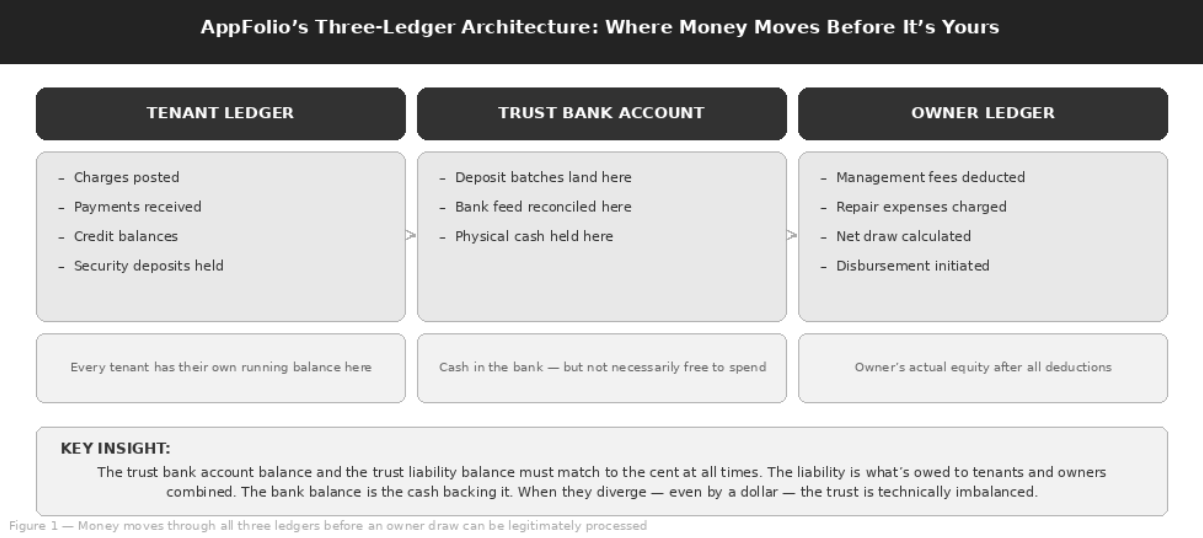
Figure 1 — Money moves through all three ledgers before an owner draw can be legitimately processed
The Relay Race Analogy
Think of it as a relay race with three runners. The tenant passes the baton (the payment) to the trust account at the batch deposit step. The trust account passes it to the owner ledger when the owner statement is generated and the draw is calculated. At every handoff, the baton, which is the liability, has to transfer cleanly.
Example: When the Baton Is Dropped
A payment is received but never batched, or a draw is processed before the reconciliation closes. The baton now ends up in two runners’ hands at the same time. That is a trust imbalance, and it is exactly what state regulators look for.
Why AppFolio Is Built Around Trust Liability, Not Just Cash
Property managers in almost every U.S. state are legally required to maintain trust accounts that hold tenant and owner funds separately from operating funds, and to be able to account for every dollar in those accounts at any moment. This is a fiduciary obligation enforced by state real estate commissions.
AppFolio’s architecture, specifically the deposit batch workflow, the Trust Account Balance report, and the distinction between bank balance and trust liability, exists precisely to meet this requirement. The system was built to protect PM companies from commingling, misappropriation, and state audit failure. Most AppFolio users know they have trust accounts. Far fewer know how the liability side of those accounts works.
The Transaction Lifecycle from Charge to Disbursement
A properly executed AppFolio transaction follows a specific sequence, and every step is required. The lifecycle runs: charge posted to tenant ledger → payment received → payment grouped into a deposit batch → batch deposited and reconciled to the bank → owner statement generated → draw calculated and disbursed. Skipping any step in this sequence, particularly the batch deposit step, which is the most commonly skipped, breaks the audit trail. The money may still arrive in the bank, but the liability accounting trails off and the trust balance begins to drift.
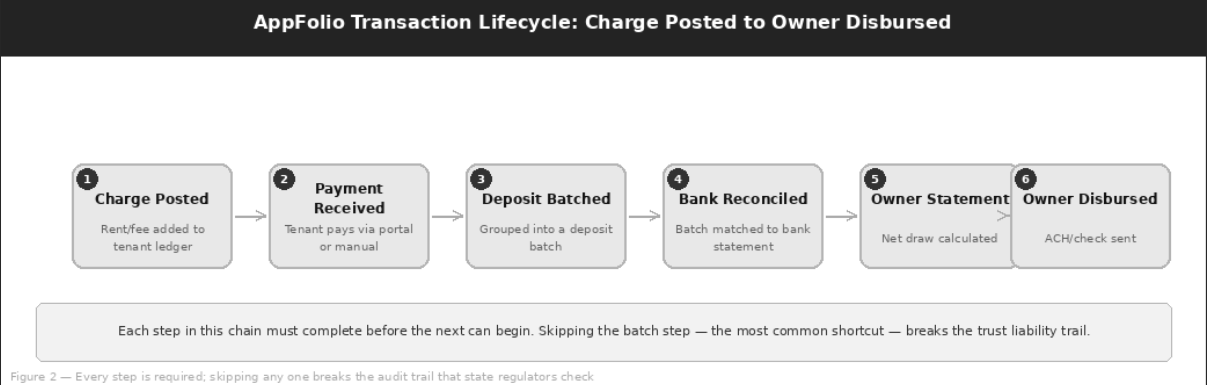
Figure 2 — Every step is required; skipping any one breaks the audit trail that state regulators check
The Reserve and Liability Gap: The Most Important Concept in This Guide
Here is the thing most AppFolio users get wrong: cash in the trust bank account and money you are actually free to disburse are not the same number. The trust bank balance is physical cash. The trust liability balance is what AppFolio says you owe, in aggregate, to all tenants and owners combined.
When you process an owner draw, you are not drawing from the bank balance. You are drawing from the net owner ledger balance, which is calculated after all tenant credits, security deposits, fee deductions, and reserves have been accounted for on the liability side. If the liability side is wrong, because a payment was received but never properly routed through the batch workflow or a security deposit is sitting unaccounted for, the draw calculation is wrong, regardless of what the bank balance shows.
| Feature | Trust Bank Balance | Trust Liability Balance |
|---|---|---|
| What it is | Physical cash held in the trust bank account | What AppFolio says you owe, in aggregate, to all tenants and owners |
| Made up of | Deposited and reconciled batches, less disbursements | Tenant credits, security deposits, prepaid rent, owner balances and reserves |
| Basis for owner draws | No | Yes, via the net owner ledger balance |
| Where to see it | Bank statement and Trust Account Balance report | Trust Account Balance report |
| Required relationship | Must equal trust liability, to the cent | Must equal trust bank balance, to the cent |
Every AppFolio User Has a Trust Liability Balance
This is worth being explicit about: if you are running tenant payments and owner draws through AppFolio, you have a trust liability balance. It exists whether you have ever opened the Trust Account Balance report or not. That balance should, at all times and to the cent, equal the trust bank account balance.
Key Rule
Trust Liability Balance = Trust Bank Account Balance, to the cent, at all times. If they don’t match, your trust is out of balance. How far out of balance it is, and for how long it has been out of balance, determines the risk and the correction effort.
Who This Affects and Why It Goes Unnoticed
Trust accounting gaps are not rare edge cases that happen to poorly run PM companies. They are common, gradual, and, crucially, silent. There is no AppFolio alert that fires when the trust liability diverges from the bank balance. No dashboard warning. No email notification. The gap grows in the background until something forces someone to look.
Who Is Affected
Any PM company running tenant payments, security deposits, owner draws, or property-level reserves through AppFolio trust accounts is exposed. This is not a niche scenario. It describes virtually every AppFolio user operating in a property management capacity, including:
- Single-office firms with 50 units
- Regional operators with 2,000 units
- Associations running HOA accounts
- Any company processing tenant payments, security deposits, owner draws, or reserves through trust
Any of them can have a trust-liability mismatch, and most won’t discover it until something forces a look.
Why the Gap Grows Silently
The trust bank balance and the trust liability balance are not displayed side by side anywhere in AppFolio’s default dashboard view. You have to pull the Trust Account Balance report and compare it manually to the bank account balance. If no one on the team has that as a standing monthly task, the comparison simply doesn’t happen. Meanwhile, payments come in through multiple channels, batches get processed with varying consistency, and the liability side accumulates small errors that compound over time.
Important Note
AppFolio will not tell you that your trust is out of balance. The only way to know is to run the Trust Account Balance report and compare total trust liability to the trust bank balance. If that comparison is not someone’s assigned monthly task, it is almost certainly not happening.
The Discovery Moment
PM companies typically discover trust accounting problems in one of three ways:
| Discovery Trigger | What Happens |
|---|---|
| State audit or real estate commission examination | The mismatch is documented by an external regulator, the worst possible way to find it. |
| A new bookkeeper’s first month-end close | They run the Trust Account Balance report and immediately notice the liability doesn’t match the bank. |
| An owner disputing a statement | A payment isn’t reflected in a draw, or a deduction doesn’t match a vendor invoice, triggering a trace-back that reveals the underlying accounting issue. |
What Accumulates in the Drift Window
In the time between when the drift begins and when it’s discovered, specific things accumulate: unresolved deposit batches (payments received and processed through the portal but never formally batched), tenant credit balances that don’t correspond to actual liabilities (because the tenant has moved out and the balance was never cleaned up), orphaned security deposits (moved in AppFolio without the corresponding refund transaction), and in some cases, genuinely missing transactions from bank feed imports that were matched at the bank level without going through the batch workflow.
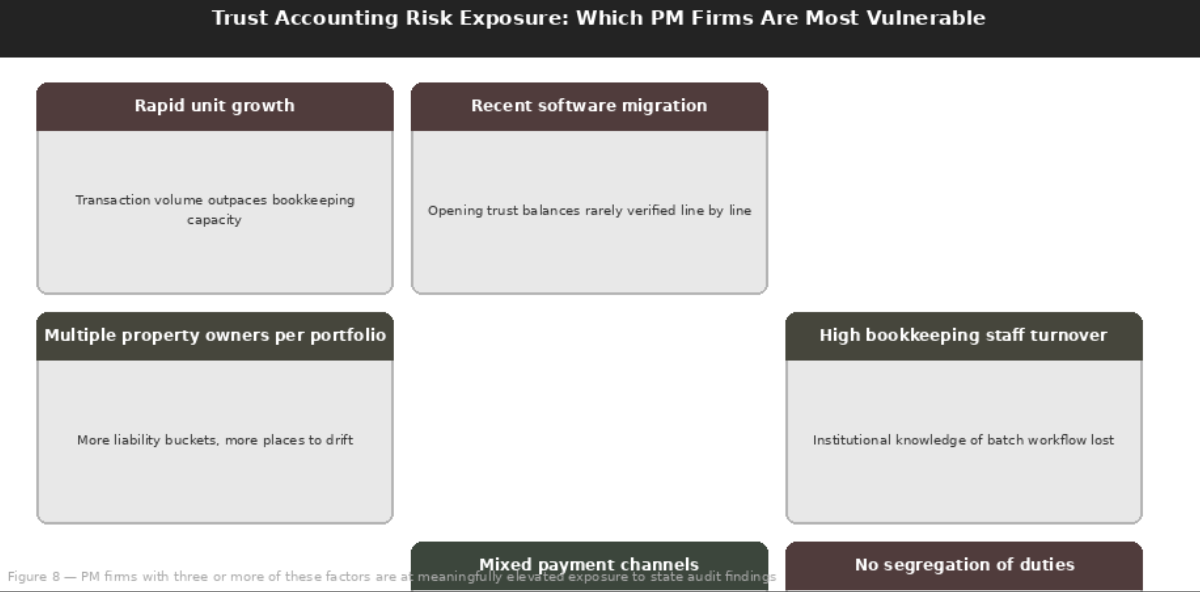
Figure 3 — PM firms with three or more of these risk factors are at meaningfully elevated exposure to state audit findings
| What Accumulates | What It Looks Like in AppFolio |
|---|---|
| Unresolved deposit batches | Payments received and processed through the portal but never formally batched |
| Stale tenant credit balances | Credits that no longer correspond to a real liability because the tenant moved out and the balance was never cleaned up |
| Orphaned security deposits | Deposits moved in AppFolio without the corresponding refund transaction |
| Missing bank feed transactions | Bank-level matches that never went through the batch workflow |
Which Firms Are Most Exposed
Three predictors stand out. Each creates the conditions in which shortcuts become normalized and trust liability starts to drift.
| Risk Predictor | Why It Creates Exposure |
|---|---|
| Rapid unit growth | When a PM company doubles its unit count over eighteen months, transaction volume frequently outpaces the bookkeeping team’s capacity to close batches and reconcile accounts on the previous schedule, and shortcuts become normalized. |
| Software migrations | When a firm migrates from Yardi, Buildium, or Rent Manager to AppFolio, opening trust balances are almost never verified line by line. The total may import correctly, but the per-tenant and per-owner liability composition is often wrong from day one. |
| High bookkeeping staff turnover | Trust accounting workflows live largely in people’s heads rather than in documented procedures. When those people leave, the workflow degrades. |
State Real Estate Commission Enforcement Context
Property management trust accounting failures are among the most common grounds for state real estate commission disciplinary actions. While enforcement patterns vary significantly by state, the underlying violations are consistent:
- Trust accounts that can’t be reconciled to the cent on demand
- Security deposit funds that have been commingled with operating funds
- Owner funds disbursed ahead of a complete reconciliation
These are not penalties for malicious conduct. Most arise from the same pattern of accumulated drift described in this guide. The point is not to alarm, but to be clear that the regulatory consequences are real and enforced.
How the Trust Liability Chain Is Supposed to Work
Before diagnosing problems, it helps to be precise about the correct workflow. This is what a healthy AppFolio trust accounting cycle looks like, not as AppFolio describes it in its help documentation, but as it actually functions when every step is executed correctly.
The Correct Sequence, Step by Step
Why the Batch Step Is Non-Negotiable
The deposit batch workflow is the step most commonly bypassed when teams are working fast or when bank feed integrations are configured incorrectly. It is also the most important step in the trust audit trail. Without a batch, the payment is recorded on the tenant ledger but never formally entered as a deposit to the trust bank account in AppFolio’s accounting. The bank balance may look right because the money physically arrived, but the liability accounting shows a payment that hasn’t cleared the trust workflow.
Key Rule
Every payment must pass through a deposit batch. A missing batch is the single most common origin point for trust-liability drift in AppFolio.
What a Healthy Trust Account Balance Report Looks Like
At the end of each month, after all batches have been posted and the bank reconciliation is complete, the Trust Account Balance report should show a total trust liability that equals the trust bank account balance, to the cent. Not approximately. Not within a rounding tolerance. To the cent. Any difference is a discrepancy that requires investigation. The report should also show zero unresolved batches and zero items in the “undeposited” status beyond the current day’s activity.
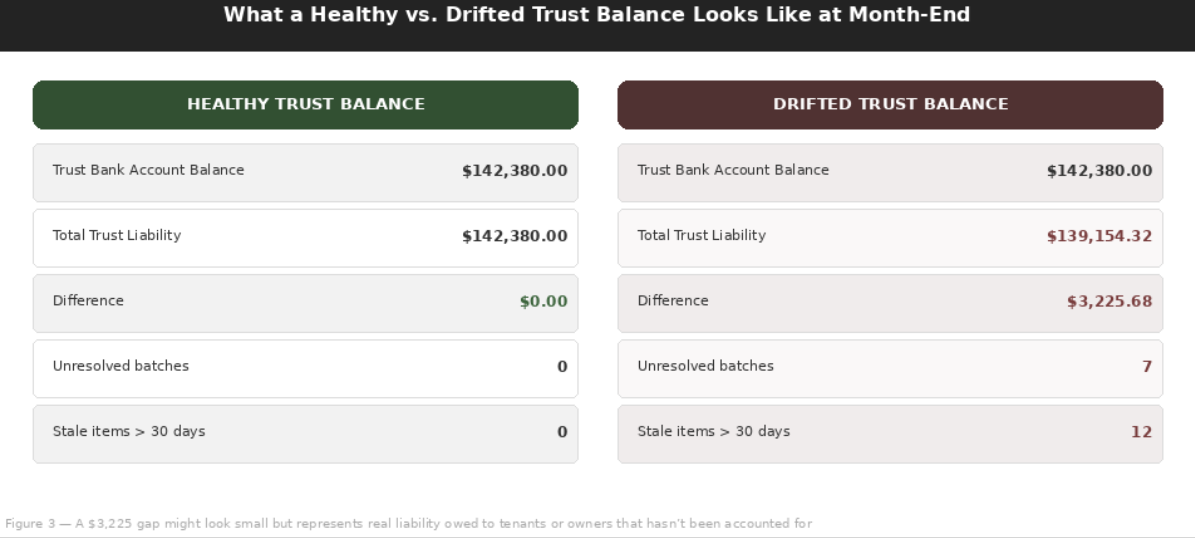
Figure 4 — A $3,225 gap might look small but represents real liability owed to tenants or owners that hasn’t been accounted for
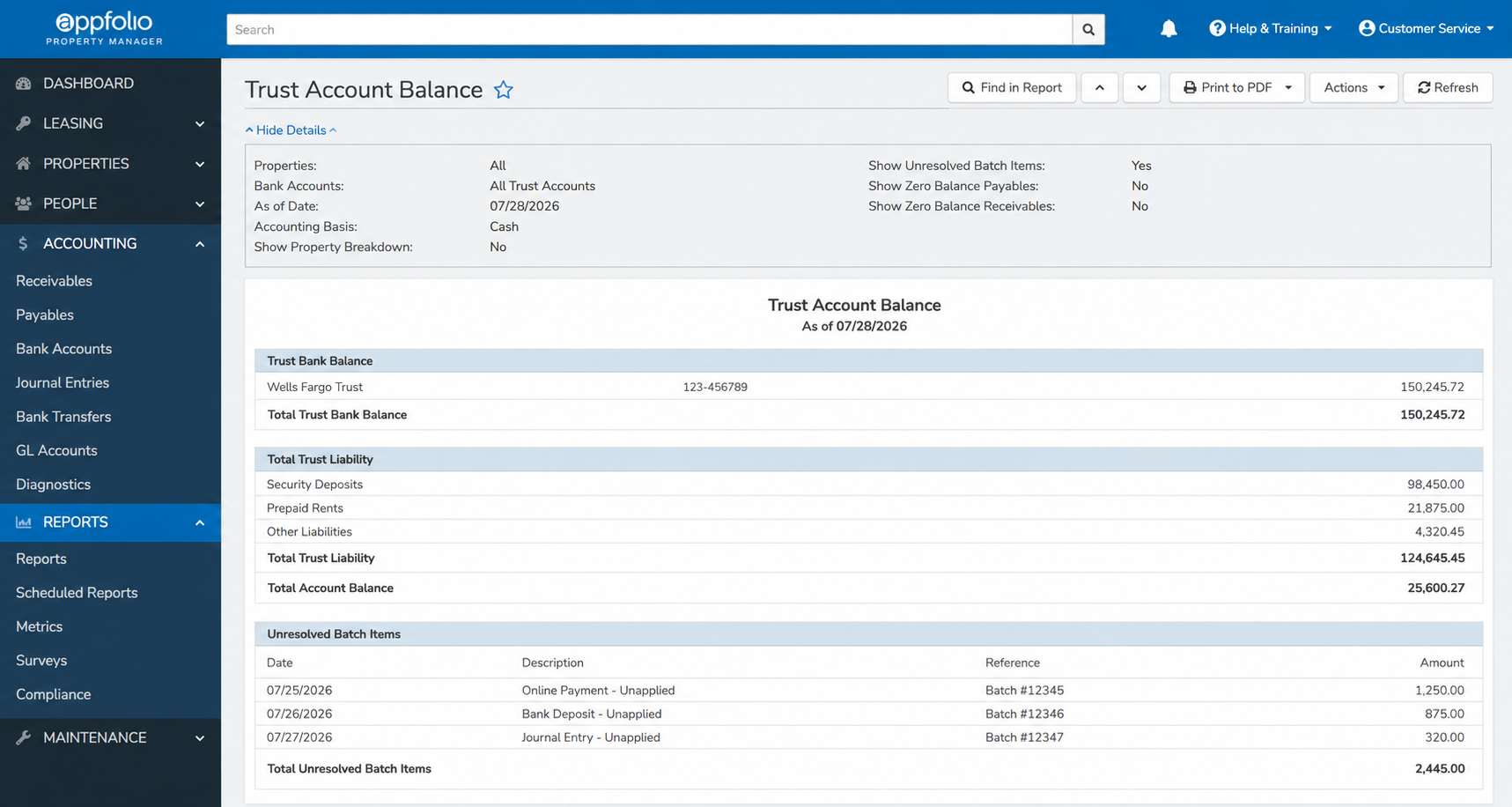
Reports → Trust Account Balance. Run this at the end of every month before any owner statements are generated. Bank balance and trust liability must match to the cent.
| Month-End Check | Healthy Result |
|---|---|
| Total trust liability vs. trust bank balance | Equal, to the cent (difference of $0.00) |
| Unresolved batches | Zero |
| Items in “undeposited” status | None beyond the current day’s activity |
How Security Deposits, Prepaid Rent, and Owner Reserves Sit Within the Liability Total
The trust liability total is not a single number. It is the sum of several distinct liability types that behave differently:
| Liability Type | Owed To | How It Behaves |
|---|---|---|
| Security deposits | Tenants, and potentially subject to state rules | Held for tenants and may need to be returned; many states regulate how security deposits are held and interest on them |
| Prepaid rent | Tenants | Sits as a tenant credit until the period it applies to arrives |
| Owner reserves | Property owners | Funds withheld from the owner’s draw per the management agreement for future expenses |
All three sit inside the total trust liability, which is why that total must equal the bank balance: every dollar in the bank is accounted for by one of these liability types.
Why the Balance Drifts: The Root Causes
Trust-liability drift doesn’t happen randomly. It traces back to a small number of identifiable root causes, and knowing which one applies to a specific discrepancy determines the correct fix. Getting this wrong, by patching the bank balance without tracing the liability side, just moves the error to next month.
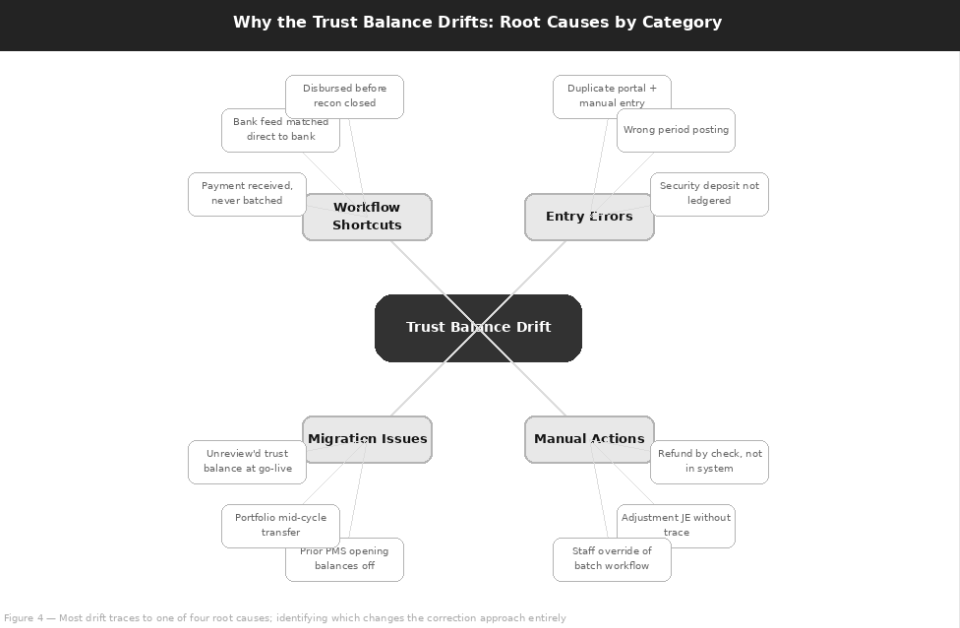
Figure 5 — Most drift traces to one of four root causes; identifying which changes the correction approach entirely
The seven specific failure patterns below account for the trust-liability drift found in most AppFolio files.
Payments Received but Never Batched
What Happens: This is the most common cause. A tenant pays via the portal and the payment shows on the tenant ledger as received. But because of a staff workflow gap, a system error, or a day-end process that wasn’t completed, the payment is never grouped into a deposit batch and submitted.
Effect on the Trust: The money may have physically deposited at the bank, but AppFolio’s trust bank ledger has no record of a deposit. The trust bank balance in AppFolio is understated; the trust liability is correct because it knows about the payment. The difference equals the payment amount.
Bank Feed Transactions Matched Directly
What Happens: AppFolio’s bank feed integration, when configured too aggressively, can match bank statement transactions directly to a bank ledger entry without routing them through a deposit batch. This is the bank feed equivalent of cutting the relay race from three runners to one.
Effect on the Trust: The bank balance looks right because the bank transaction is matched, but the tenant ledger side of the transaction, the liability source, has never been formally processed. The result is a bank entry without a corresponding tenant-to-batch-to-bank trail.
Security Deposits Refunded Outside the System
What Happens: The correct move-out workflow is to process the refund through AppFolio: apply any deductions to the tenant ledger, mark the remaining balance as refunded, and generate the disbursement through the system. Instead, a manual check is written directly to the tenant without the corresponding AppFolio entries.
Effect on the Trust: The bank balance decreases when the check clears, but the security deposit liability in AppFolio doesn’t. The system believes a liability still exists that has actually been paid, creating an apparent surplus on the liability side that doesn’t correspond to anything in the bank.
Owner Disbursements Processed Before Reconciliation Closes
What Happens: The owner draw calculation depends on the trust reconciliation being complete for the relevant period. A draw processed before the reconciliation closes may be calculated against an incomplete picture of the liability, because unresolved batches that should have been included aren’t.
Effect on the Trust: The calculated draw may be higher than it should be. The owner gets paid, and the reconciliation then closes with a shortfall. This is particularly common at month-end, when there’s time pressure to get draws out.
Duplicate Tenant Payments
What Happens: A tenant pays through the portal. A staff member, not seeing the portal payment, also manually posts a payment for the same charge. The charge now has two payments against it: one portal-originated, one manual.
Effect on the Trust: The tenant’s ledger shows an overpayment and the trust bank balance is overstated by the amount of the duplicate. This is more common than most PM companies expect, particularly when communication between leasing staff and bookkeeping is informal.
Property Moved Between Owners or Portfolios Mid-Cycle
What Happens: When a property changes ownership or is reassigned to a different AppFolio portfolio mid-accounting period, the associated liability (prepaid rent, reserves, and security deposits) needs to transfer cleanly between the old owner ledger and the new one.
Effect on the Trust: This is a technically complex operation in AppFolio. When it’s done without accounting guidance, it’s common for the liability entries to be dropped or duplicated in the transfer.
Data Migration from a Prior PMS
What Happens: This deserves particular attention because migration errors don’t announce themselves and compound over time. When a PM company migrates from Yardi, Buildium, or Rent Manager to AppFolio, the trust balance at the point of migration is typically imported as a total, not as a line-by-line reconstruction of each tenant’s and owner’s individual ledger.
Effect on the Trust: If the imported total is close but not exact, or if the per-tenant liability composition is wrong even when the total matches, every reconciliation run since the migration has been off by the same amount, with additional drift layered on top.
Root Causes at a Glance
| Root Cause | Bank Side | Liability Side |
|---|---|---|
| Payment never batched | AppFolio trust bank understated | Correct (knows about the payment) |
| Bank feed matched directly | Looks correct | No tenant-to-batch-to-bank trail |
| Deposit refunded offline | Reduced when the check clears | Still shows the deposit as owed |
| Draw before reconciliation | Short after reconciliation closes | Draw calculated on incomplete data |
| Duplicate tenant payment | Overstated by the duplicate | Tenant shows an overpayment |
| Mid-cycle property move | Unchanged | Entries dropped or duplicated |
| Migration from prior PMS | Constant offset since go-live | Wrong total or wrong composition |
Why Patching the Bank Balance Is Always the Wrong Fix
When a trust discrepancy is discovered, the tempting shortcut is to create a journal entry that makes the bank balance match the liability, or vice versa. This makes the report look right. But unless the entry traces back to the actual cause of the discrepancy (the unmatched payment, the unrecorded refund, the duplicate entry), it doesn’t fix the underlying error. It simply hides it in a different account.
At the next reconciliation, the error reappears, often with additional drift on top of it. The correct approach is always to trace the discrepancy to its source and correct it at that level.
How to Audit Your Trust Accounting in AppFolio
An audit of your AppFolio trust accounting is not a complicated process, but it requires working through a specific set of reports in a specific order. Don’t start correcting anything until the audit is complete. Corrections made without a full understanding of the scope often move errors rather than eliminate them.
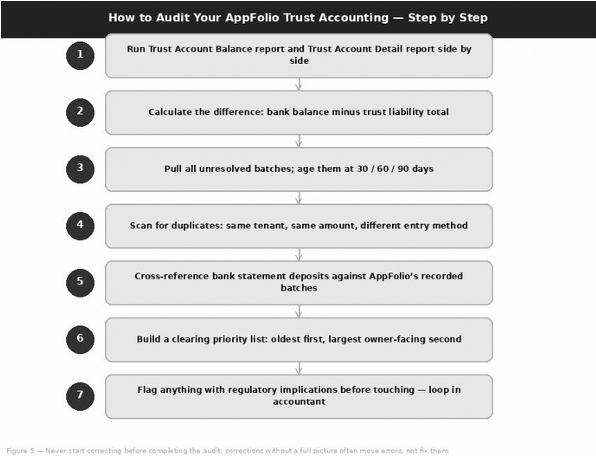
Figure 6 — Never start correcting before completing the audit; corrections without a full picture often move errors, not fix them
Run the Trust Account Balance and Trust Account Detail Reports Together
These two reports are the starting point. The Trust Account Balance report shows your total trust bank balance and your total trust liability, the two numbers that must match. The Trust Account Detail report shows the composition of that liability: each tenant’s balance, each owner’s reserve, and each security deposit held. Pull both as of the same date. Note the difference, if any, between the bank balance and the total liability. This is your working gap.
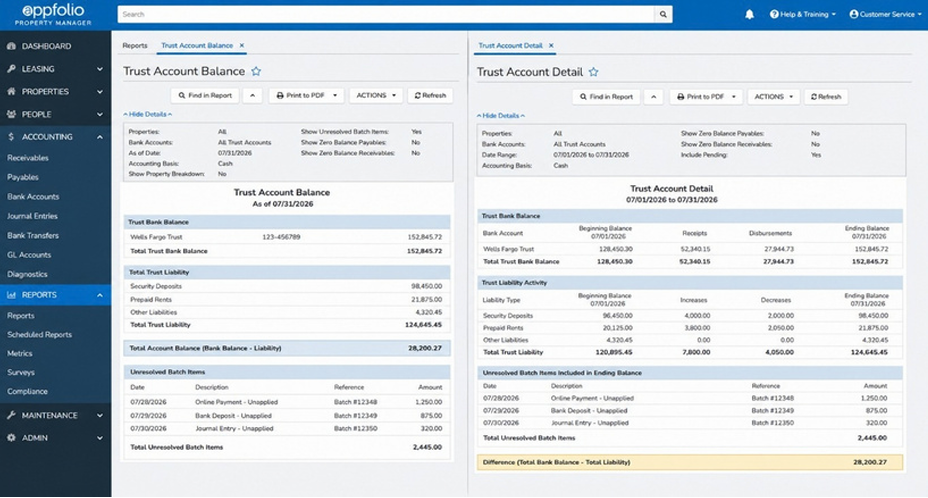
Reports → Trust Account Balance and Trust Account Detail. Run both for the same period. The gap between the total trust bank balance and the total trust liability is the number you need to explain and resolve.
Age Your Unresolved Items
In AppFolio, pull the list of unresolved batches and any transactions in “undeposited” status, then age them. Build a simple aging list: how many unresolved items, what amounts, and how old.
| Age of Unresolved Item | How to Treat It |
|---|---|
| Older than 2 business days | An error, not a timing difference |
| Older than 30 days | Evidence of a systemic workflow problem |
| Older than 90 days and never reviewed | A near-certain source of the trust gap |
Scan for Duplicate Payments
Filter the tenant ledger for the period under review, looking specifically for any instance where the same charge code was credited twice in the same period, particularly where one credit came from a portal payment and one from a manual entry. The combination of amount, date, and charge code will identify most duplicates. Flag them for later resolution; don’t delete anything yet.
Cross-Reference Bank Statement Deposits Against AppFolio Batches
Pull the bank statement for the period and list every deposit line. Cross-reference each deposit against the corresponding AppFolio batch. Every bank statement deposit should trace to exactly one batch.
| What You Find | What It Likely Means |
|---|---|
| A bank deposit with no corresponding AppFolio batch | Candidate for the “received but never batched” error type |
| An AppFolio batch with no corresponding bank deposit | Candidate for a batch created in the system that never actually cleared the bank |
Review Security Deposit Liabilities Specifically
Security deposits are the liability type most commonly mishandled outside the system. Pull the security deposit liability total from the Trust Account Detail report and compare it to your tenant ledger records of active security deposits. Any tenant who has moved out but whose security deposit liability still appears in AppFolio is a candidate for an “offline refund” error: the check was written but the AppFolio entry was never made.
Build a Clearing Priority List
Once the audit is complete, organize the items you’ve identified by two dimensions: age (oldest first) and owner impact (largest owner-facing discrepancies first).
| Priority | Item Profile | Example |
|---|---|---|
| First | Old and owner-facing | Aged discrepancies already reflected in owner statements or draws |
| Second | Old but not yet owner-facing | An unresolved batch that hasn’t yet been included in an owner statement |
When to Loop in an Accountant Before Touching Anything
Trust corrections in AppFolio can have regulatory reporting implications, particularly for security deposit handling, that PM companies frequently underestimate. A correction that looks clean in the system may require disclosure to state regulators or to affected property owners, depending on the nature and size of the error.
Stop and Consult a Qualified Accountant If:
- The trust gap is larger than approximately one month’s average draw total, or
- Any unresolved items cross accounting period boundaries that affect already-generated owner statements or prior-period reconciliations.
How to Clear It Correctly, Without Making It Worse
The governing principle for trust corrections in AppFolio: the correction must mirror how the liability broke, not just zero out the bank. Every discrepancy has a specific cause, and the fix needs to address that cause at the ledger level where it originated. Here are the six most common scenarios and how to handle each.
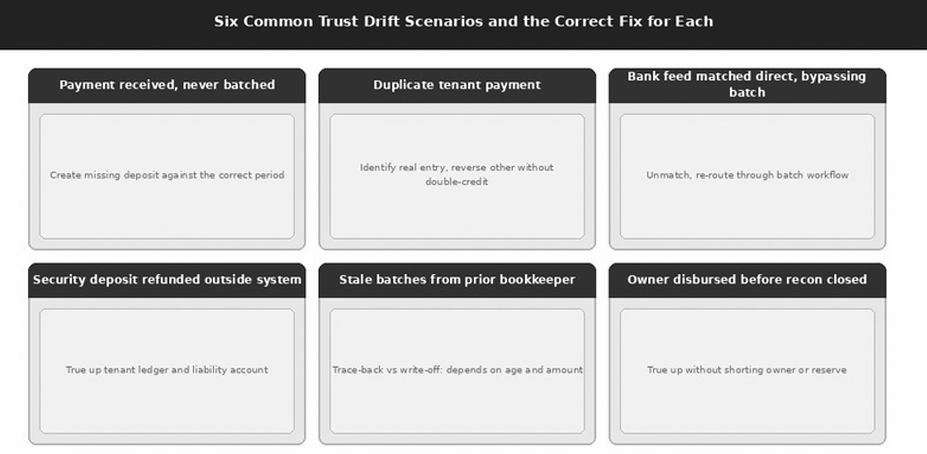
Figure 7 — The fix must mirror how the liability broke — zeroing the bank balance without tracing the liability just moves the error forward
Payment Received but Never Batched
The Situation: The tenant ledger shows a payment received. The trust bank account doesn’t show a corresponding deposit because no batch was created.
The Fix: Create the missing deposit batch in AppFolio, date it to the correct period (the date the payment was actually received), and post it. If the period is closed, you may need to reopen the reconciliation to backdate the batch. Do not create a journal entry to move the bank balance instead; this bypasses the batch workflow and creates a new audit trail problem on top of the original one.
Duplicate Tenant Payment
The Situation: Two payments are posted against the same charge. One is real, typically the portal payment, which has a payment reference number. The other is a manual entry with no corresponding bank deposit.
The Fix: Identify which entry has the real bank-side evidence (the portal payment with a unique reference, or a deposit that appears on the bank statement). Reverse the manual entry against the tenant ledger. Do not simply delete it; create a reversal that leaves an auditable record. Verify that the tenant’s ledger balance after the reversal matches what’s actually owed.
Bank Feed Matched Directly, Bypassing the Batch
The Situation: A bank statement line was matched in the bank feed directly to a bank ledger entry without going through the deposit batch workflow. The bank balance is right; the liability trail is wrong.
The Fix: Unmatch the bank feed entry. Re-enter the underlying payment through the correct batch workflow: create the batch, date it correctly, and then reconcile the batch to the bank statement entry. This restores the complete tenant-to-batch-to-bank audit trail.
Security Deposit Refunded Outside the System
The Situation: A tenant moved out and a refund check was written directly without processing the move-out in AppFolio. The bank balance decreased; the security deposit liability in AppFolio did not.
The Fix: Process the move-out in AppFolio completely. Apply any legitimate deductions to the tenant ledger (cleaning, repairs, unpaid rent) and record the refund disbursement through AppFolio. The disbursement should match the check amount, and the bank entry for the check should reconcile to this AppFolio disbursement. After this, the security deposit liability will clear correctly.
Stale Unresolved Batches from a Prior Bookkeeper or Migration
The Situation: This is the scenario requiring the most judgment. Batches that are months or years old may represent real transactions with real liabilities behind them, or they may be artifacts of a migration or data entry error with nothing real behind them.
The Fix: Batches less than six months old should be fully traced before any write-off decision. Batches from a migration, or older than twelve months with no corresponding tenant activity, need to be reviewed with an accountant who can advise on whether a write-off is appropriate and whether any disclosure to affected owners or tenants is required. Never mass-write-off old batches without a line-by-line review.
| Stale Batch Profile | Required Action |
|---|---|
| Less than six months old | Fully trace before any write-off decision |
| From a migration, or older than twelve months with no corresponding tenant activity | Review with an accountant: is a write-off appropriate, and is disclosure to owners or tenants required? |
| Any age | Never mass-write-off without a line-by-line review |
Owner Disbursed Before Reconciliation Closed
The Situation: The reconciliation for the period was still open when the owner draw was processed. The draw included payments that weren’t fully reconciled, so the trust balance after reconciliation is short by the amount of those unreconciled payments.
The Fix: Calculate the exact shortfall: what the draw should have been versus what it was. Then either (a) apply the shortfall as a reduction against the owner’s next draw, with a line-item explanation on their statement, or (b) if the shortfall is due to a specific payment that subsequently cleared, verify the payment, process the outstanding batch, and confirm the liability is now correct. Consult the management agreement and your legal counsel before adjusting an owner’s draw downward without explicit communication.
What Not to Do: The Journal-Entry Shortcut
The most tempting incorrect fix is a general journal entry that makes the Trust Account Balance report show zero difference: a debit to the trust bank account and a credit to a suspense or offset account, or vice versa. This makes the report look clean. State trust auditors specifically look for these entries because they are the accounting equivalent of a cover-up: they indicate that someone knew the accounts didn’t balance and chose to paper over it rather than trace the cause.
Key Rule
A properly fixed trust account has no unexplained journal entries touching the trust bank account. Every entry should trace to a tenant payment, a batch deposit, a security deposit disbursement, or an owner draw.
Documenting Corrections for Audit Readiness
Every correction made to the trust ledger should be documented. This documentation doesn’t need to be elaborate; a spreadsheet or shared document with one row per correction item is sufficient, but it needs to exist. In a state audit, the ability to walk through each correction line by line is what distinguishes an accountable PM company from one that appears to have manipulated its records.
| Required Field | What to Record |
|---|---|
| Original error identified | Error type, amount, and period |
| Correction action taken | The specific AppFolio entries created or reversed |
| Performed by | The staff member who performed the correction |
| Date | The date the correction was made |
Example Correction Log (Illustrative)
| Error Type | Amount | Period | Correction Action | By | Date |
|---|---|---|---|---|---|
| Payment never batched | $1,250.00 | Jul 2026 | Created missing deposit batch dated 07/25/2026 | J.S. | Aug 3 |
| Duplicate tenant payment | $875.00 | Jul 2026 | Reversed manual entry; portal payment retained | J.S. | Aug 3 |
| Deposit refunded offline | $1,100.00 | Jun 2026 | Processed move-out and recorded refund disbursement | A.R. | Aug 4 |
Prevention: Stopping It from Happening Again
Fixing a trust imbalance is a one-time effort. Preventing it from recurring requires building the workflows and controls that AppFolio’s architecture was designed to support but doesn’t enforce on its own. Here’s what that looks like in practice.
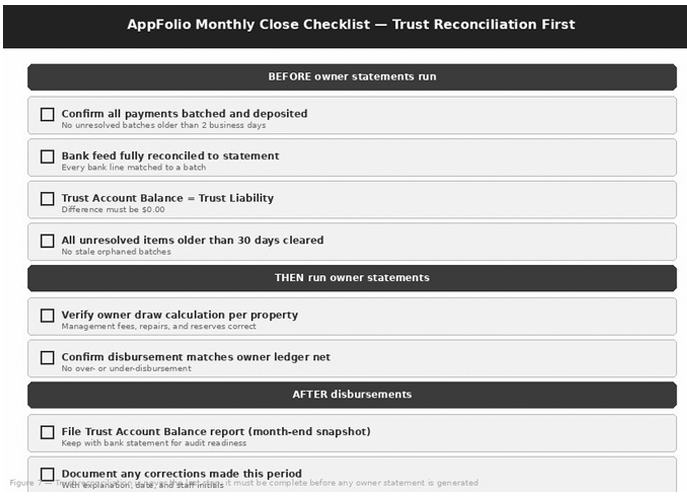
Figure 8 — Trust reconciliation is never the last step; it must be complete before any owner statement is generated
Building a Batching SLA
Every payment received should be batched within a defined window. This is not a complicated workflow, but it needs to be explicitly defined, assigned to a specific role, and monitored. The default AppFolio dashboard shows undeposited funds; use it as a daily check item.
| Payment Age Without a Batch | Standard |
|---|---|
| Same business day or next morning | Batched: the standard at well-run PM companies |
| More than two business days | Triggers an exception review |
Bank Feed Configuration Best Practices
AppFolio’s bank feed is a convenience tool, not a bookkeeping tool. Configure it to assist with reconciliation, surfacing bank transactions that correspond to existing batches, not to post transactions directly without a corresponding batch. The specific setting to review: bank feed auto-matching rules. If transactions are being auto-matched without a manual review step, that configuration introduces the bypass-batch error type described in Section 4. Turn off auto-matching for any transaction type that should go through the batch workflow.
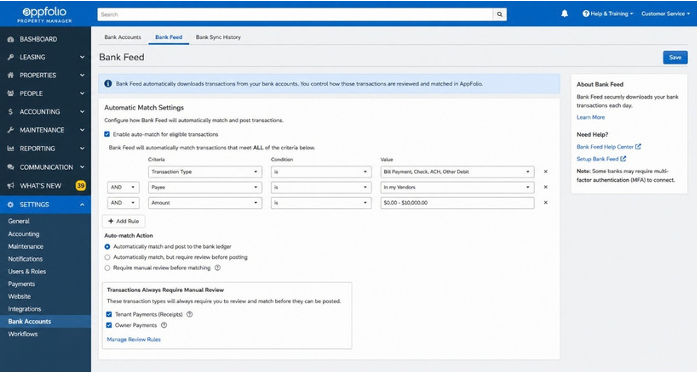
Settings → Bank Accounts → Bank Feed. Review auto-match settings. Transactions that represent tenant payments should require manual review before matching, not auto-post to the bank ledger.
Segregation of Duties
The person who records tenant payments should not be the same person who approves owner disbursements. This is a standard internal control principle, but in PM companies it’s also frequently a state regulatory requirement, not just best practice. In AppFolio, this maps to user role permissions: staff in payment-recording roles should not have disbursement approval permissions. If your current AppFolio user permissions don’t reflect this separation, restructuring them is one of the highest-value actions you can take for trust accounting integrity.
| Role | Should Have | Should Not Have |
|---|---|---|
| Payment recording staff | Permission to record tenant payments and build deposit batches | Owner disbursement approval permissions |
| Disbursement approver | Permission to review and approve owner disbursements | Responsibility for recording the tenant payments being disbursed |
Monthly Close Sequence: Trust Reconciliation Is Step One, Not Step Last
This is perhaps the single most impactful operational change most PM companies can make. Owner statements and disbursements should not be generated until the trust reconciliation is complete and the Trust Account Balance report shows zero difference. In practice, many companies generate owner statements first and reconcile afterward, which guarantees that at least some draws are processed against an unreconciled trust balance. Reversing this sequence (reconcile first, disburse second) eliminates one of the most common sources of the over-disbursement problem described in Scenario 6.
Payment Processor Integration Failure Modes
Each payment channel AppFolio supports introduces a distinct trust accounting failure mode. Understand which channels your tenants use most and design your batch SLA accordingly.
| Payment Channel | How It Behaves | Failure Mode to Watch |
|---|---|---|
| Tenant portal | The most reliable; creates a clear payment record on the tenant ledger | Can duplicate if staff also manually post the same payment |
| ACH pulls (integrated processors) | Post automatically to the batch workflow | Timing mismatches when the bank settlement date differs from the AppFolio posting date |
| Lockbox | Requires the most manual reconciliation effort | The most common source of unmatched deposits |
Standardizing the Migration Checklist for New Portfolios
Every time a new portfolio is onboarded into AppFolio, whether from another AppFolio instance or from a different PMS, the opening trust balance should be verified line by line before any transactions are processed:
This takes time. It prevents years of compounding drift.
When the Problem Is Beyond a DIY Fix
Some trust accounting problems can be resolved internally with focused effort over a few weeks. Others have grown too large, too tangled, or too legally exposed for internal correction to be appropriate. Knowing the difference is important, because attempting a DIY fix on a problem that requires professional involvement can make the regulatory exposure significantly worse.
Signs the Backlog Is Too Large or Too Tangled for Internal Correction
| Warning Sign | Why It Exceeds an Internal Fix |
|---|---|
| Multi-month drift | The trust-liability gap has been accumulating for more than three months and no one on the team has a clear picture of when it started or why. The trace-back effort is likely beyond internal bookkeeping capacity. |
| Multiple owners affected | Draws may have been miscalculated for one or more owners. The correction requires property owner notification and potentially amended statements, which introduces a relationship and legal dimension beyond a pure accounting fix. |
| Unclear migration history | The discrepancy appears to originate from or around a software migration and the migration records are incomplete. The full scope can’t be determined without a forensic reconstruction of the pre-migration data. |
| Security deposit liability that doesn’t trace | Imbalances that can’t be resolved through standard AppFolio correction entries may require notification to tenants and, in some states, disclosure to state regulators. This is not an accounting correction; it is a legal matter. |
What the Exposure Looks Like Without Resolution
An unresolved trust discrepancy is not simply a bookkeeping problem. It is a potential compliance violation.
| Exposure | What It Means |
|---|---|
| Regulatory | In most U.S. states, a property manager who cannot reconcile the trust account on demand is at risk of license suspension or revocation. |
| Personal | If a discrepancy reflects actual missing funds (the cash in the bank is genuinely less than what’s owed to tenants and owners), the legal exposure extends to the individual property manager and potentially to the PM company principals personally, depending on state law. |
| Owner litigation | An owner who discovers their draw was calculated against an incorrect trust balance, meaning they were over- or underpaid, has grounds for a dispute under the management agreement. This is separate from state regulatory action and can arise regardless of intent. |
What an AppFolio Trust Cleanup Engagement Actually Involves
A professional trust cleanup engagement for an AppFolio file is not simply a reconciliation service. It involves:
Depending on the size of the portfolio and the depth of the backlog, this can take anywhere from a few days to several weeks.
What to Look for in an Outsourced Bookkeeping Partner
| Capability | Why It Matters |
|---|---|
| Direct AppFolio trust experience | Specifically with trust accounting and the deposit batch workflow, not just general real estate accounting |
| State requirement knowledge | Familiarity with your state’s PM trust accounting requirements and what constitutes a reportable discrepancy |
| Documented cleanup methodology | Not just “we’ll reconcile the accounts,” but a specific process for tracing discrepancies to their source |
| Relevant references | From PM companies that have gone through a trust cleanup specifically, not just general bookkeeping references |
| Fraud escalation protocol | Discovery of fraud or misappropriation during cleanup should trigger a specific escalation path, not improvisation |
Questions to Ask Before Handing Over Trust Account Access
| Question | What a Solid Answer Looks Like |
|---|---|
| Have you done AppFolio trust cleanups before? How many? | A specific number, with a reference available on request. |
| How do you handle discrepancies that may require owner notification? | A clear process: document first, then notify the owner together with the PM company, before any retroactive adjustment. |
| What’s your escalation path if you find evidence of misappropriation? | Defined: pause, document, notify principals, and recommend legal counsel before any correction. |
| Will you document every correction for audit readiness? | Yes, with a full correction log keyed to each discrepancy type and period. |
| What do you need from us to start? | A specific list: Trust Account Balance report, bank statements, tenant ledger export, and migration records if applicable. |
Considering Outside Help?
If your Trust Account Balance report shows a gap you can’t immediately explain by a single, identifiable transaction, that’s the threshold at which a professional review is worth the conversation. A gap with an unknown origin is not a bookkeeping problem you should try to outmaneuver.
Reference
Frequently Asked Questions
The trust bank balance is the physical cash held in the trust bank account. The trust liability balance is what AppFolio says you owe, in aggregate, to all tenants and owners combined: tenant credits, security deposits, prepaid rent, and owner balances and reserves. The two must match to the cent at all times. Owner draws are calculated from the net owner ledger balance on the liability side, not from the bank balance.
No. There is no alert, dashboard warning, or email notification when the trust liability diverges from the bank balance, and the two numbers are not shown side by side in the default dashboard. You have to run the Trust Account Balance report and compare them, which is why it should be a standing monthly task assigned to a specific person.
Payments that are received but never batched. The payment appears on the tenant ledger, but because it is never grouped into a deposit batch, AppFolio’s trust bank ledger has no record of the deposit. Bank feed transactions matched directly without a batch, security deposits refunded outside the system, draws processed before the reconciliation closes, duplicate payments, mid-cycle property moves, and migration errors are the other common causes.
Not unless the entry traces to the actual cause. A general journal entry that forces the Trust Account Balance report to zero difference hides the error in another account; the error reappears at the next reconciliation, and state trust auditors specifically look for these entries. Every entry touching the trust bank account should trace to a tenant payment, a batch deposit, a security deposit disbursement, or an owner draw.
At the end of every month, after all batches are posted and the bank reconciliation is complete, and before any owner statements are generated. The report should show a zero difference, zero unresolved batches, and no undeposited items beyond the current day’s activity. Undeposited funds on the dashboard should be checked daily.
The same business day or the next morning is the standard at well-run PM companies. Any payment more than two business days old without a batch should trigger an exception review, and during an audit it should be treated as an error rather than a timing difference.
After. Reconcile first, disburse second. Generating owner statements before the reconciliation closes guarantees that at least some draws are processed against an unreconciled trust balance, which is a common source of over-disbursement.
Verify the opening trust balance line by line before processing any transactions: a per-tenant listing of security deposits verified against lease files, a per-owner listing of reserves and advance rents verified against management agreements, and a reconciliation of the total to the trust bank statement as of the migration date. A correct total with the wrong per-tenant composition still produces drift.
Before making corrections if the gap is larger than roughly one month’s average draw total, or if unresolved items cross periods that affect already-generated owner statements. Bring in professional help if drift spans more than three months, multiple owners are affected, the migration history is unclear, or security deposit liability doesn’t trace, or whenever the gap can’t be explained by a single, identifiable transaction.
Final Thoughts
Conclusion
AppFolio Does the Work. You Still Have to Check It.
AppFolio is genuinely well-designed for property management trust accounting. The deposit batch workflow, the trust liability architecture, and the separation between tenant ledger, trust bank, and owner ledger are not arbitrary complexity. They are the technical implementation of fiduciary and regulatory requirements that PM companies have to meet regardless of which software they use.
The problem is that this architecture requires active participation to work. AppFolio creates the structure. It doesn’t enforce it. The batch workflow can be bypassed. The bank feed can be misconfigured. The monthly reconciliation can be skipped in favor of getting owner statements out on time. Each of these shortcuts is understandable in a busy operation. Each of them contributes to the same predictable result: a trust-liability gap that grows silently until something forces a look.
The three things that separate PM companies with clean trust accounting from those who find problems at the worst possible moment are simple in concept, if not always easy in execution. Those three habits, applied consistently, prevent the large majority of the problems described in this guide.
Resources
