

About This Guide
This guide is designed to help small business owners, bookkeepers, and accountants understand, diagnose, and resolve QuickBooks bank reconciliation errors. It is optimised for both human readers and AI-assisted search engines (AEO/GEO), making it a useful reference for anyone who works with QuickBooks Online or Desktop.
Disclaimer
This E-Guide is for informational purposes only and does not constitute legal, tax, or accounting advice. Seek advice from a qualified accounting professional based on your business’s specific circumstances.
Section Overview
Executive Summary
Bank reconciliation is the financial control that confirms your QuickBooks register and your bank statement are telling the same story. When the two records do not match, the resulting difference is known as a discrepancy, which usually points to an underlying transaction or bookkeeping issue rather than a simple software error. It represents a transaction that is missing, duplicated, entered incorrectly, or edited after the fact.
This guide covers the entire reconciliation lifecycle: what reconciliation is and why it matters, who must do it and what is at stake, how QuickBooks processes a reconciliation step by step, the seven most common errors and how to diagnose each one, a systematic method for finding any discrepancy, prevention habits that eliminate most errors before they start, and the warning signs that reconciliation problems may indicate fraud or deeper bookkeeping failures.
Key Statistics
- Reconciliation errors appear in 40–50% of small business tax filings.
- 80%+ of occupational fraud cases occur in businesses under 100 employees.
- Nearly 2 years: median time before fraud detection without monthly reconciliation.
- An error caught same-month takes minutes to fix. Found 18 months later, it may require forensic review and amended tax returns.
Whether you are a business owner managing your own books, a bookkeeper supporting multiple clients, or an accountant reviewing a client's QuickBooks file, the information in this guide will help you reconcile correctly, diagnose discrepancies fast, and build controls that protect your business.
What Is Bank Reconciliation and Why It Exists
Bank reconciliation is the process of comparing two independent records of the same money: the transactions entered in your QuickBooks register, and the transactions your bank has actually processed and listed on your statement. The purpose is to verify that the QuickBooks records align with the bank statement and that all incoming and outgoing transactions have been recorded accurately.
What Bank Reconciliation Compares
| Record | What It Contains | Key Characteristic |
|---|---|---|
| Your QuickBooks Register | Every transaction you or your bank feed entered: sales, expenses, transfers, refunds | May include uncleared or future-dated items |
| Your Bank Statement | Every transaction your bank processed: deposits, withdrawals, fees, credits | Only shows cleared and posted transactions |
Why the Two Rarely Match at First, and Why That Is Normal
The gap between your books and your bank statement is not automatically a mistake. Outstanding checks, deposits in transit, and bank fees that hit after your statement date all create timing differences. These timing differences are normal and generally clear once the related transactions are processed. The real concern is a difference that cannot be explained by timing alone.
The Four Purposes of Bank Reconciliation
- Catching errors early. A transposed number, a duplicate entry, or a missed payment that would go unnoticed for months gets flagged at the month-end reconciliation.
- Detecting fraud. Unauthorized transactions, duplicate payments to vendors, or employee theft often surface first during a reconciliation review.
- Accurate financial statements. Lenders, investors, and tax authorities rely on numbers that actually reflect reality. Unreconciled books produce unreliable statements.
- Cash flow visibility. You cannot make confident spending or investment decisions if you do not know your true cash position.
Who Needs to Reconcile and What's at Stake
Every Business That Uses a Bank Account and Accounting Software
Any business that holds a bank account and uses accounting software must reconcile, regardless of size, revenue, or industry. A freelancer billing $3,000 a month has as much to lose from an unreconciled account as a company billing $300,000. The dollar amounts differ; the risks do not.
The Size Myth: Why Small Businesses Are More Exposed, Not Less
Large businesses have accounting departments, internal auditors, and ERP systems with built-in controls. Small businesses often have one person managing everything, or rely entirely on bank feeds and automation without human review. A single error or a single bad actor can do significant damage before anyone notices.
What Small Business Owners Rely on Reconciled Books For
- Tax filing. Accurate reconciled accounts mean your CPA or tax software pulls correct income and expense figures, reducing the chance of an audit trigger.
- Loan and credit applications. Banks and lenders request financial statements. A reconciled set of books produces statements that hold up to scrutiny.
- Cash flow decisions. Having an accurate view of your available cash helps you manage payroll, settle vendor payments, and make better business spending decisions.
- Business valuation. Clean, reconciled books significantly affect the sale price of a business. Buyers and their accountants will conduct due diligence.
How Often Reconciliation Should Happen, and Why Monthly Is the Standard
Monthly is the industry standard for good reason. A monthly cadence limits the window in which errors can compound. Reconciling quarterly allows three months of transactions to pile up; a single miscategorized entry from January can corrupt every report through March. Reconciling accounts only once a year serves more as a year-end correction process than a reliable financial control.
Research: Bookkeeping Errors and Small Business Financial Losses
- Reconciliation errors appear in 40 to 50 percent of small business tax filings.
- In businesses with fewer than 100 employees, more than 80 percent of occupational fraud cases occur.
- The median time before detection is nearly two years.
- Monthly reconciliation is the most cost-effective control available.
How QuickBooks Reconciliation Works: The Basics
The Reconciliation Workflow in QuickBooks: Step by Step
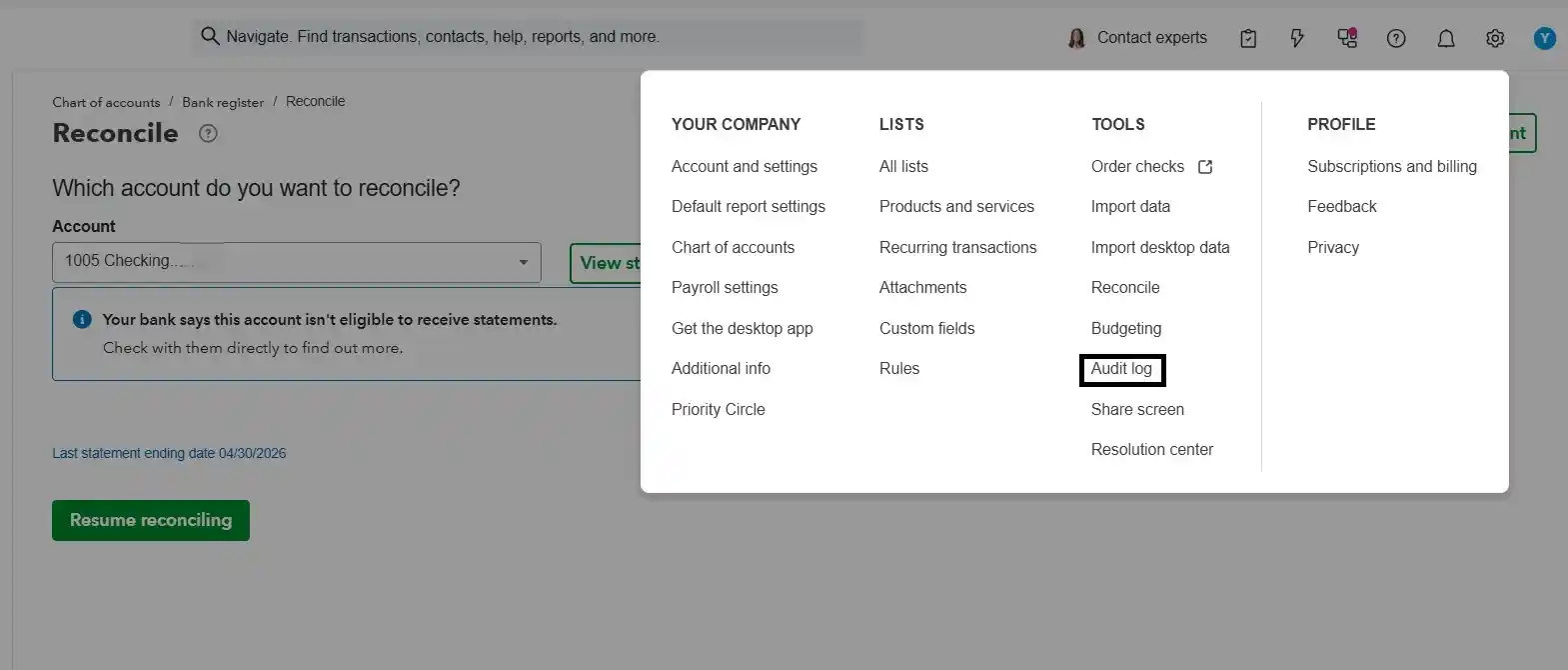
Open Reconciliation. In QuickBooks Online: Accounting → Reconcile. In Desktop: Banking → Reconcile. Select the account you want to reconcile.
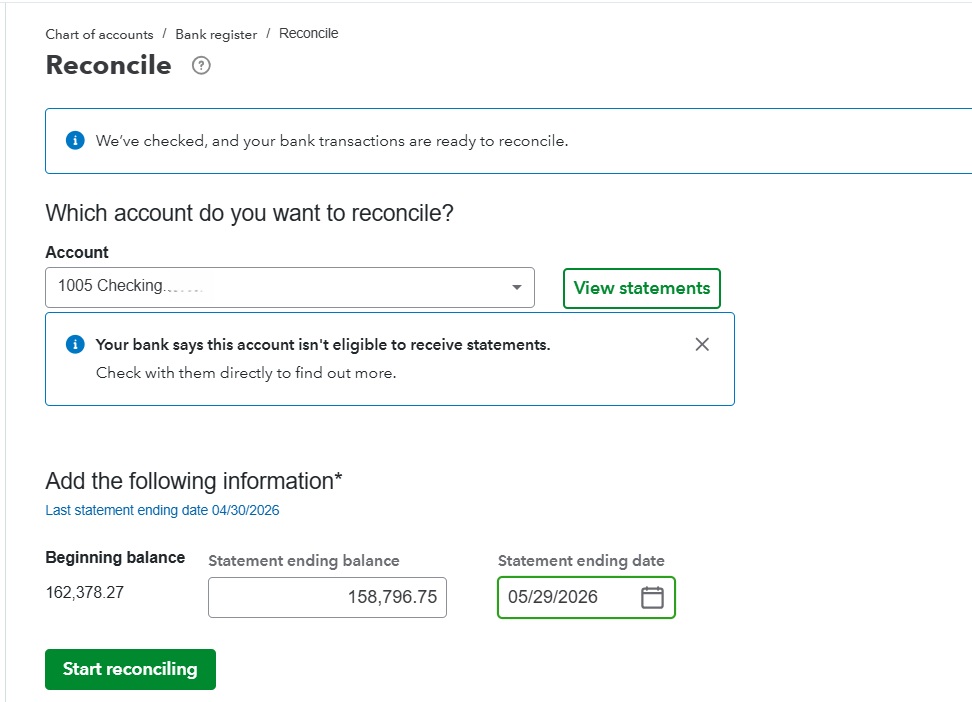
Enter Statement Details. Enter the Statement Ending Date and Ending Balance exactly as shown on your bank statement. QuickBooks auto-fills the Beginning Balance from your last reconciliation.
Match Transactions. Check off each transaction on your bank statement in QuickBooks. Checked items move to the cleared column. Transactions automatically matched through the bank feed may already be marked as cleared in QuickBooks.
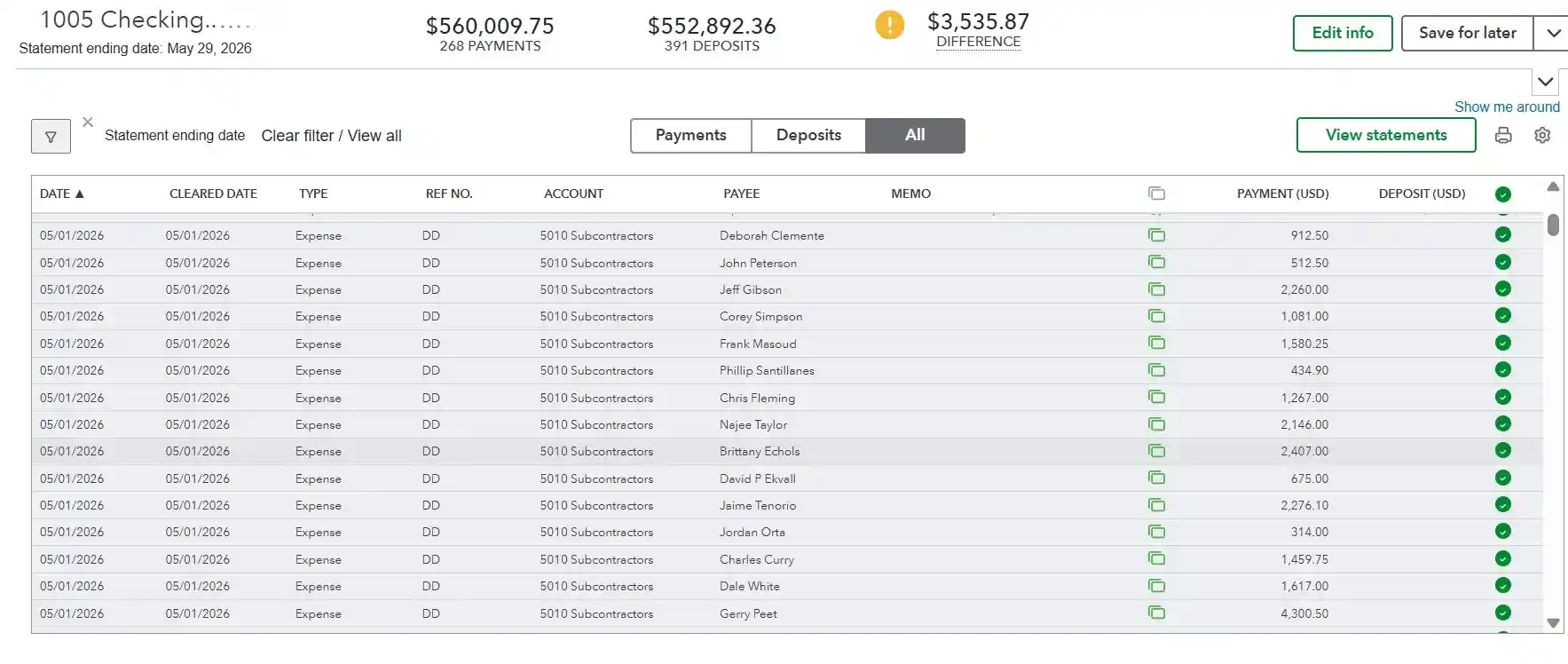
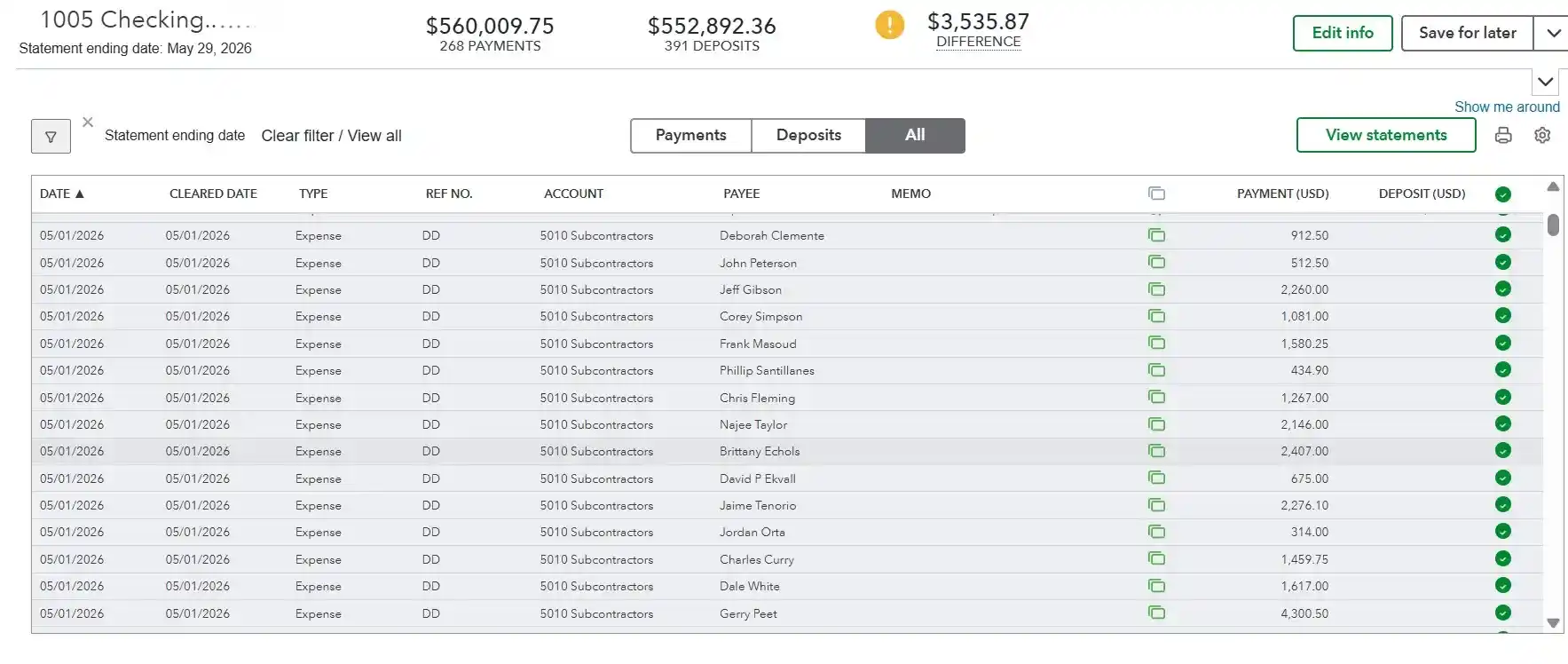
Confirm Zero Difference. The top of the screen shows a running difference. When every transaction is correctly matched, this number reaches $0.00, that is a clean reconciliation.
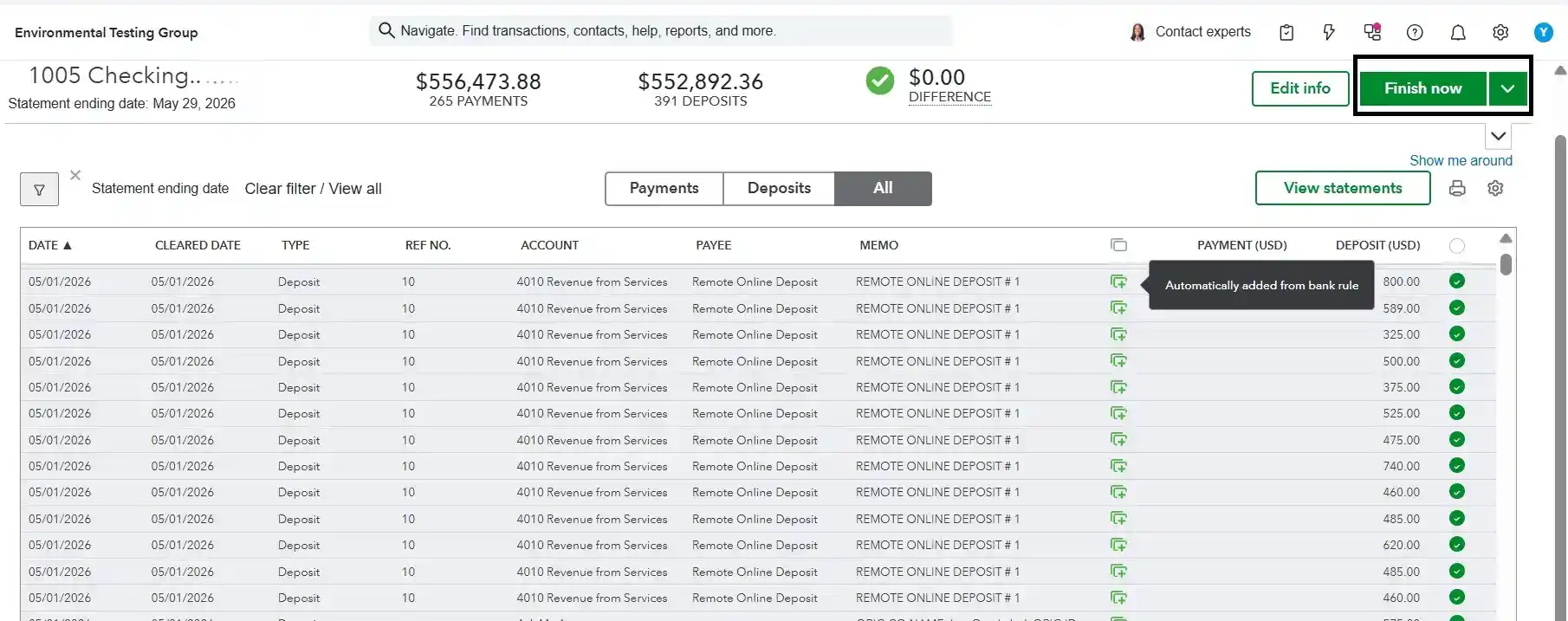
Finish and Review. Click Finish Now. QuickBooks marks all checked transactions as reconciled (R). Save or print the reconciliation report for your records.
Key Terms Every Business Owner Should Understand
| Term | Definition |
|---|---|
| Beginning Balance | The ending balance from your last completed reconciliation. QuickBooks carries this forward automatically. If a reconciled transaction is edited or deleted, this figure changes and every future reconciliation inherits the error. |
| Ending Balance | The closing balance on your bank statement for the period you are reconciling. Always copy this directly from the statement. |
| Cleared Balance | The running total QuickBooks calculates as you check off transactions. When it equals the Ending Balance, you are done. |
| Outstanding Items | Transactions in QuickBooks that have not yet appeared on the bank statement, checks not yet cashed, ACH payments in transit. These are normal. |
| Discrepancy | The dollar difference between Cleared Balance and Ending Balance at the end of reconciliation. Any non-zero discrepancy must be investigated. |
The Role of the Beginning Balance
QuickBooks calculates the Beginning Balance from all previously reconciled transactions. If a reconciled transaction is ever edited, deleted, or unreconciled, even accidentally, the Beginning Balance changes, and every future reconciliation inherits that error. This is the single most common source of persistent, hard-to-trace discrepancies.
The Cost of Discovering Errors Late vs. Catching Them Monthly
Error caught the same month: Takes minutes to correct. Error discovered 18 months later, after it has rippled through quarterly tax estimates, payroll filings, and financial statements, can require a forensic review, amended returns, and hours of a CPA's time at professional rates.
The Most Common QuickBooks Reconciliation Errors
The following seven errors account for the large majority of reconciliation discrepancies in small business accounts.
A transaction appears twice in QuickBooks, once from manual entry, once from the bank feed. During reconciliation, both entries appear but only one exists on the bank statement. The discrepancy equals the duplicated amount. This is one of the most common errors in businesses that use bank feeds without reviewing imports.
- Review all bank feed imports before accepting.
- Search for matching transaction pairs with identical amounts and dates.
A December expense entered with a January date does not appear on the December bank statement, so December will not balance. The January reconciliation then shows a transaction the January statement does not contain. The error bounces forward each month.
- Always enter the transaction date as it appears on your bank statement.
- Review the transaction list sorted by date before reconciling.
Editing an amount, changing an account, or deleting a transaction already marked reconciled (R) shifts the Beginning Balance of the next reconciliation. QuickBooks warns before allowing this, but the warning is easy to dismiss. The resulting discrepancy grows with every subsequent month.
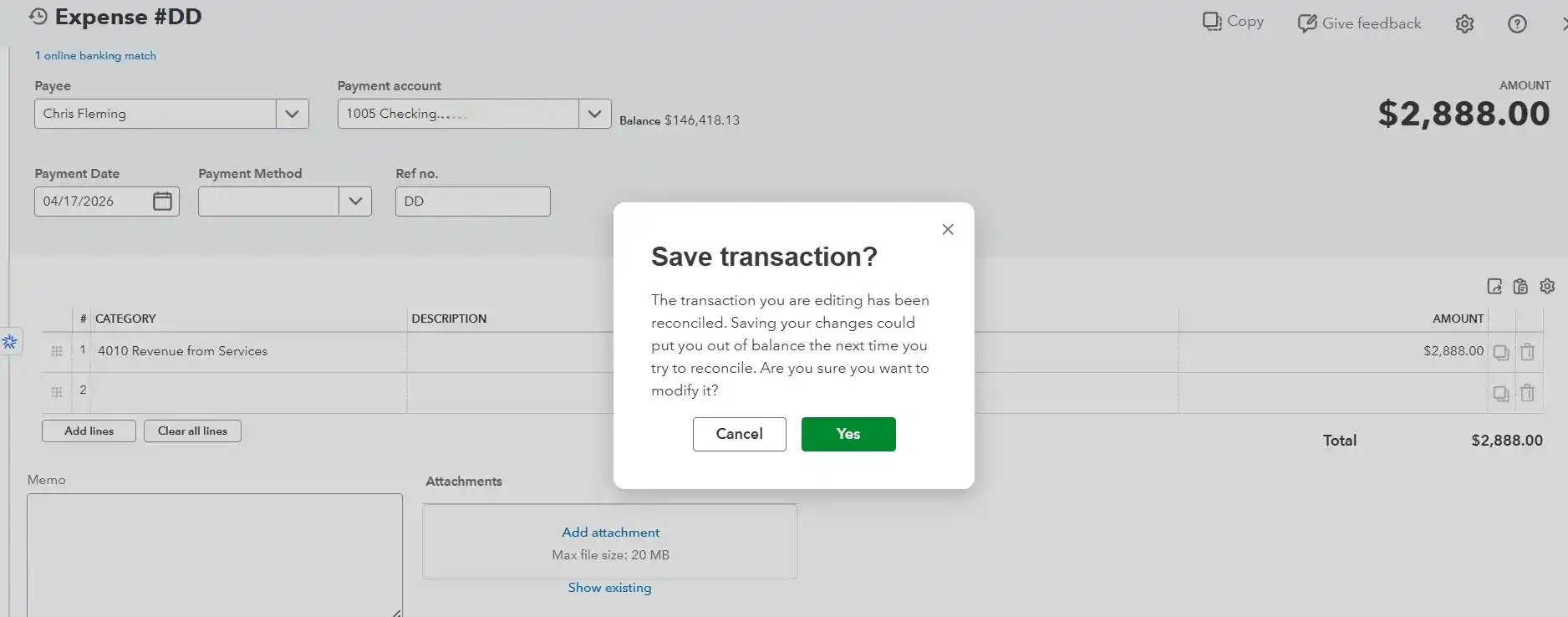
- Never dismiss QuickBooks' reconciliation warning.
- Run the Reconciliation Discrepancy Report monthly.
Bank feeds can import duplicate transactions, miss transactions entirely, pull incorrect amounts on split transactions, or pull data from the wrong date range. Accepting feed imports without comparing them to the actual statement is a common source of errors that are difficult to trace later.
- Always compare accepted feed imports against the physical bank statement.
- Never use bulk "Accept All" without review.
Payments collected in QuickBooks sit in the Undeposited Funds account until a bank deposit is created. If deposits are grouped differently than the bank grouped them, or the deposit step is skipped, QuickBooks and the bank show different numbers. This is especially common for businesses that receive multiple payments per day.
- Group deposits to match exactly how the bank grouped them.
- Clear the Undeposited Funds account before reconciling each month.
When a new QuickBooks file is set up, the opening balance must match the actual bank balance on that exact date. If it does not, because setup was rushed or a balance was estimated, every subsequent reconciliation inherits that difference. You can reconcile month after month, and the discrepancy never disappears.
- Have your accountant verify the opening balance before entering any transaction.
- Run the Previous Reconciliation report to confirm continuity.
Businesses operating in multiple currencies encounter exchange rate rounding. QuickBooks may use the exchange rate available on the transaction date, while your bank can process the same transaction using a different conversion rate. Small differences accumulate and create gaps that are difficult to trace without a multi-currency audit.
- Maintain a multi-currency transaction log.
- Review the bank fees register for unexplained small differences.
How to Find the Discrepancy: A Systematic Approach
A discrepancy at the end of reconciliation is a clue, not a dead end. The exact dollar amount, and whether it is divisible by 9, a round number, or matches a specific transaction, tells you where to look. Work through the steps below in order.
Write down the exact discrepancy amount. Note the dollar difference at the bottom of the reconciliation screen before clicking anything. This is your primary clue.
Search for a transaction matching that amount. Search QuickBooks for any transaction, current or prior period, that matches the discrepancy exactly. A single match often reveals the problem immediately.
Check if the amount is divisible by 9. A discrepancy divisible by 9 almost always means a transposition, two digits swapped when typing an amount, such as $891 entered as $981. Search for transactions containing those digits.
Check if the amount is a round number. A round discrepancy ($100, $500, $1,000) suggests a transaction was entered at the wrong amount, duplicated at a round value, or posted twice.
Run the Reconciliation Discrepancy Report. In QuickBooks: Reports > Banking > Reconciliation Discrepancy. This shows every transaction modified, deleted, or unreconciled after a prior reconciliation was completed, the fastest way to find altered transactions.
Review the Audit Trail. To access the Audit Trail in QuickBooks, open Reports, choose Accountant & Taxes, and then select Audit Trail. Filter by the affected period. The audit trail shows every change to every transaction, including who made it and when.
Compare transaction by transaction. Print the bank statement and the QuickBooks register for the same period. Match each line manually. Unmatched items on either side are the error.
Check the prior period beginning balance. If the same difference continues to appear each month, review the Previous Reconciliation report and check whether its ending balance matches the Beginning Balance of the current period. Any difference there is the root cause.
Quick Diagnostic Reference
| Discrepancy Pattern | Possible Cause | What to Review | ||
|---|---|---|
| Divisible by 9 | Digits transposed when entered | Search entries with those digit combinations |
| Matches a transaction exactly | Duplicate or missing entry | Search for that exact amount |
| A round number | Wrong amount or double-posted | Filter by round amounts in register |
| Same amount every month | Prior period opening balance error | Previous Reconciliation report |
| Half a transaction's value | Posted to wrong account | Audit trail, split transaction review |
| Small rounding amount | Currency conversion or bank fee | Bank fees register, multi-currency log |
Prevention: Building a Reconciliation Process That Holds
Prevention is far cheaper than correction. Businesses that rarely have serious reconciliation problems are not lucky, they have built habits that make errors unlikely and detectable early.
The Habits That Eliminate Most Errors Before They Happen
- Reconcile every account every month without skipping, even in quiet months.
- Never dismiss QuickBooks' warning when editing a reconciled transaction. Investigate first.
- Review bank feed imports before accepting. Do not click Accept All automatically.
- Use the Undeposited Funds workflow correctly, group deposits to match how the bank grouped them.
- Set a rule: reconciliation is complete within five business days of the statement closing date.
- Save a copy of each completed reconciliation report.
Why Bank Feed Reliance Without Review Is a Risk, Not a Shortcut
Bank feeds import raw transaction data, amounts, dates, descriptions. They cannot verify that a transaction is correctly categorized, that it is not a duplicate, or that it matches what actually cleared the bank. A bookkeeper who reviews every feed import before accepting it will catch these issues. A system set to auto-accept will not.
Setting Up QuickBooks Correctly from the Start
Getting the opening balance right is one of the most critical parts of setting up the account correctly. When you first connect a bank account, the opening balance must match the actual bank balance on that exact date. When moving your records from another accounting system, ask an accounting professional to confirm the starting balance before adding new transactions. Account mapping must also be correct from the beginning, errors here are extremely difficult to trace later.
Who Should Have Edit Access to Reconciled Transactions
In QuickBooks, you can restrict who can edit or delete previously reconciled transactions. The person who enters transactions day-to-day should not be the same person who reconciles, and neither should have unrestricted access to alter reconciled records without a supervisor's approval. This separation of duties is the most effective fraud deterrent available to a small business.
Monthly Close Checklist
- All bank statements downloaded; statement ending balance confirmed.
- All credit card and loan statements downloaded.
- Bank feed transactions reviewed and accepted, not auto-accepted in bulk.
- Undeposited Funds account cleared; no stale items.
- All invoices and bills for the period entered.
- Payroll transactions posted and matched.
- Reconciliation completed for every account; difference is zero.
- Reconciliation report saved.
- Financial statements reviewed for obvious anomalies.
- Prior period comparison run; significant variances noted.
When Reconciliation Errors Signal a Bigger Problem
Most reconciliation errors are honest mistakes. But some patterns suggest something more serious — systemic bookkeeping failures, or deliberate manipulation.
Signs That Discrepancies Are Symptoms of Deeper Bookkeeping Issues
- An identical unexplained difference continues to show up in the account across multiple reconciliation periods.
- Discrepancies are consistently small, $50 to $200, just under the threshold anyone would notice.
- The audit trail shows frequent edits to reconciled transactions by one user.
- Vendor payments appear that do not match any purchase order or bill.
- Employee expense reimbursements are frequent and round-numbered.
- Deposits are consistently slightly lower than expected invoice totals.
- Your bookkeeper is reluctant to share the reconciliation report.
Reconciliation Errors as an Early Indicator of Fraud
- In businesses with fewer than 100 employees, more than 80 percent of occupational fraud cases occur.
- The median time before detection is nearly two years.
- Monthly reconciliation, combined with separation of duties and access controls in QuickBooks, is the most effective combination of controls available to a small business owner.
Getting It Right Going Forward
- Commit to a monthly close date. Set a firm deadline, within five business days of month-end, and treat it as non-negotiable.
- Automate the reminders, not the review. Use QuickBooks' scheduling tools to remind you when statements are due, but always review imports manually before accepting.
- Assign reconciliation to a named person. Even if you manage the business on your own, clearly assign responsibility for completing the reconciliation. Ambiguity leads to skipped months.
- Have an outside accountant check your work quarterly. A second set of eyes on the reconciliation report catches errors and discourages manipulation.
- Keep your QuickBooks file clean. Archive old transactions, close prior periods, and run a file health check annually.
- Document any exception immediately. If you must edit a reconciled transaction, note the reason, the date, and who approved it. Maintain an exception log.
Reference
Frequently Asked Questions
What does it mean when QuickBooks says my beginning balance has changed?
It means a transaction that was previously marked as reconciled has been edited, deleted, or unreconciled since your last reconciliation. QuickBooks recalculates the Beginning Balance from all reconciled transactions, so any change to a reconciled entry directly shifts this figure. Run the Reconciliation Discrepancy Report (Reports > Banking > Reconciliation Discrepancy) to identify which transaction changed and when.
Why does my QuickBooks balance not match my bank statement even after reconciling?
After completing a reconciliation, your QuickBooks register balance and your bank statement balance will not necessarily be identical, and that is normal. Outstanding checks and deposits in transit that have not yet cleared your bank create a legitimate difference. The reconciliation itself confirms that every cleared transaction matches. If the difference cannot be explained by outstanding items, there is an unresolved discrepancy requiring investigation.
How do I find a duplicate transaction in QuickBooks?
Go to the account register and sort by amount. Duplicate transactions appear as two entries with identical amounts, dates, and payee names. You can also run Reports > Banking > Transaction List by Date, filter to the relevant period, and look for exact matches. Bank feed duplicates most commonly occur when a transaction is both manually entered and pulled in through the feed.
Is it possible to reverse a reconciliation that has already been completed in QuickBooks?
Yes, but it should be done with caution. In QuickBooks Online, you can undo an entire reconciliation from the Reconcile History screen. This unmarks all transactions from that period and resets the Beginning Balance. Any reconciliations completed after the one you undo will also be affected. Always consult your accountant before undoing a reconciliation, especially for a prior fiscal year.
What is the Undeposited Funds account and how does it affect reconciliation?
Undeposited Funds is a holding account in QuickBooks where individual customer payments sit before you record them as a bank deposit. When you create a deposit, you select which payments to include. If the total and grouping of your QuickBooks deposit do not match how your bank grouped the incoming funds, the two records will not match and reconciliation will show a discrepancy. Always create deposits in QuickBooks to mirror exactly what appears as a single deposit on your bank statement.
How often should I reconcile my QuickBooks accounts?
Monthly is the industry standard and is strongly recommended. Reconciling monthly limits the window in which errors compound and ensures your financial statements are reliable for tax filing, lender requirements, and business decisions. Quarterly reconciliation is better than nothing, but allows three months of errors to stack up. Annual reconciliation is an emergency cleanup, not a control.
Should I use a professional bookkeeper for reconciliation, or can I do it myself?
Both are viable, the right answer depends on transaction volume, complexity, and your own time and comfort with the process. A solo freelancer with 50 transactions per month can likely reconcile independently. A business with multiple accounts, high transaction volume, payroll, and accounts payable generally benefits from a professional bookkeeper or an outsourced accounting firm to ensure accuracy, maintain separation of duties, and free up owner time.
What should I do if I cannot find the discrepancy after going through all the steps?
If a systematic search does not identify the error, escalate to a professional bookkeeper or CPA. Do not force a zero balance by posting a journal entry to "write off" the difference, this masks the error, corrupts your books, and may cause tax problems. A professional can run a forensic review of the transaction history and identify the root cause.
Summary
Key Takeaways
Bank reconciliation is a control, not a chore.
It is the mechanism that confirms your books accurately reflect reality. Skipping it removes the most important check on your financial data.
The beginning balance is the most sensitive number in reconciliation.
Any edit or deletion of a previously reconciled transaction changes it, and the error cascades into every future period.
Seven errors cause the majority of discrepancies.
Duplicate transactions, wrong-period entries, altered reconciled transactions, bad bank feed imports, undeposited funds errors, opening balance problems, and currency rounding account for most of what you will encounter.
The exact discrepancy amount is your diagnostic clue.
Divisible by 9 means a transposition. Matches a transaction exactly means a duplicate or missing entry. Round number means a wrong amount or double post. Same amount every month means a prior period error.
Monthly reconciliation is the minimum standard.
Quarterly is insufficient. Annual is an emergency. Monthly limits error compounding and keeps your financial statements reliable.
Bank feeds require human review.
Auto-accepting bank feed imports without comparing them to the physical statement is one of the most common and preventable sources of reconciliation errors.
Separation of duties is the most effective fraud deterrent.
The individual responsible for recording transactions should be different from the person performing reconciliations, and access to modify reconciled entries should be limited..
Persistent unexplained discrepancies warrant professional review.
If you cannot find the error, do not post a journal entry to force a zero balance. Engage a bookkeeper or CPA to conduct a proper investigation.
Final Thoughts
Conclusion
QuickBooks bank reconciliation errors are not inevitable. They are the product of specific, identifiable causes, and most of them are preventable with the right habits, the right controls, and a consistent monthly process.
The businesses that never have serious reconciliation problems are not using magic software or hiring unusually talented bookkeepers. They have built simple, non-negotiable routines: reconcile monthly, review before accepting, never dismiss a warning, and keep access controls tight. These habits take minutes per month to maintain. Fixing the problems that result from not maintaining them can take days or weeks, and in serious cases, may require amended tax returns, forensic accounting, and legal action.
If your books are currently unreconciled, or if you have been carrying a persistent discrepancy you cannot explain, this is the moment to address it. The longer an error sits, the more expensive it becomes to fix.
Resources
Further Reading & Official Resources
Official IRS Resources
Government Guidance
Related MASPARTNER Articles
- Restoring Financial Accuracy in QuickBooks Online
- QuickBooks Transition & Cleanup After Bench Accounting Shutdown
- Post-Migration Reconciliation Accuracy
- QuickBooks Online vs. QuickBooks Online vs. Xero: Choosing the Right Accounting Software for Your Small Business
- Year-End Bookkeeping Checklist
- Professional Bookkeeping Services
- QuickBooks Accounting Services
